
Web app · Finance
VestLedger
The equity-comp math your brokerage dashboard never shows you
Add each RSU, ESPP or ISO grant once and VestLedger projects every vest, then shows the dollar gap between the flat 22% withholding and your real bracket, the Form 8949 correction for the broker's $0 cost basis, and how much of your net worth rides on one ticker. Free, offline, no login.
Stored in your browser only. Nothing you do in the web version is sent to our servers. Clear your browser data and it's gone — so export a backup from the in-app menu if you want to keep it.
This app is a community proposal.
Try the full browser version now. We build the iPhone and Android app once 100 people upvote it.
We'll email you once, when it ships. Unsubscribe anytime.
In your browser
What you can do in VestLedger on the web
Vesting calendar from one grant
Enter shares, term, cadence and cliff and VestLedger projects every future vest date, share count and estimated value into a timeline — RSU, ESPP purchase and ISO all handled.
The 22% withholding gap, in dollars
Set your federal bracket and state rate once. Every RSU vest then shows what was withheld at the flat supplemental rate, what you actually owe, and the exact amount to send as an estimated payment this quarter.
Cost-basis corrector for Form 8949
Takes the FMV at vest and the broker's $0 or blank 1099-B figure and outputs your true adjusted basis plus the column (g) adjustment with code B — the fix that stops you paying tax twice and triggering a CP2000.
Single-stock concentration meter
A risk gauge over Diversified / Healthy / Watch / Concentrated, a net-worth donut and a per-ticker share, so the most overlooked equity-comp risk is visible.
Everything unlocked
Multiple employers and grants in one ledger, ESPP discount tracking, and a year-end CSV export for your preparer — no upgrade, no subscription.
Never leaves this browser
Your salary, grants and bracket are some of the most sensitive numbers you own, so there is no account, no sync and no brokerage connection.
Screens
Every screen, rebuilt for the browser
-
1
Vesting
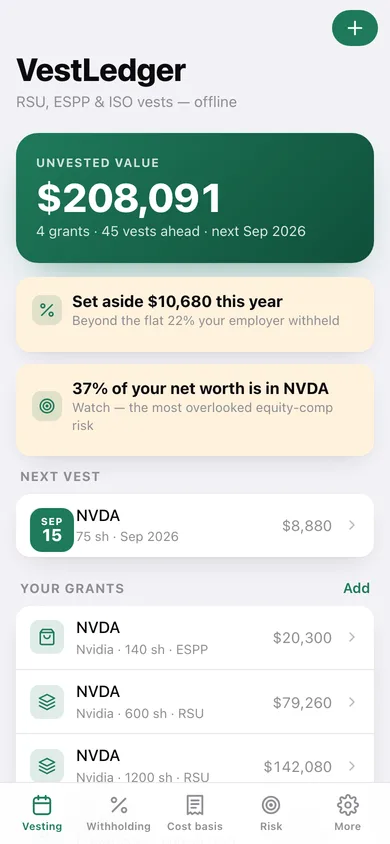
Unvested value, the year's set-aside alert, your grants and the upcoming vest timeline.
-
2
Grant detail
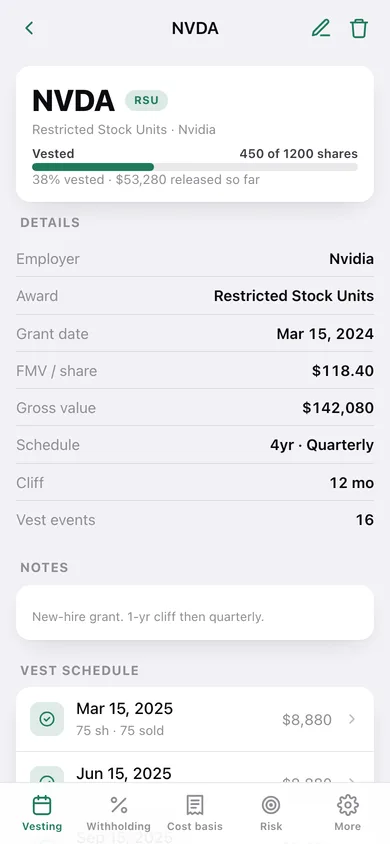
Vesting progress, schedule details and every projected vest for one grant.
-
3
Grant editor
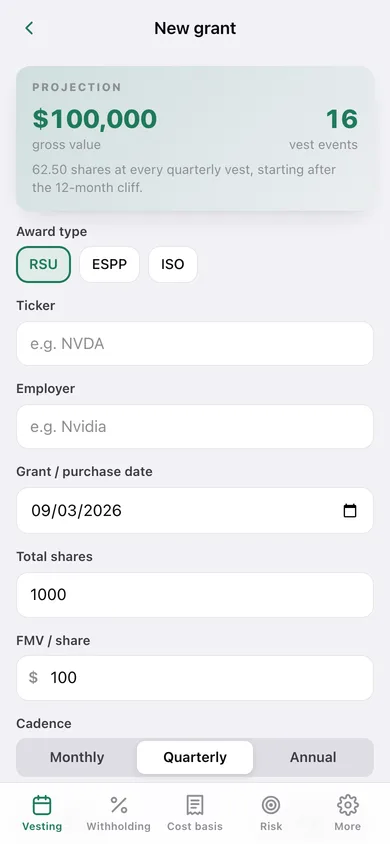
Ticker, employer, award type, shares, FMV, cadence, cliff and ESPP discount with a live projection.
-
4
Vest detail
One vest's value, its withholding gap, its adjusted cost basis and a vested toggle.
-
5
Withholding gap
This year's set-aside, a withheld-vs-owed column chart and the gap on every RSU vest.
-
6
Your bracket
Federal marginal bracket, state rate, filing status and outside net worth.
-
7
Cost basis
Double-tax avoided, the sales needing a correction, and every vested lot with its true basis.
-
8
Form 8949
Shares sold, proceeds and broker basis in, with the exact 8949 columns and corrected gain out.
-
9
Concentration
The risk gauge for your top ticker, the net-worth mix donut and a per-ticker share.
-
10
Settings
Your profile, ledger totals, re-projection, CSV and JSON export, sample data and erase.
Try it with sample data: Adds a 32%-bracket California profile plus four grants — a 1,200-share NVDA new-hire RSU with a one-year cliff, a 600-share refresher, a 140-share ESPP purchase at a 15% discount and an 800-share CrowdStrike ISO — with one vested lot already sold at a $0 broker basis. You can start fresh at any time.
Ready? It's free.
No account, no install, no subscription. Everything you do stays in this browser.
Your say
What should VestLedger do? Tell us before we build it.
Tell us what to build next.
Comments need a free Google sign-in, so every one is from a real person.
Sign in with Google to commentNo comments yet — be the first to say what this app should do next.
Questions
Is the web version of VestLedger free?+
Yes. Every screen is free to use: no subscription, no in-app purchases, no account.
Do I need an account?+
No. Open VestLedger and start using it right away. Sign in with Google only if you want to upvote an app, save it to your list, or leave a comment.
Where is my data stored?+
Only in this browser's local storage. Nothing you enter is sent to our servers, so we can't see it, back it up, or restore it. Clearing site data, a private window, or another device starts empty. Export a backup from the in-app menu to keep it.
Is there a VestLedger app for iPhone or Android?+
Not yet. VestLedger is a community proposal: the browser version is complete, and we build the iPhone and Android app once 100 people upvote it. Upvoters get one email when it ships.