
Web app · Business
Vendbook
Which vending machine actually pays — per-machine profit, in your browser
Log every service run in under a minute: cash pulled, what you loaded, a note. Vendbook turns that into a monthly P&L per machine — revenue, product cost, location commission, net — and flags any machine whose take drops below its own baseline. Free, no install.
Stored in your browser only. Nothing you do in the web version is sent to our servers. Clear your browser data and it's gone — so export a backup from the in-app menu if you want to keep it.
This app is a community proposal.
Try the full browser version now. We build the iPhone and Android app once 100 people upvote it.
We'll email you once, when it ships. Unsubscribe anytime.
In your browser
What you can do in Vendbook on the web
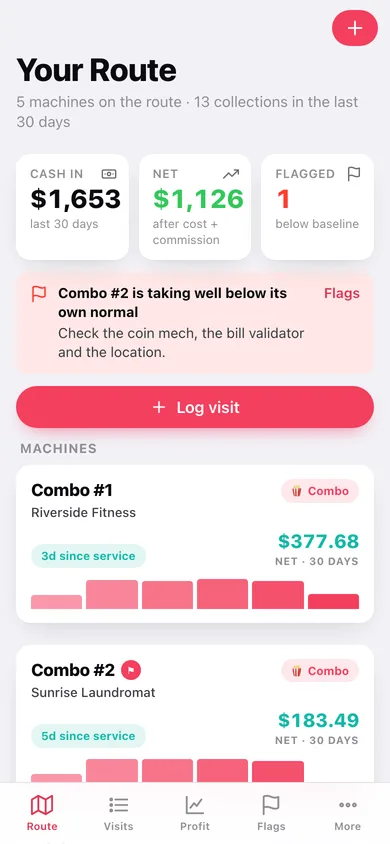
One card per machine on the route
Location, type, commission split, days since service and this month's net, with a spark of the last six collections — so a stop that needs a visit stands out at a glance.
A visit takes under a minute
Pick the machine, key the cash you pulled, tap the products you loaded with plus and plus-six buttons, add a note. Big controls sized for a dim break room.
Baseline flags catch a dying machine
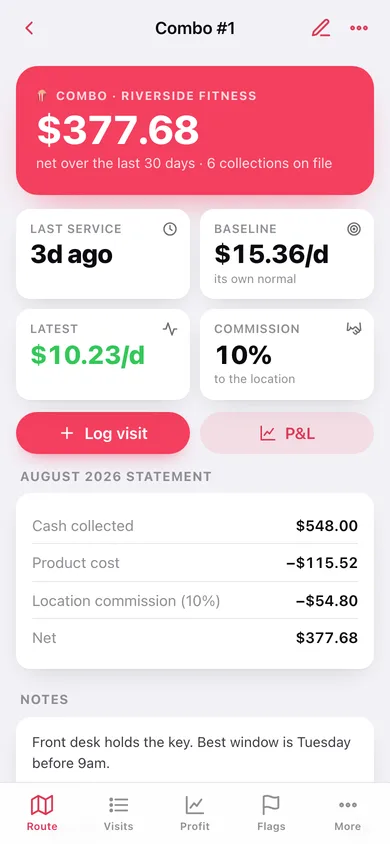
Vendbook learns each machine's normal daily take from its own visit history and flags any collection that lands below 65% of it — the math is shown, not hidden.
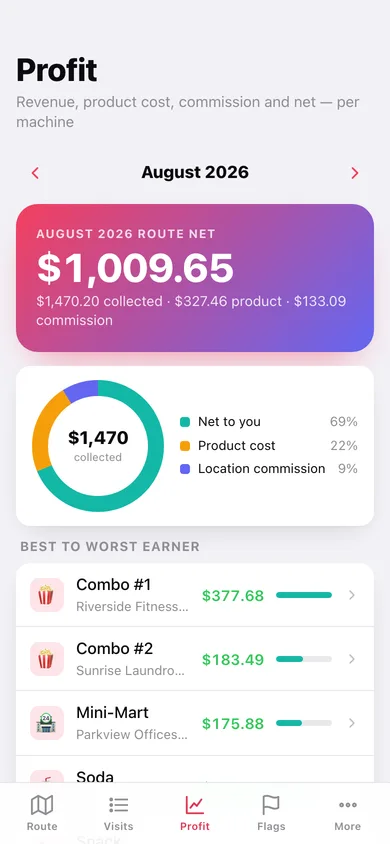
Monthly P&L that computes itself
Cash collected minus product cost from the restock lines minus the location's commission, per machine and for the whole route, with machines ranked best to worst earner.
A catalog where cost lives once
Ten starter products with cost and vend price. Change a cost when the club store raises it and every future margin follows — past visits keep the price they were saved with.
Month-end books and a CSV
A per-machine table for any month with a route rollup, and a CSV of every collection for taxes or a spreadsheet-loving accountant.
Screens
Every screen, rebuilt for the browser
-
1
Your Route
Every machine with days since service, this month's net and flag warnings up top.
-
2
Machine
One machine's baseline, latest daily take, monthly statement and every collection.
-
3
Edit machine
Name, location, type, commission split and route status.
-
4
Log visit
Cash pulled and the restock lines, tapped straight off the catalog.
-
5
Visit
What one stop was worth: cash, product loaded, commission and contribution.
-
6
Visits
Every collection grouped by month, searchable by machine, location or note.
-
7
Profit
The month's route P&L and machines ranked from best to worst earner.
-
8
Machine P&L
Net by month, the lifetime statement and what moves the most units.
-
9
Flags
Machines below their own baseline, with the baseline, latest take and drop shown.
-
10
Catalog
Products by category with cost, vend price and margin.
-
11
Product
Cost and vend price for one product, plus which past visits already loaded it.
-
12
Reports
The month-end per-machine table, route totals and CSV export.
-
13
More
Flag threshold, catalog, reports, export, sample route and erase.
Try it with sample data: Adds a real five-machine route — a gym combo, a lube-shop soda, a machine-shop snack, a laundromat combo that has quietly stopped taking money, and a new mini-mart that is ramping — with about ten weeks of collections and restock lines behind them. You can start fresh at any time.
Ready? It's free.
No account, no install, no subscription. Everything you do stays in this browser.
Your say
What should Vendbook do? Tell us before we build it.
Tell us what to build next.
Comments need a free Google sign-in, so every one is from a real person.
Sign in with Google to commentNo comments yet — be the first to say what this app should do next.
Questions
Is the web version of Vendbook free?+
Yes. Every screen is free to use: no subscription, no in-app purchases, no account.
Do I need an account?+
No. Open Vendbook and start using it right away. Sign in with Google only if you want to upvote an app, save it to your list, or leave a comment.
Where is my data stored?+
Only in this browser's local storage. Nothing you enter is sent to our servers, so we can't see it, back it up, or restore it. Clearing site data, a private window, or another device starts empty. Export a backup from the in-app menu to keep it.
Is there a Vendbook app for iPhone or Android?+
Not yet. Vendbook is a community proposal: the browser version is complete, and we build the iPhone and Android app once 100 people upvote it. Upvoters get one email when it ships.