
Web app · Health And Fitness
Unclench
Catch your jaw clenching now — not in an exercise session later
A running check-in that asks, in the middle of your workday, whether your teeth are touching. Answer, run the five-second reset drill, and a heatmap shows the exact hour you clench most. Six TMJ stretches included, free, nothing to install.
Stored in your browser only. Nothing you do in the web version is sent to our servers. Clear your browser data and it's gone — so export a backup from the in-app menu if you want to keep it.
This app is a community proposal.
Try the full browser version now. We build the iPhone and Android app once 100 people upvote it.
We'll email you once, when it ships. Unsubscribe anytime.
In your browser
What you can do in Unclench on the web
The check-in, not a programme
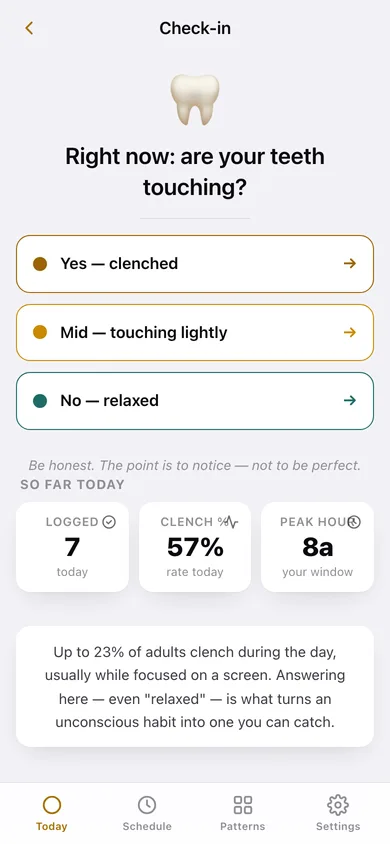
Every 10, 20, 30 or 45 minutes inside your active hours this tab chimes and asks one question: are your teeth touching right now? Clenched, mid or relaxed — one tap.
The five-second reset drill
After every answer: tongue on the roof of your mouth, teeth apart, lips together, held for a timed count. That is the thing that retrains the habit.
Your trigger window, found
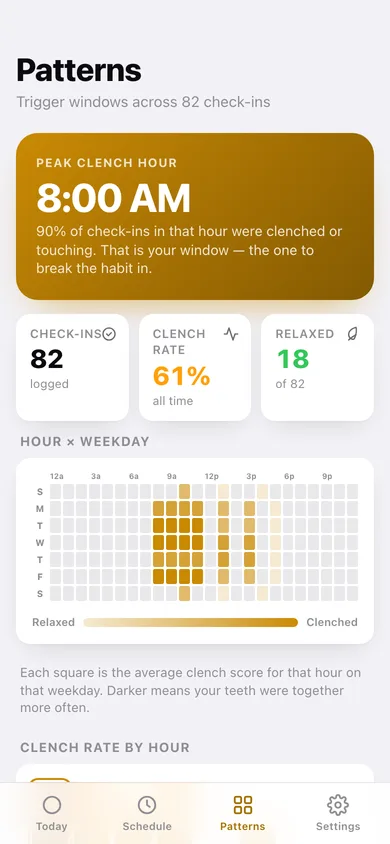
An hour-by-weekday heatmap plus a clench-rate-by-hour chart name the window where your teeth are together most — 11am on calls, or after 4pm.
Six clinician-recommended TMJ stretches
Resisted opening, both goldfish exercises, chin tucks, side-to-side jaw and resisted closing — full instructions and a hold-timer ring for each.
Night grinding log
Record episodes and hours for each night so daytime clenching and night-time bruxism sit side by side, with a bar chart across your recent nights.
No streak, no guilt, no account
Miss a ping and nothing breaks. Your log stays in this browser and exports to CSV for a dentist or physio.
Screens
Every screen, rebuilt for the browser
-
1
Today
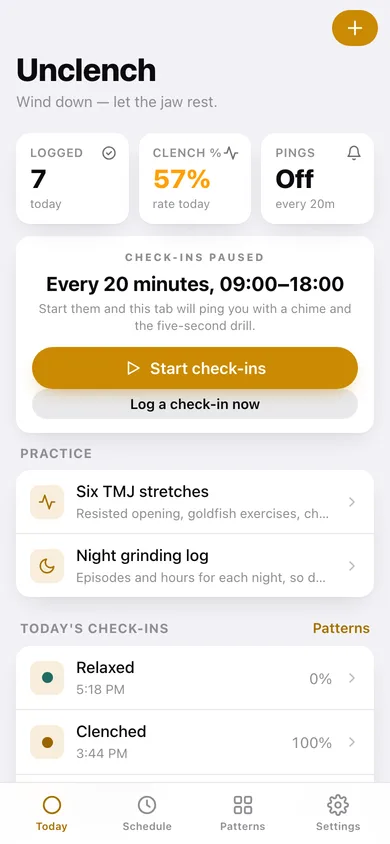
Check-ins today, your clench rate, the countdown to the next ping, and everything you logged today.
-
2
Check-in
Right now: are your teeth touching? Three answers, then the timed reset drill.
-
3
Patterns
Peak clench hour, the hour-by-weekday heatmap, clench rate by hour and the status mix.
-
4
Stretches
The six-exercise TMJ set with hold times.
-
5
Stretch detail
Full instructions and a hold-timer ring for one stretch, with the rest of the set underneath.
-
6
Night grinding
Last night's episodes, a per-night bar chart and the form to log a night.
-
7
Schedule
Active hours, how often the ping fires, whether check-ins are running and the drill length.
-
8
Settings
Chime, CSV export for your dentist, JSON backup, sample data and erase.
Try it with sample data: Loads two weeks of check-ins — seven a day on weekdays, three at weekends — weighted so the late-morning hours read clenched and the late afternoon relaxes, plus five nights of grinding episodes. You can start fresh at any time.
Ready? It's free.
No account, no install, no subscription. Everything you do stays in this browser.
Your say
What should Unclench do? Tell us before we build it.
Tell us what to build next.
Comments need a free Google sign-in, so every one is from a real person.
Sign in with Google to commentNo comments yet — be the first to say what this app should do next.
Questions
Is the web version of Unclench free?+
Yes. Every screen is free to use: no subscription, no in-app purchases, no account.
Do I need an account?+
No. Open Unclench and start using it right away. Sign in with Google only if you want to upvote an app, save it to your list, or leave a comment.
Where is my data stored?+
Only in this browser's local storage. Nothing you enter is sent to our servers, so we can't see it, back it up, or restore it. Clearing site data, a private window, or another device starts empty. Export a backup from the in-app menu to keep it.
Is there a Unclench app for iPhone or Android?+
Not yet. Unclench is a community proposal: the browser version is complete, and we build the iPhone and Android app once 100 people upvote it. Upvoters get one email when it ships.