
Web app · Food And Drink
TurnIn
Enter four turn-in times — get the whole competition day built backward
Chicken at noon, ribs at 12:30, pork at one, brisket at 1:30. TurnIn builds every meat's day in reverse from its window, runs a live DQ countdown, staggers labelled alarms, logs probe temps against target and keeps your box-build debriefs. Free, no install, works offline.
Stored in your browser only. Nothing you do in the web version is sent to our servers. Clear your browser data and it's gone — so export a backup from the in-app menu if you want to keep it.
This app is a community proposal.
Try the full browser version now. We build the iPhone and Android app once 100 people upvote it.
We'll email you once, when it ships. Unsubscribe anytime.
In your browser
What you can do in TurnIn on the web
Backward day builder
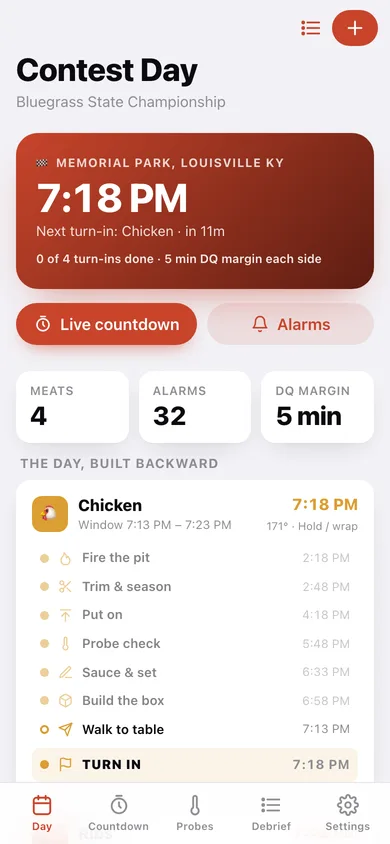
Enter the sanctioned turn-in times once and TurnIn computes fire-the-pit, trim, put-on, wrap, rest, box-build and walk-to-table for all four meats — shift a turn-in and the whole ladder moves with it.
Live DQ-window countdown
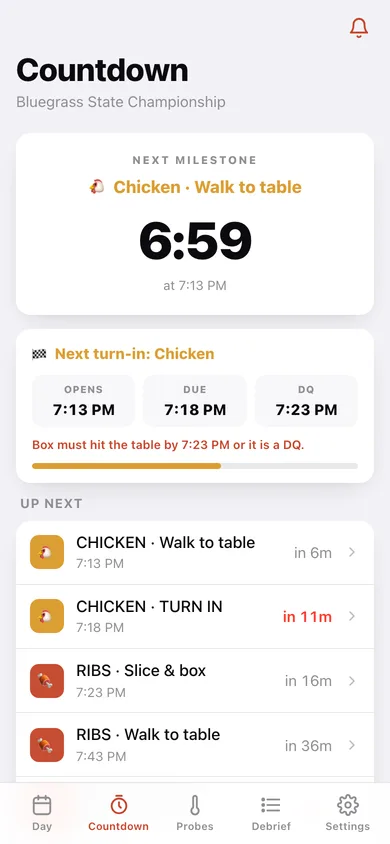
A ticking clock to the next milestone plus an opens / due / DQ card for the next turn-in, going red inside the last five minutes and calling WINDOW OPEN when you can walk it.
Staggered per-meat alarms
Every milestone across the day in one labelled list — CHICKEN · Sauce & set, PORK · Wrap — filterable by meat, so a beep at the pit is never ambiguous.
Probe log with trend
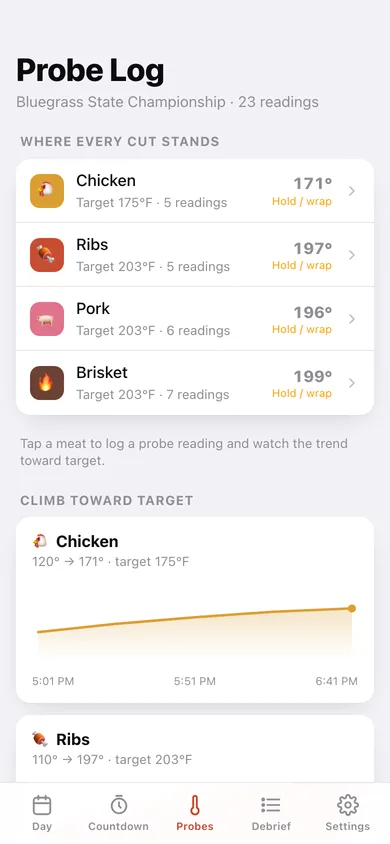
Log internal temps per cut against its target and get the hold / wrap / pull verdict the iPhone app gives, with a line chart of the climb.
Box-build debriefs that come back
Appearance, taste, tenderness, score and place per meat — and when you debrief the same meat next contest, last time's notes are shown at the top.
KCBS-style starting template
The standard noon / 12:30 / 1:00 / 1:30 stagger and the full milestone ladder for each protein ship built in.
Screens
Every screen, rebuilt for the browser
-
1
Contest Day
Next turn-in hero, DQ margin, and all four meats with their whole day drawn as a backward milestone rail.
-
2
Countdown
The live dial to the next milestone, the opens / due / DQ window card, and the next seven events across the day.
-
3
Alarms
Every staggered alarm for the day, labelled with its meat and step, filterable per protein.
-
4
Probe Log
Where every cut stands against target, the climb charted per meat, and the reference target temperatures.
-
5
Meat
One cut: target temp, notes, trend chart, full reading log and its backward ladder.
-
6
Build the Day
Name, venue, date, DQ margin and the four turn-in times, with a live preview of what each ladder becomes.
-
7
Debrief
This contest's four boxes to debrief plus the archive of every finished cook.
-
8
Debrief a box
Appearance, taste, tenderness, score and place — with last contest's notes for the same meat on top.
-
9
Contest
One archived cook: box by box scores and places, plus that day's turn-in schedule.
-
10
Settings
Which day you are running, milestone beeps, the four milestone ladders, CSV export of the probe log and erase.
Try it with sample data: Loads the KCBS template, two finished contests with full debriefs and scores, and a live contest today whose chicken turn-in is twelve minutes out, with a believable probe climb on all four cuts. You can start fresh at any time.
Ready? It's free.
No account, no install, no subscription. Everything you do stays in this browser.
Your say
What should TurnIn do? Tell us before we build it.
Tell us what to build next.
Comments need a free Google sign-in, so every one is from a real person.
Sign in with Google to commentNo comments yet — be the first to say what this app should do next.
Questions
Is the web version of TurnIn free?+
Yes. Every screen is free to use: no subscription, no in-app purchases, no account.
Do I need an account?+
No. Open TurnIn and start using it right away. Sign in with Google only if you want to upvote an app, save it to your list, or leave a comment.
Where is my data stored?+
Only in this browser's local storage. Nothing you enter is sent to our servers, so we can't see it, back it up, or restore it. Clearing site data, a private window, or another device starts empty. Export a backup from the in-app menu to keep it.
Is there a TurnIn app for iPhone or Android?+
Not yet. TurnIn is a community proposal: the browser version is complete, and we build the iPhone and Android app once 100 people upvote it. Upvoters get one email when it ships.