
Web app · Education
Tuitionly
Every class, every fee, paid — the tuition register for your whole family
Add each child, then each class: subject, teacher, batch days, monthly fee and the day it falls due. The dues board shows what's overdue and due this week, every payment is logged as cash, UPI or bank, and a one-tap tally shows whether you got the classes you paid for. Free, offline, no account.
Stored in your browser only. Nothing you do in the web version is sent to our servers. Clear your browser data and it's gone — so export a backup from the in-app menu if you want to keep it.
This app is a community proposal.
Try the full browser version now. We build the iPhone and Android app once 100 people upvote it.
We'll email you once, when it ships. Unsubscribe anytime.
In your browser
What you can do in Tuitionly on the web
Children and their classes
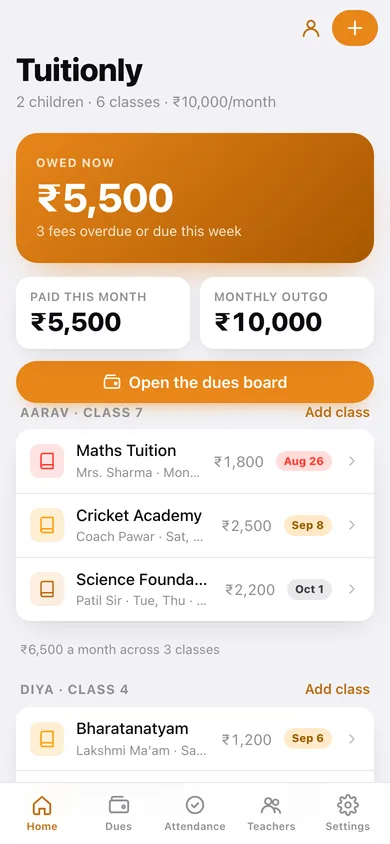
One screen for every child and every tuition, coaching or academy — subject, teacher, batch days, timing, monthly fee and the due day, totalled per child.
Dues board
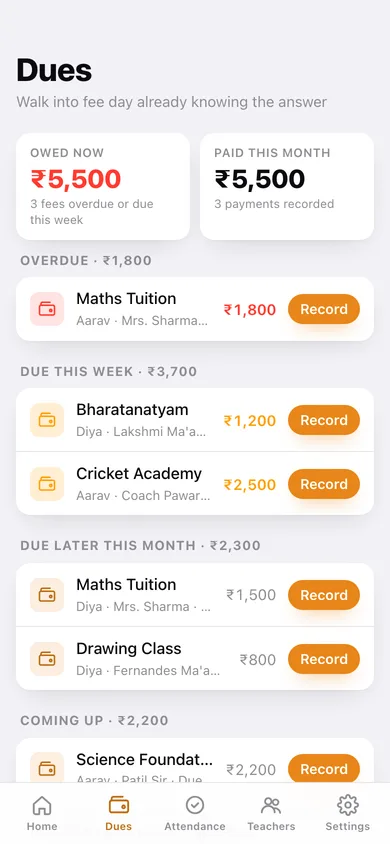
Overdue, due this week, due later this month and coming up, with the rupee total owed right now and what you've already paid this month.
Payment ledger
Record each payment with its date, amount and mode — cash, UPI or bank — and the class rolls automatically to its next monthly cycle.
Classes delivered vs fees paid
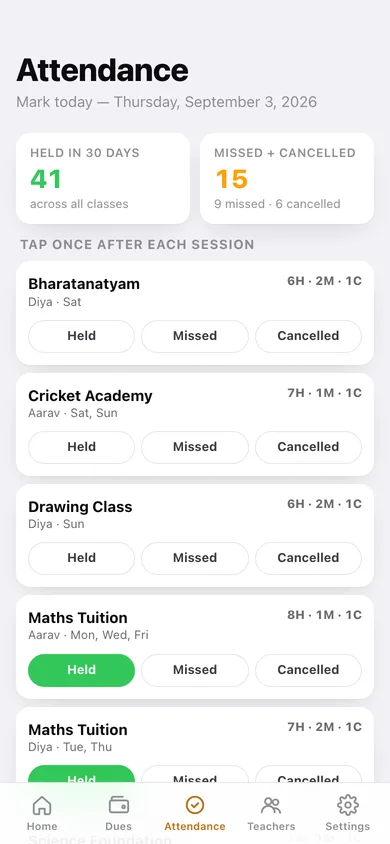
One tap marks each session held, missed by your child, or cancelled by the teacher; the month view shows sessions held against the fee and the real cost per class.
Teacher cards with dated notes
Every teacher gets a card with their phone number and a dated log — the fee hike they mentioned, the batch change, what they said at the parent meeting.
Nothing leaves your browser
No sign-up and no server; export the whole register as JSON or the payment ledger as a CSV whenever you need it.
Screens
Every screen, rebuilt for the browser
-
1
Family
What you owe right now, monthly outgo, and every child's classes with their next due date.
-
2
Dues board
Overdue, due this week, due later this month and coming up, each with a Record button.
-
3
Class detail
Fee, cycle, teacher, this month's held/missed/cancelled tally against what you paid.
-
4
Class editor
Subject, child, teacher, batch days, timing, monthly fee and the due day.
-
5
Payment ledger
Six months of payments as bars, a cash/UPI/bank split, and every payment listed.
-
6
Attendance
Mark today held, missed or cancelled per class, with the month tally and cost per class.
-
7
Teachers
Every teacher with the classes they take and how many notes you've kept.
-
8
Teacher card
Phone, the classes they teach, and the dated conversation notes.
-
9
Settings
Register totals, child management, JSON backup, CSV of the ledger and erase.
Try it with sample data: Loads a two-child register — Aarav and Diya across six classes with five teachers — plus four months of payments in cash, UPI and bank, this month's attendance and five dated teacher notes. You can start fresh at any time.
Ready? It's free.
No account, no install, no subscription. Everything you do stays in this browser.
Your say
What should Tuitionly do? Tell us before we build it.
Tell us what to build next.
Comments need a free Google sign-in, so every one is from a real person.
Sign in with Google to commentNo comments yet — be the first to say what this app should do next.
Questions
Is the web version of Tuitionly free?+
Yes. Every screen is free to use: no subscription, no in-app purchases, no account.
Do I need an account?+
No. Open Tuitionly and start using it right away. Sign in with Google only if you want to upvote an app, save it to your list, or leave a comment.
Where is my data stored?+
Only in this browser's local storage. Nothing you enter is sent to our servers, so we can't see it, back it up, or restore it. Clearing site data, a private window, or another device starts empty. Export a backup from the in-app menu to keep it.
Is there a Tuitionly app for iPhone or Android?+
Not yet. Tuitionly is a community proposal: the browser version is complete, and we build the iPhone and Android app once 100 people upvote it. Upvoters get one email when it ships.