
Web app · Business
TruckTally
Which stops actually pay: per-shift food truck profit, in your browser
Log every stop with service hours and weather, count the till by cash, card and app orders, attach the pitch fee, commissary share, fuel and labour, and TruckTally ranks every venue by net profit per service hour — so 'should I rebook that brewery night' is a number. Free, no install.
Stored in your browser only. Nothing you do in the web version is sent to our servers. Clear your browser data and it's gone — so export a backup from the in-app menu if you want to keep it.
This app is a community proposal.
Try the full browser version now. We build the iPhone and Android app once 100 people upvote it.
We'll email you once, when it ships. Unsubscribe anytime.
In your browser
What you can do in TruckTally on the web
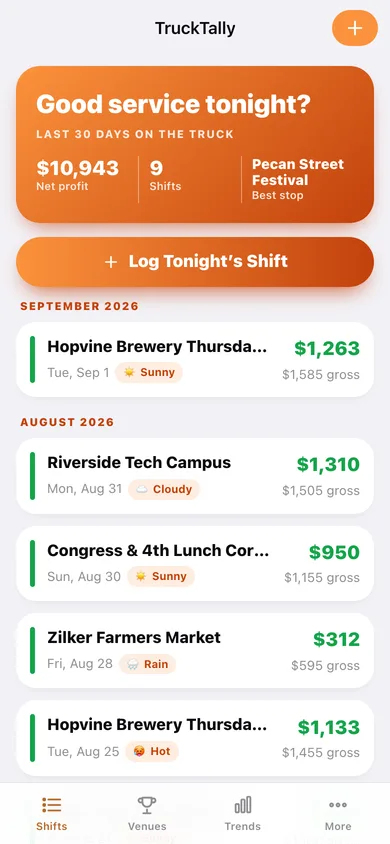
One row per stop, with its own net
Pick the venue, set service hours, tag the weather and add notes. Every shift lands in the ledger with gross sales, costs and net profit already worked out.
The end-of-night till count
Count the drawer by payment type — cash with a denomination counter, the card/POS total keyed off the Square screen, and app orders — minus the starting bank.
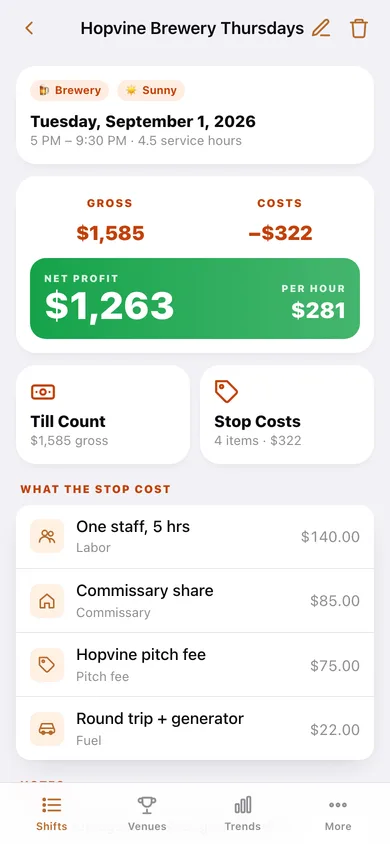
Stop costs that actually land
Pitch or event fee, commissary share, fuel, labour, supplies and permits attached to the shift they belong to, with the venue's default pitch fee pre-filled.
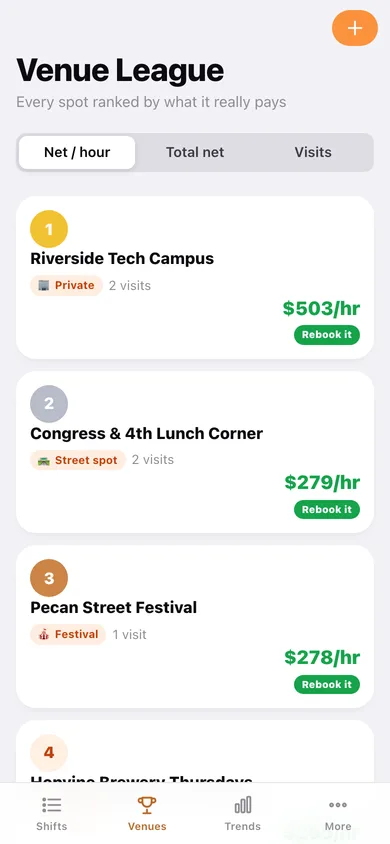
The venue league table
Every venue ranked by average net per service hour, with visit count, best and worst shift, and a rebook verdict at a glance.
Trends by month, weekday and weather
Monthly profit trend, weekday versus weekend, and a weather breakdown — so a slump gets blamed on the spot or the sky, not on a hunch.
Per-venue prep checklists and CSV
Propane, cambros, permit copy — a checklist per venue that resets before each shift, plus a CSV of every shift, sale and expense for the accountant.
Screens
Every screen, rebuilt for the browser
-
1
Shift ledger
Every stop with gross, costs and net, and this month's route profit up top.
-
2
Shift
One stop's sales, costs, hours and net profit per service hour.
-
3
Log a shift
Venue, date, service hours, weather and notes for a stop.
-
4
Till count
Cash by denomination, card/POS total and app orders, minus the starting bank.
-
5
Stop costs
Pitch fee, commissary share, fuel, labour, supplies and permits for the stop.
-
6
Venue league
Venues ranked by average net profit per service hour, with a rebook verdict.
-
7
Venue
One venue's visit history, best and worst shifts and default pitch fee.
-
8
Edit venue
Name, kind, city, default pitch fee and the prep list for this spot.
-
9
Trends
Monthly profit, weekday versus weekend, and profit by weather.
-
10
Prep checklist
The venue's pre-shift list, ticked off and reset for the next stop.
-
11
More
Starting bank, labour rate, CSV export, sample data and erase.
Try it with sample data: Adds about six weeks of a real route: a handful of venues from brewery nights to office parks, roughly a dozen logged shifts with till counts, stop costs and weather, and prep lists per venue. You can start fresh at any time.
Ready? It's free.
No account, no install, no subscription. Everything you do stays in this browser.
Your say
What should TruckTally do? Tell us before we build it.
Tell us what to build next.
Comments need a free Google sign-in, so every one is from a real person.
Sign in with Google to commentNo comments yet — be the first to say what this app should do next.
Questions
Is the web version of TruckTally free?+
Yes. Every screen is free to use: no subscription, no in-app purchases, no account.
Do I need an account?+
No. Open TruckTally and start using it right away. Sign in with Google only if you want to upvote an app, save it to your list, or leave a comment.
Where is my data stored?+
Only in this browser's local storage. Nothing you enter is sent to our servers, so we can't see it, back it up, or restore it. Clearing site data, a private window, or another device starts empty. Export a backup from the in-app menu to keep it.
Is there a TruckTally app for iPhone or Android?+
Not yet. TruckTally is a community proposal: the browser version is complete, and we build the iPhone and Android app once 100 people upvote it. Upvoters get one email when it ships.