
Web app · Finance
Tokensaver
Track per-service AI token usage. Don't get capped.
Once a month you read the token count off each AI service's billing page and log it here. Tokensaver flags anything past 90% of cap — before the cap — and shows across months which services drain it. Free, no keys, no account.
Stored in your browser only. Nothing you do in the web version is sent to our servers. Clear your browser data and it's gone — so export a backup from the in-app menu if you want to keep it.
This app is a community proposal.
Try the full browser version now. We build the iPhone and Android app once 100 people upvote it.
We'll email you once, when it ships. Unsubscribe anytime.
In your browser
What you can do in Tokensaver on the web
Cap meter per service
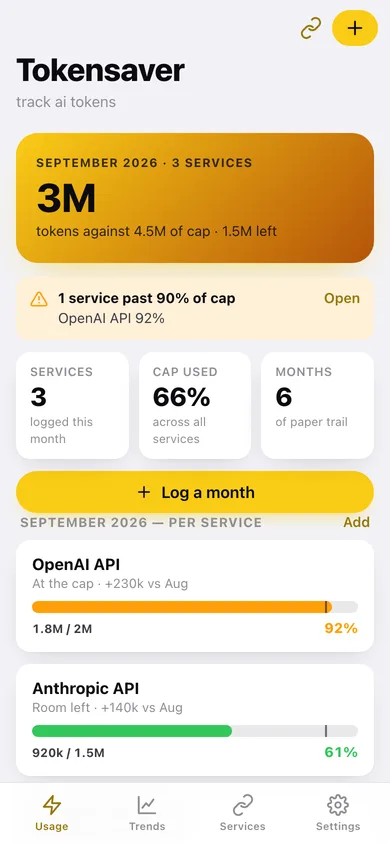
Every logged month shows tokens used against the cap with a filled meter, a marker at your warning threshold, and a Room left / Watch it / At the cap / Over cap read.
Flagged before you get capped
The home screen banners any service past your threshold (90% by default, adjustable) with the exact headroom left in tokens.
18 AI services with their usage pages
OpenAI, Anthropic, Gemini, OpenRouter, xAI, DeepSeek, Mistral, Groq, Together, Fireworks, Cohere, Perplexity, Azure OpenAI, Bedrock, Replicate, Hugging Face, ElevenLabs and Cursor — each with the page to open and where to look on it. Add your own too.
Every month reads as a trend
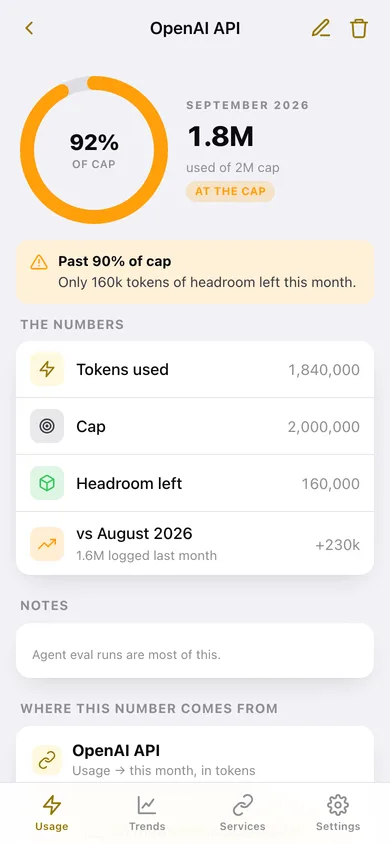
Each service-month shows how it moved against the same service last month — +230k vs Aug — so a creeping service is obvious before it caps.
Months of trail, charted
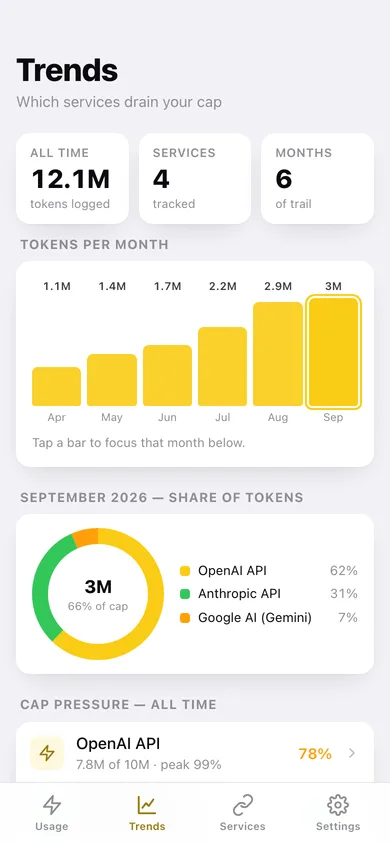
Tokens per month, share of the month by service, cap pressure all-time, and a month-over-month line per service.
Manual on purpose
Tokensaver never calls an API and never holds a key — it links out to the billing page and you type the number in. Everything stays in this browser.
Screens
Every screen, rebuilt for the browser
-
1
Usage
This month's tokens against cap, the flag banner, and a cap meter per service.
-
2
Usage detail
One service-month: cap gauge, headroom, month-over-month change, and where the number came from.
-
3
Log usage
Service, month, tokens used and cap, with a live cap meter and status preview.
-
4
Trends
Tokens per month, share of a month by service, all-time cap pressure and a per-service line.
-
5
Services
The AI services you track and the rest of the catalog, each with this month's percentage of cap.
-
6
Service detail
Every month logged for one service, its usage page link and tokens-per-month chart.
-
7
Service editor
Name, monthly token cap, usage page and where to look on it.
-
8
Settings
Warning threshold, default cap, CSV and JSON export, catalog restore, sample data and erase.
Try it with sample data: Adds six months of usage across OpenAI, Anthropic, Gemini and OpenRouter — including the month OpenAI hit 99% of a 1M cap and the cap got raised. You can start fresh at any time.
Ready? It's free.
No account, no install, no subscription. Everything you do stays in this browser.
Your say
What should Tokensaver do? Tell us before we build it.
Tell us what to build next.
Comments need a free Google sign-in, so every one is from a real person.
Sign in with Google to commentNo comments yet — be the first to say what this app should do next.
Questions
Is the web version of Tokensaver free?+
Yes. Every screen is free to use: no subscription, no in-app purchases, no account.
Do I need an account?+
No. Open Tokensaver and start using it right away. Sign in with Google only if you want to upvote an app, save it to your list, or leave a comment.
Where is my data stored?+
Only in this browser's local storage. Nothing you enter is sent to our servers, so we can't see it, back it up, or restore it. Clearing site data, a private window, or another device starts empty. Export a backup from the in-app menu to keep it.
Is there a Tokensaver app for iPhone or Android?+
Not yet. Tokensaver is a community proposal: the browser version is complete, and we build the iPhone and Android app once 100 people upvote it. Upvoters get one email when it ships.