
Web app · Finance
TipVault
Your tip log. Audit-ready. Nothing leaves this browser.
Log every shift — cash tips, credit tips, tip-out, sales and section — then read your weekly charts, estimate the No-Tax-on-Tips deduction with 2025 rules, and download a per-year audit packet. Free, no account, no cloud.
Stored in your browser only. Nothing you do in the web version is sent to our servers. Clear your browser data and it's gone — so export a backup from the in-app menu if you want to keep it.
This app is a community proposal.
Try the full browser version now. We build the iPhone and Android app once 100 people upvote it.
We'll email you once, when it ships. Unsubscribe anytime.
In your browser
What you can do in TipVault on the web
Five-second shift entry
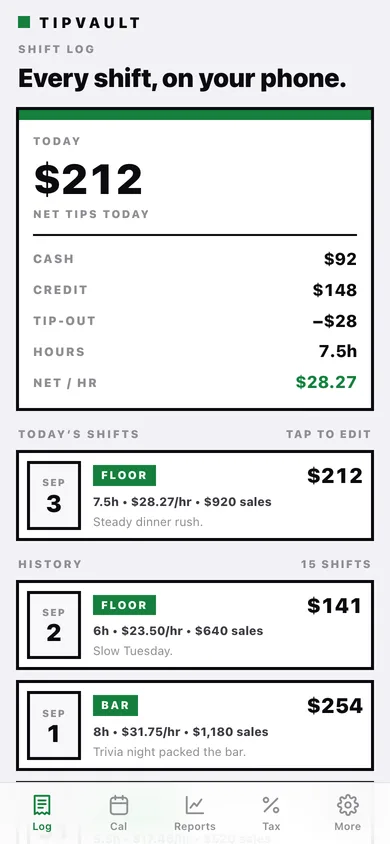
Date, hours, cash tips, credit-card tips, tip-out and sales, with a live preview of net, gross and net-per-hour as you type.
Section-aware income
Tag every shift Bar, Floor, Delivery or Other and see net tips and $/hr broken out per station in Reports and the audit packet.
No-Tax-on-Tips estimator
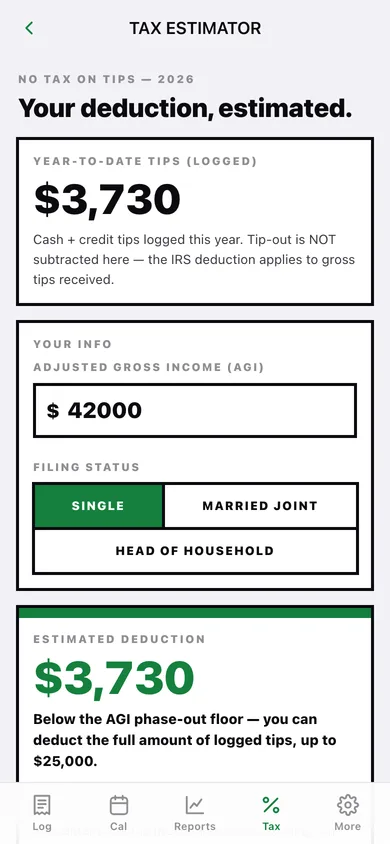
The real 2025-2028 rules on-device: $25,000 cap, −$100 per $1,000 of AGI above $150K single / $300K joint, never below zero — with the phase-out explained in plain English.
Month calendar
A colour-graded month grid of your logged days; tap any day to see or add that day's shifts, with the month's net tips, hours and $/hr on top.
Weekly, day-of-week and per-shift charts
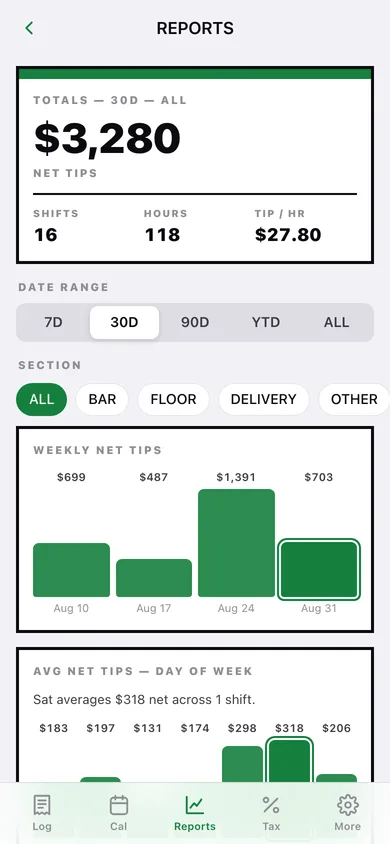
Filter by 7D / 30D / 90D / YTD / ALL and by section, then read weekly net tips, your best day of the week, and net tips per hour shift by shift.
Audit packet you can hand over
A per-year file with cover totals, every shift listed month by month, and the nine-line No-Tax-on-Tips worksheet — plus a CSV of raw shifts.
Screens
Every screen, rebuilt for the browser
-
1
Shift log
Today's net tips broken into cash, credit and tip-out, then every past shift as a date-block row.
-
2
Shift detail
Net tips, the three buckets, hours, section, sales and tip-out as a percentage of sales.
-
3
Add / edit shift
Date, hours, cash, credit, tip-out, sales, section and notes with a live net / gross / net-per-hour preview.
-
4
Calendar
Month grid marked by how big each day was, with the month summary and that day's shifts.
-
5
Reports
Range and section filters over weekly net tips, average net tips by day of week, and net tips per hour.
-
6
Tax estimator
Year-to-date logged tips, your AGI and filing status, and the estimated No-Tax-on-Tips deduction with the rules that produced it.
-
7
Audit packet
Per-year totals, breakdown by section, the nine-line worksheet, and the downloadable packet and CSV.
-
8
Settings
Shift defaults, filing status, backup, CSV export, sample data and erase.
Try it with sample data: Adds sixteen shifts across the last three and a half weeks — floor, bar, delivery and a banquet-room private party — with realistic cash/credit splits, tip-outs and sales. You can start fresh at any time.
Ready? It's free.
No account, no install, no subscription. Everything you do stays in this browser.
Your say
What should TipVault do? Tell us before we build it.
Tell us what to build next.
Comments need a free Google sign-in, so every one is from a real person.
Sign in with Google to commentNo comments yet — be the first to say what this app should do next.
Questions
Is the web version of TipVault free?+
Yes. Every screen is free to use: no subscription, no in-app purchases, no account.
Do I need an account?+
No. Open TipVault and start using it right away. Sign in with Google only if you want to upvote an app, save it to your list, or leave a comment.
Where is my data stored?+
Only in this browser's local storage. Nothing you enter is sent to our servers, so we can't see it, back it up, or restore it. Clearing site data, a private window, or another device starts empty. Export a backup from the in-app menu to keep it.
Is there a TipVault app for iPhone or Android?+
Not yet. TipVault is a community proposal: the browser version is complete, and we build the iPhone and Android app once 100 people upvote it. Upvoters get one email when it ships.