
Web app · Finance
Walkwith
Know what you walked with — every shift, every tipout, every hour
Log hours, cash tips, card tips and tipout in thirty seconds and Walkwith shows your take-home and effective hourly rate, which days actually pay, and a year summary with the cash/card split. Free, no account, no install.
Stored in your browser only. Nothing you do in the web version is sent to our servers. Clear your browser data and it's gone — so export a backup from the in-app menu if you want to keep it.
This app is a community proposal.
Try the full browser version now. We build the iPhone and Android app once 100 people upvote it.
We'll email you once, when it ships. Unsubscribe anytime.
In your browser
What you can do in Walkwith on the web
Take-home and $/hr on every shift
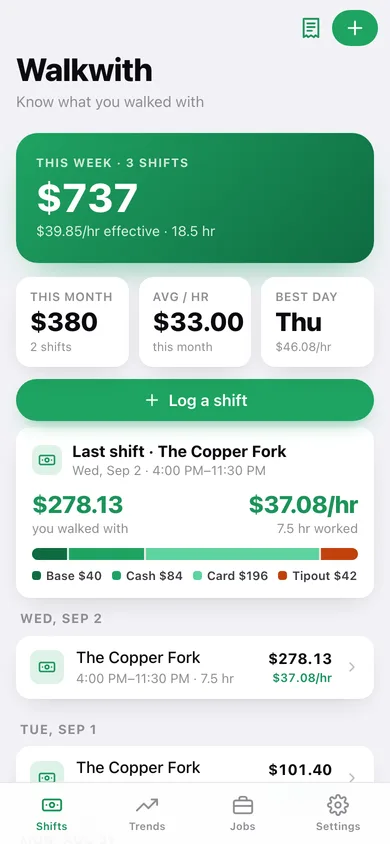
Base wage × hours + cash + card − tipout, worked out the moment you type it — with a live preview while you fill the form and a stacked bar showing where the money came from.
Overnight shifts handled
Clock in at 7pm and out at 2am and Walkwith wraps the hours across midnight instead of returning a negative shift.
Best days, weekly and monthly trends
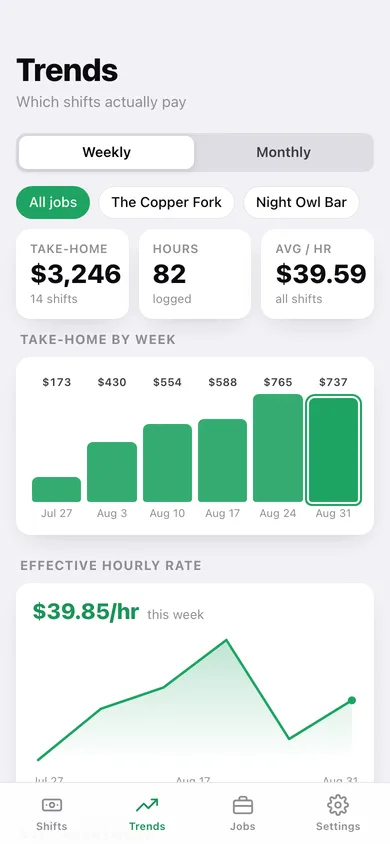
Take-home by week or month, an effective-hourly-rate line, and a day-of-week chart that names the day paying you the most per hour.
Two jobs, two base wages
Keep each employer separate with its own role and default hourly wage; new shifts inherit it, and Trends filters by job.
Tax-season summary
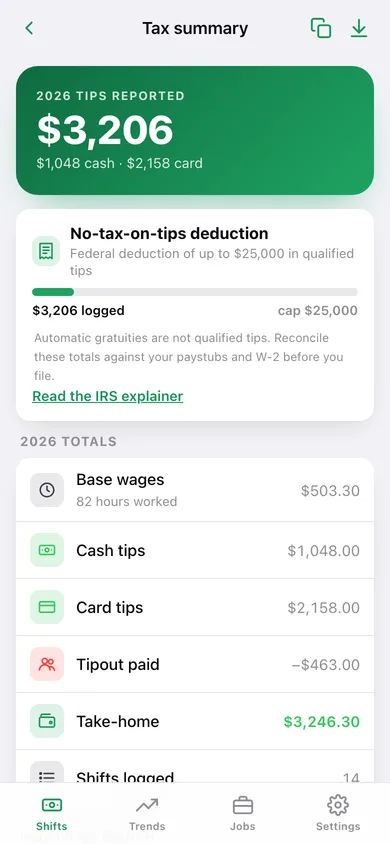
A year total of base wages, cash tips, card tips and tipout with a month-by-month table, a no-tax-on-tips progress bar against the $25,000 cap, copy-to-clipboard text and a CSV export.
Stays in this browser
No account, no sync, no ads — your shifts are saved locally and you can export a JSON backup or a CSV any time.
Screens
Every screen, rebuilt for the browser
-
1
Shifts
This week's take-home and hourly rate, your last shift, and every shift grouped by day.
-
2
Shift detail
What you walked with, the effective hourly rate, and the base/cash/card/tipout breakdown.
-
3
Log a shift
Job, date, clock in/out, base wage, cash, card and tipout with a live take-home preview.
-
4
Trends
Take-home by week or month, effective hourly rate over time, and the day-of-week rates that show which shifts pay.
-
5
Jobs
Each job with its base wage, shifts, hours, take-home and blended hourly rate.
-
6
Job editor
Name, role and default base hourly wage for one job.
-
7
Tax summary
Year totals with the cash/card split, month-by-month table and the no-tax-on-tips deduction bar.
-
8
Settings
Default clock in/out times, default job, week start, CSV and JSON export, sample data and erase.
Try it with sample data: Adds two jobs — The Copper Fork (server, $5.35/hr) and Night Owl Bar (bartender, $7.25/hr) — and fourteen shifts across the last five weeks, including overnight bar shifts and slow Tuesday lunches. You can start fresh at any time.
Ready? It's free.
No account, no install, no subscription. Everything you do stays in this browser.
Your say
What should Walkwith do? Tell us before we build it.
Tell us what to build next.
Comments need a free Google sign-in, so every one is from a real person.
Sign in with Google to commentNo comments yet — be the first to say what this app should do next.
Questions
Is the web version of Walkwith free?+
Yes. Every screen is free to use: no subscription, no in-app purchases, no account.
Do I need an account?+
No. Open Walkwith and start using it right away. Sign in with Google only if you want to upvote an app, save it to your list, or leave a comment.
Where is my data stored?+
Only in this browser's local storage. Nothing you enter is sent to our servers, so we can't see it, back it up, or restore it. Clearing site data, a private window, or another device starts empty. Export a backup from the in-app menu to keep it.
Is there a Walkwith app for iPhone or Android?+
Not yet. Walkwith is a community proposal: the browser version is complete, and we build the iPhone and Android app once 100 people upvote it. Upvoters get one email when it ships.