
Web app · Food And Drink
Tiffin
Plan every lunchbox for the week in one grid — then shop from one list
A weekday × person planning grid, a tagged dish library with ingredients, dislikes that get flagged before they reach the box, two-week repeat avoidance and a prep list built straight from the plan. Free, no install, nothing leaves your browser.
Stored in your browser only. Nothing you do in the web version is sent to our servers. Clear your browser data and it's gone — so export a backup from the in-app menu if you want to keep it.
This app is a community proposal.
Try the full browser version now. We build the iPhone and Android app once 100 people upvote it.
We'll email you once, when it ships. Unsubscribe anytime.
In your browser
What you can do in Tiffin on the web
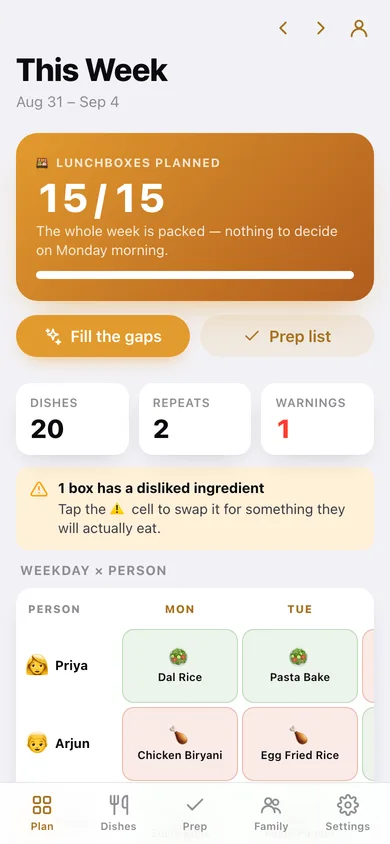
Weekday × person grid
Monday to Friday across, everyone who gets a tiffin down — tap any cell to assign, swap or clear that box, with a ⚠️ on anything they dislike.
Plan my week in one tap
The auto-filler rotates your library across every empty box, skipping dishes packed in the last two weeks and anything on that person's dislike list.
Dish library with real ingredients
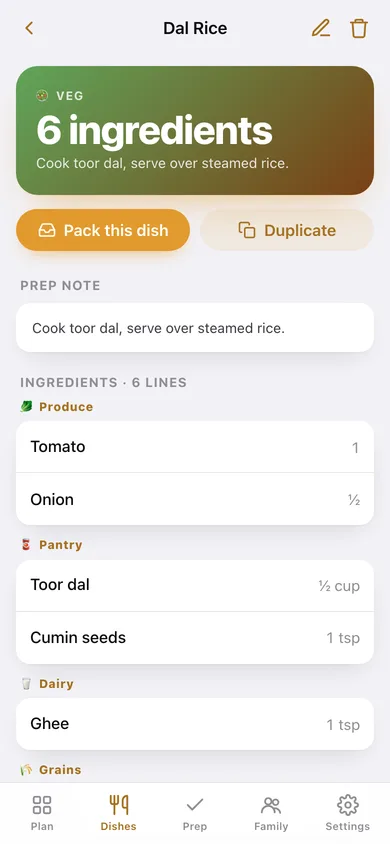
20 tiffin and school-lunch staples ship with the sample data — diet tag, prep note and every ingredient filed into one of six aisles. Add your own, unlimited.
Prep list built from the plan
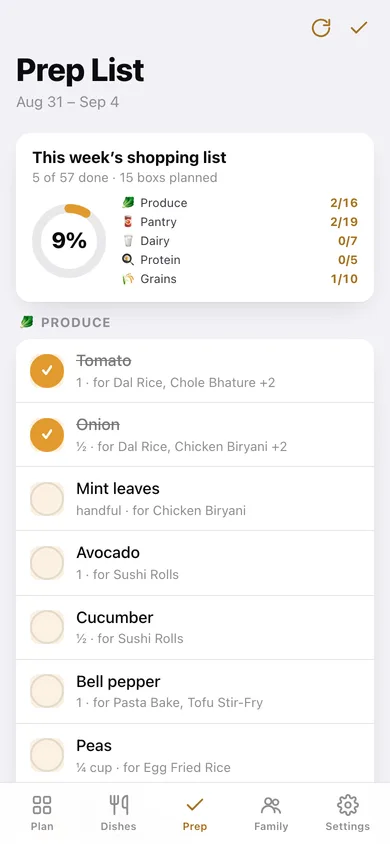
Every ingredient in the week, deduped, grouped by aisle, with which dishes need it — tick items off as you shop, and rebuild after you change the plan.
People and their dislikes
Record what each person will not eat; matching dishes sink to the bottom of the assign list and get flagged wherever they appear in the plan.
Plan any week, not just this one
Step forward or back a week from the header — last week's plan is what feeds the repeat-avoidance window.
Screens
Every screen, rebuilt for the browser
-
1
This Week
Boxes-planned hero, the weekday × person grid, repeat and dislike warnings, and everyone's fill rate.
-
2
Assign a dish
Pick a dish for one person on one day, freshest choices first, with recent and disliked dishes flagged.
-
3
Dish Library
Search and tag-filter every dish, with how often each one has actually been packed.
-
4
Dish
Diet tag, prep note, ingredients by aisle, who is eating it this week, and pack-it-for-someone.
-
5
Edit dish
Name, diet tag, prep note and an ingredient list with quantity and aisle.
-
6
Prep List
Progress ring, per-aisle counts and a tickable checklist of every ingredient in the week's plan.
-
7
Family
Everyone who gets a tiffin, their dislikes and how full their week is.
-
8
Person
One person's five boxes, their dislike list and the dishes they get packed most often.
-
9
Edit person
Name, emoji avatar and the comma-separated dislike list.
-
10
Settings
Week you are planning, dislike warnings, auto-fill behaviour, aisle counts, CSV export and erase.
Try it with sample data: Loads 20 dishes (dal rice to Greek salad box), the family of three from the iPhone app, this week's and last week's plans, and a prep list with the first few items already ticked. You can start fresh at any time.
Ready? It's free.
No account, no install, no subscription. Everything you do stays in this browser.
Your say
What should Tiffin do? Tell us before we build it.
Tell us what to build next.
Comments need a free Google sign-in, so every one is from a real person.
Sign in with Google to commentNo comments yet — be the first to say what this app should do next.
Questions
Is the web version of Tiffin free?+
Yes. Every screen is free to use: no subscription, no in-app purchases, no account.
Do I need an account?+
No. Open Tiffin and start using it right away. Sign in with Google only if you want to upvote an app, save it to your list, or leave a comment.
Where is my data stored?+
Only in this browser's local storage. Nothing you enter is sent to our servers, so we can't see it, back it up, or restore it. Clearing site data, a private window, or another device starts empty. Export a backup from the in-app menu to keep it.
Is there a Tiffin app for iPhone or Android?+
Not yet. Tiffin is a community proposal: the browser version is complete, and we build the iPhone and Android app once 100 people upvote it. Upvoters get one email when it ships.