
Web app · Productivity
Taskbook
Your Position Task Book, off the paper and in the browser
Open a book for any NWCG position, check tasks off as evaluators sign them — evaluator, incident and date on every one — and watch the RT-130 and work capacity test countdowns that keep a red card alive. Free, offline, no login.
Stored in your browser only. Nothing you do in the web version is sent to our servers. Clear your browser data and it's gone — so export a backup from the in-app menu if you want to keep it.
This app is a community proposal.
Try the full browser version now. We build the iPhone and Android app once 100 people upvote it.
We'll email you once, when it ships. Unsubscribe anytime.
In your browser
What you can do in Taskbook on the web
12 NWCG positions bundled
FFT2, FFT1, ICT5, ICT4, ENGB, CRWB, HEQB, FEMO, FIRB, DOZB, TFLD and HMGB — 121 task statements in full, grouped by behaviour, loaded the moment you open a book.
Sign-offs with the whole record
Every task carries the evaluator's name and qualified position, the incident name and number, the date signed, and where the paper signature page lives.
Open-task filter across seasons
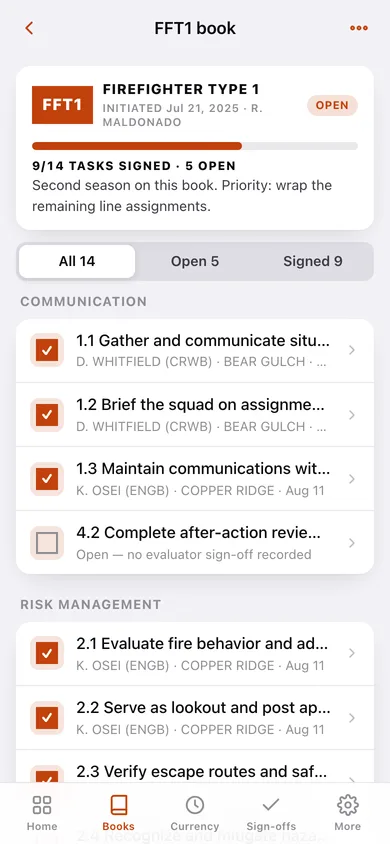
One tap shows exactly what is still unsigned in a book that has crossed three seasons and four incidents, so you can chase the assignments that close it out.
Red card currency countdowns
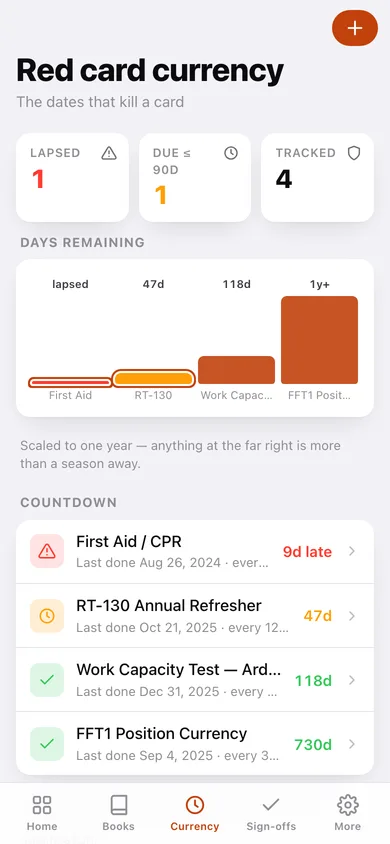
RT-130 refresher, work capacity test, first aid and any position currency you define — days remaining, lapsed items in red, and a bar chart of the whole card.
Pack test pacing timer
The 45:00 / 3-mile arduous standard (plus moderate and light) split into quarter-mile checkpoints with a live ahead/behind delta and a saved session history.
Packet export
Builds the dated personal copy the agencies tell you to keep — task by task, evaluator by evaluator, with your currency dates — to download or print to PDF.
Screens
Every screen, rebuilt for the browser
-
1
Home
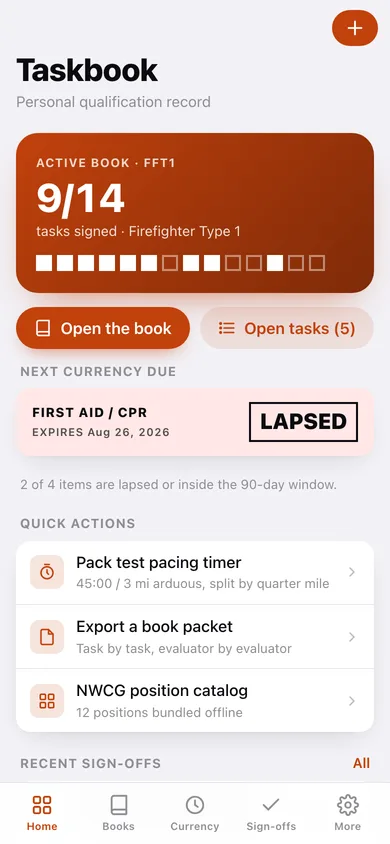
Active book progress square-by-square, the next currency due, quick actions and your latest sign-offs.
-
2
Task books
Every book you have opened, grouped into open, completed and archived with a percent signed.
-
3
Book detail
The full task list grouped by behaviour, filtered to all / open / signed, with a progress bar and book actions.
-
4
Sign-off editor
Record who signed a task, their qualified position, the incident name and number, and the date.
-
5
NWCG positions
Searchable catalog of the bundled positions with task counts and prerequisites.
-
6
Position detail
One position's summary, prerequisite, behaviour groups and every task statement — then start a book from it.
-
7
Red card currency
Countdown dashboard: lapsed and 90-day counts, a days-remaining chart, and every tracked item with its interval.
-
8
Track currency
Add or edit a currency item; the expiry auto-fills from the last completed date and the interval.
-
9
Sign-off log
Every signed task across every book, grouped by incident, with sign-offs-per-incident totals.
-
10
Pack test
Work capacity test pacing timer with quarter-mile checkpoints, ahead/behind delta and past sessions.
-
11
Export a packet
Pick a book and preview the dated personal record, then download it or copy it.
-
12
Settings
Trainee name, default pack test level, currency warning window, backup, sample data and erase.
Try it with sample data: Loads a two-season record: an open FFT1 book with 9 of 14 tasks signed across the Bear Gulch, Copper Ridge and Sawmill incidents, a completed FFT2 book, four currency items (one already lapsed) and three pack test sessions. You can start fresh at any time.
Ready? It's free.
No account, no install, no subscription. Everything you do stays in this browser.
Your say
What should Taskbook do? Tell us before we build it.
Tell us what to build next.
Comments need a free Google sign-in, so every one is from a real person.
Sign in with Google to commentNo comments yet — be the first to say what this app should do next.
Questions
Is the web version of Taskbook free?+
Yes. Every screen is free to use: no subscription, no in-app purchases, no account.
Do I need an account?+
No. Open Taskbook and start using it right away. Sign in with Google only if you want to upvote an app, save it to your list, or leave a comment.
Where is my data stored?+
Only in this browser's local storage. Nothing you enter is sent to our servers, so we can't see it, back it up, or restore it. Clearing site data, a private window, or another device starts empty. Export a backup from the in-app menu to keep it.
Is there a Taskbook app for iPhone or Android?+
Not yet. Taskbook is a community proposal: the browser version is complete, and we build the iPhone and Android app once 100 people upvote it. Upvoters get one email when it ships.