
Web app · Finance
Taikyo Check
退去費用は本当にその金額? Check your Japan move-out restoration bill
Enter the landlord's genjo kaifuku invoice line by line and Taikyo Check applies the MLIT guideline's useful-life depreciation — wallpaper falls to a ¥1 residual after 6 years — then drafts the Japanese negotiation letter. Free, no install, nothing leaves your browser.
Stored in your browser only. Nothing you do in the web version is sent to our servers. Clear your browser data and it's gone — so export a backup from the in-app menu if you want to keep it.
This app is a community proposal.
Try the full browser version now. We build the iPhone and Android app once 100 people upvote it.
We'll email you once, when it ships. Unsubscribe anytime.
In your browser
What you can do in Taikyo Check on the web
ガイドラインの減価計算 MLIT depreciation engine
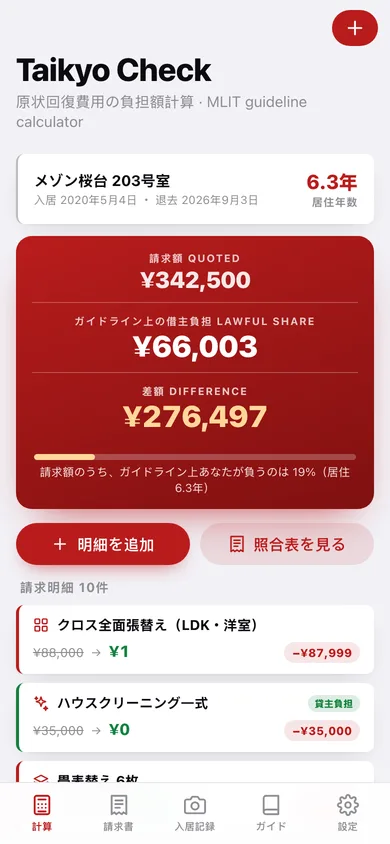
Every invoice line is run through the guideline's straight-line useful-life rule: ¥88,000 of wallpaper after 6.3 years of tenancy is a ¥1 residual, and normal wear (sun-fading, furniture marks) is ¥0 to you.
照合表 Line-by-line challenge sheet
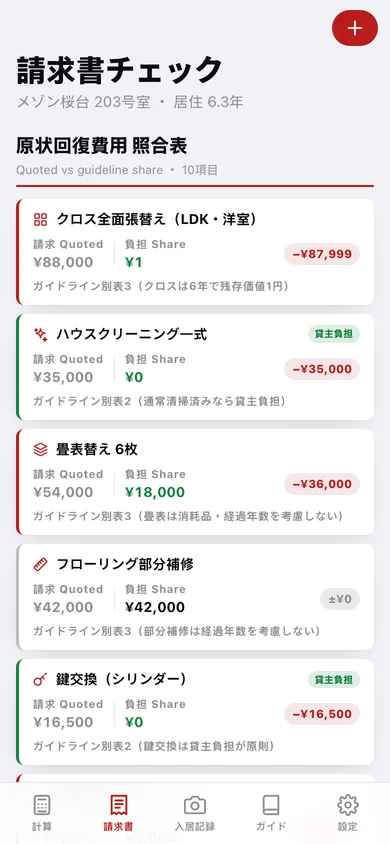
The landlord's quote rebuilt row by row next to your lawful share, with a −¥ delta chip per line, a 貸主負担 badge on the lines the guideline gives the landlord, and the running total gap.
計算の内訳 The arithmetic, shown
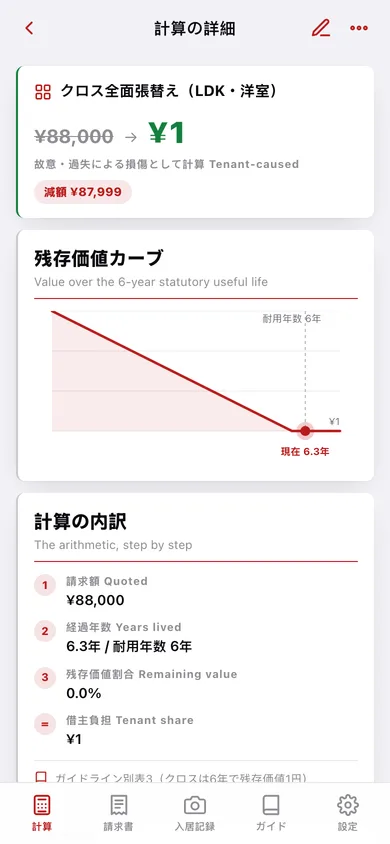
Tap any line for the residual-value curve with a 'you are here' marker, the numbered steps (quoted → damaged portion → years lived → remaining value → your share) and the 別表 clause it rests on.
交渉文書 Japanese negotiation letter
Pick the lines to dispute and a tone (丁寧 or 簡潔) and the app writes a formal 拝啓/敬具 letter quoting your tenancy dates, each computed share and the guideline citation — copy it or save it as text.
入居記録 Move-in evidence binder
A room-by-room walkthrough (リビング, キッチン, 浴室・洗面, 寝室, 玄関・廊下) where every condition note is stamped with the date and time you wrote it, so pre-existing damage can't be billed years later.
ガイド Plain-language guideline library
Four Japanese-and-English articles — who pays for what, useful life & the ¥1 rule, how far a 特約 can go, and how to use the 消費生活センター (188) — plus the full 15-row useful-life table.
Screens
Every screen, rebuilt for the browser
-
1
負担額計算
Quoted vs lawful share for the whole invoice, the share gauge, your tenancy years and every line.
-
2
請求書チェック
The challenge sheet: each invoice line quoted against your guideline share with the total gap.
-
3
計算の詳細
One line's residual-value curve, the step-by-step arithmetic and the guideline clause behind it.
-
4
項目を追加
Add or edit an invoice line — category, amount, damaged units, wear vs tenant-caused — with the share updating live.
-
5
集計
Quoted / lawful / difference hero, deposit refund outlook, per-item breakdown and CSV export.
-
6
交渉文書
Choose tone and the lines to dispute, see the clauses that will be cited, then generate the letter.
-
7
文書プレビュー
The formal Japanese letter on a stamped document card, ready to copy or save as text.
-
8
入居記録
Room tiles with a completeness ring and a 済 hanko once a room has three or more records.
-
9
部屋の記録
One room's timestamped condition records, condition notes and record-adding sheet.
-
10
ガイド
The plain-language guideline articles and the useful-life table at a glance.
-
11
解説
One guideline article in Japanese and English, with the full 15-row 別表 useful-life table.
-
12
賃貸契約
Property, unit, move-in and move-out dates, rent and deposit — the years-lived every calculation uses.
-
13
設定
English sublines, current totals, CSV and JSON export, sample data and erase.
Try it with sample data: Loads a 6.3-year Tokyo tenancy (メゾン桜台 203号室, ¥172,000 deposit), a 10-line restoration invoice totalling ¥342,500, five rooms with 15 timestamped move-in records, and one drafted negotiation letter. You can start fresh at any time.
Ready? It's free.
No account, no install, no subscription. Everything you do stays in this browser.
Your say
What should Taikyo Check do? Tell us before we build it.
Tell us what to build next.
Comments need a free Google sign-in, so every one is from a real person.
Sign in with Google to commentNo comments yet — be the first to say what this app should do next.
Questions
Is the web version of Taikyo Check free?+
Yes. Every screen is free to use: no subscription, no in-app purchases, no account.
Do I need an account?+
No. Open Taikyo Check and start using it right away. Sign in with Google only if you want to upvote an app, save it to your list, or leave a comment.
Where is my data stored?+
Only in this browser's local storage. Nothing you enter is sent to our servers, so we can't see it, back it up, or restore it. Clearing site data, a private window, or another device starts empty. Export a backup from the in-app menu to keep it.
Is there a Taikyo Check app for iPhone or Android?+
Not yet. Taikyo Check is a community proposal: the browser version is complete, and we build the iPhone and Android app once 100 people upvote it. Upvoters get one email when it ships.