
Web app · Games
Tableside
The running tab for card night — stacks, scores and who owes who
Pick a game, pull in your crew, and keep score two ways: a running points stack per player that settles in the fewest transfers, or a round-by-round scoreboard where high or low wins. Friend groups, a share-ready summary and a stats tab. Free, no account.
Stored in your browser only. Nothing you do in the web version is sent to our servers. Clear your browser data and it's gone — so export a backup from the in-app menu if you want to keep it.
In your browser
What you can do in Tableside on the web
Twelve games, or your own
Poker, Spades, Hearts, Gin Rummy, Bridge, Dominoes, Mahjong, Yahtzee, Scrabble, Bocce, Darts and Custom — each with a sensible default mode and a rule-of-thumb hint.
Stack mode
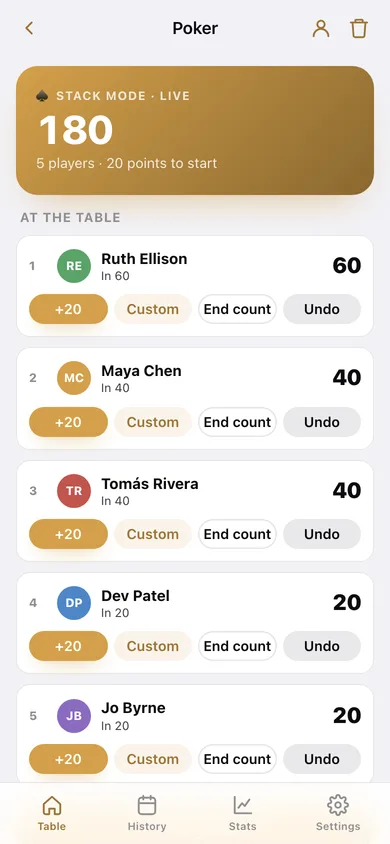
Every player has a running points stack. Top them up mid-game, enter each end count when you finish, and see who is up and who is down.
Score mode
A round-by-round scoreboard with running totals and +1 / +5 / +10 or any number per round. Choose high score wins or low score wins.
Settle up in the fewest transfers
The same greedy minimum-transactions algorithm as the iPhone app turns everyone's net into the shortest possible list of who pays who.
Friend groups
Save the crew you play with and drop all of them into a new game with one tap instead of retyping names every Friday.
Stats that settle arguments
A leaderboard with win rate and current streak, per-player history, net points across stack games, biggest night, and games by type.
Unit-less by design
Every value is just points — beads, chips, cookies. Tableside never tracks money and never shows a currency.
Screens
Every screen, rebuilt for the browser
-
1
Table
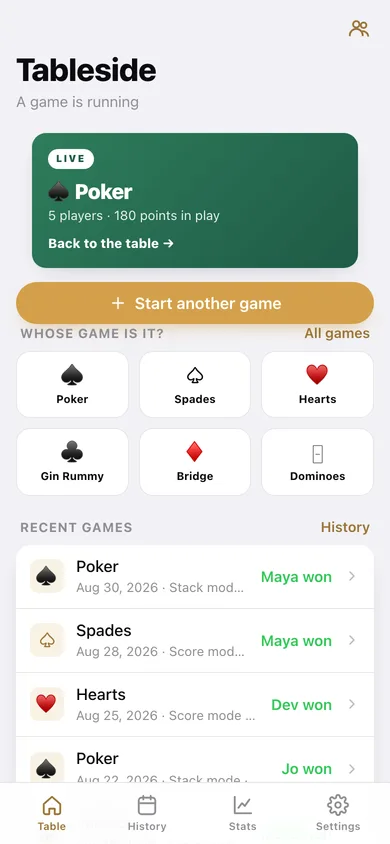
The live game, a quick game picker, recent nights and who currently runs the table.
-
2
New game
Pick a game, choose Stack or Score, set the starting stack or who wins, and build the roster.
-
3
Live game
The scoreboard: ranked players, top-ups or per-round points, late players and undo.
-
4
Settle up
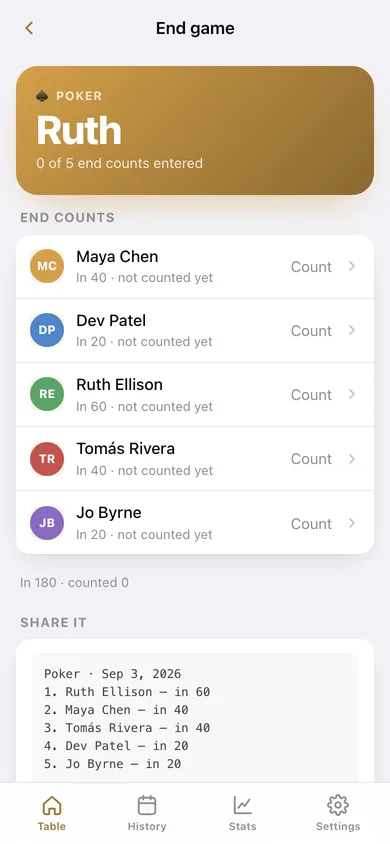
End counts, final standings, the fewest-transfers settle-up and a copyable summary.
-
5
History
Every saved game grouped by month, with the winner of each night.
-
6
Stats
Leaderboard with streaks, games by type, best night and net points across stack games.
-
7
Player history
One player's win rate, streak, best and worst night, every result and who they play with.
-
8
Friend groups
Save, edit and deal in your regular crews.
-
9
Settings
Default starting stack, low-score-wins default, clear history, export, sample data and erase.
Try it with sample data: Adds a live five-handed poker game plus nine finished nights over five weeks — poker, spades, hearts, yahtzee, scrabble, gin and darts — and two saved friend groups. You can start fresh at any time.
Ready? It's free.
No account, no install, no subscription. Everything you do stays in this browser.
Your say
Is Tableside useful? Tell us what to build next.
Sign in with Google to vote.
Tell us what to build next.
Comments need a free Google sign-in, so every one is from a real person.
Sign in with Google to commentNo comments yet — be the first to say what this app should do next.
Questions
Is the web version of Tableside free?+
Yes. Every screen is free to use: no subscription, no in-app purchases, no account.
Do I need an account?+
No. Open Tableside and start using it right away. Sign in with Google only if you want to upvote an app, save it to your list, or leave a comment.
Where is my data stored?+
Only in this browser's local storage. Nothing you enter is sent to our servers, so we can't see it, back it up, or restore it. Clearing site data, a private window, or another device starts empty. Export a backup from the in-app menu to keep it.
How is the web version different from the Tableside phone app?+
No Contacts picker in the browser: players are typed in or pulled from a saved friend group. The iPhone app can share a live game to other phones on the same Wi-Fi and run tournament brackets; the web version is a single scoreboard on this device. The share summary is copyable text rather than the iPhone app's rendered image card.