
Web app · Lifestyle
Suitor
A quiet dating coach that never uploads your photos or your messages
Rank the photo you should lead with on five axes, write a bio from eight templates, prep a date with three questions and three things to avoid, read a confusing message, and log the morning-after reflection. Free, unlocked, no install.
Stored in your browser only. Nothing you do in the web version is sent to our servers. Clear your browser data and it's gone — so export a backup from the in-app menu if you want to keep it.
This app is a community proposal.
Try the full browser version now. We build the iPhone and Android app once 100 people upvote it.
We'll email you once, when it ships. Unsubscribe anytime.
In your browser
What you can do in Suitor on the web
Photo grader with a ranked shortlist
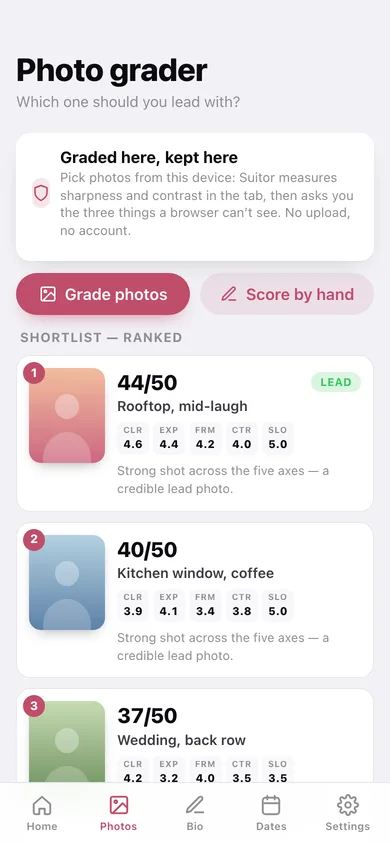
Pick candidate shots from this device: Suitor measures sharpness and contrast on a canvas in the tab, you answer the three things a browser can't see (expression, framing, how many faces), and it orders them out of 50 with the reason for each rank.
All eight bio templates
Warm everyday, dry & specific, career-led, niche interest, faith-led, traveler, recovery-aware and single parent — fill in the blanks with a live preview and character count, save as many drafts as you like.
The five writing rules
Lead with one specific thing, no negations, one opener and one invitation, no pickup-line voice, be the same person at brunch — the patterns that recur in top-quartile bios.
Date prep sheets with a prep window
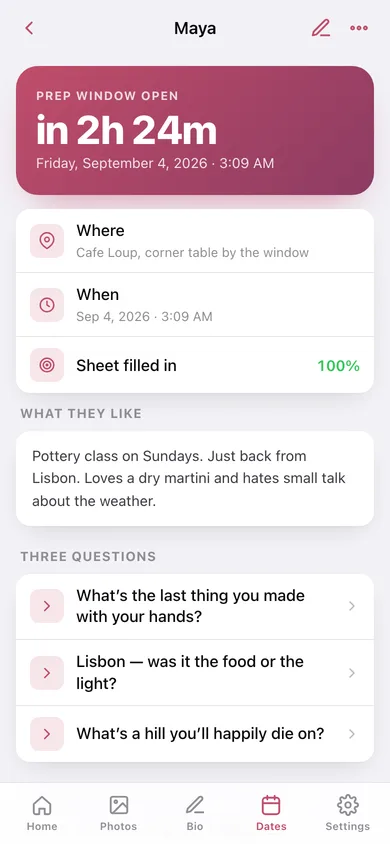
Who, where, when, what they like, three questions to ask and three subjects to keep off the table — with a readiness score and a home-screen countdown that opens the sheet a few hours before you go.
Reply helper
Paste their last message and get a plain reading of what is actually happening — two questions, one open door, energy without steering, a withdrawal cue — plus three reply drafts of escalating warmth.
Aftercare
The morning-after reflection: what surprised you, what you'd do again, what you'd change — the only part of dating that compounds.
Screens
Every screen, rebuilt for the browser
-
1
Home
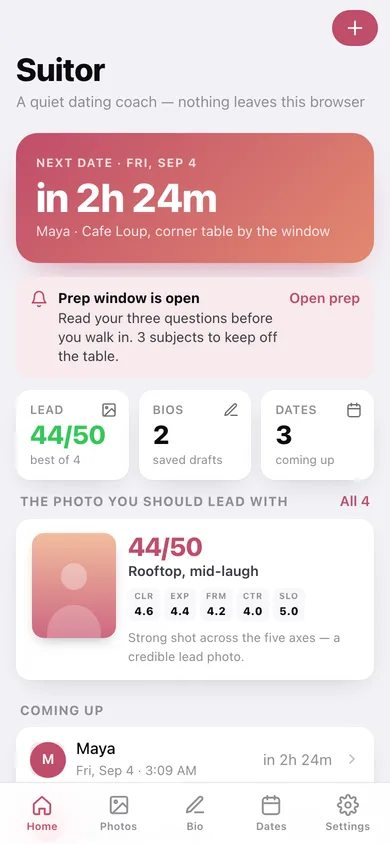
Countdown to your next date, the prep window, your current lead photo and what to do next.
-
2
Photo grader
The ranked shortlist — score out of 50, five axis chips and the reason for each rank.
-
3
Candidate
One shot: the five axes as a chart, the commentary, and the three questions only you can answer.
-
4
Bio studio
Your drafts, the eight templates and the five writing rules.
-
5
Draft
A saved bio with word and character counts, your blanks, and copy to clipboard.
-
6
Write a bio
Fill in a template's blanks with a live preview and a character count.
-
7
Date prep
Coming up and been-and-gone, each with a readiness percentage and a countdown.
-
8
Prep sheet
The countdown, what they like, three questions you can tick off, and the three subjects to avoid first.
-
9
Edit a date
Name, venue, day and time, their interests, three questions, three to avoid.
-
10
Reply helper
A reading of their last message plus three reply drafts you can copy.
-
11
Aftercare
Every morning-after reflection, and how many things you said you'd change.
-
12
Reflection
What surprised you, what you'd do again, what you'd change.
-
13
Settings
Prep window length, writing-rules order, thumbnail keeping, export, sample data and erase.
Try it with sample data: Adds four graded candidate photos, five date prep sheets (one starting in a couple of hours), two bio drafts, two aftercare reflections and a message waiting in the Reply helper. You can start fresh at any time.
Ready? It's free.
No account, no install, no subscription. Everything you do stays in this browser.
Your say
What should Suitor do? Tell us before we build it.
Tell us what to build next.
Comments need a free Google sign-in, so every one is from a real person.
Sign in with Google to commentNo comments yet — be the first to say what this app should do next.
Questions
Is the web version of Suitor free?+
Yes. Every screen is free to use: no subscription, no in-app purchases, no account.
Do I need an account?+
No. Open Suitor and start using it right away. Sign in with Google only if you want to upvote an app, save it to your list, or leave a comment.
Where is my data stored?+
Only in this browser's local storage. Nothing you enter is sent to our servers, so we can't see it, back it up, or restore it. Clearing site data, a private window, or another device starts empty. Export a backup from the in-app menu to keep it.
Is there a Suitor app for iPhone or Android?+
Not yet. Suitor is a community proposal: the browser version is complete, and we build the iPhone and Android app once 100 people upvote it. Upvoters get one email when it ships.