
Web app · Finance
SubDay
The sub teaching day and pay ledger you own — now in any browser
Log each assignment in ten seconds with the district, school, day type and job confirmation number, then reconcile every paycheck against the days you actually worked. Multi-district rates, school notes, W-2 and 1099 totals. Free, no install, no district login.
Stored in your browser only. Nothing you do in the web version is sent to our servers. Clear your browser data and it's gone — so export a backup from the in-app menu if you want to keep it.
This app is a community proposal.
Try the full browser version now. We build the iPhone and Android app once 100 people upvote it.
We'll email you once, when it ships. Unsubscribe anytime.
In your browser
What you can do in SubDay on the web
Ten-second day log
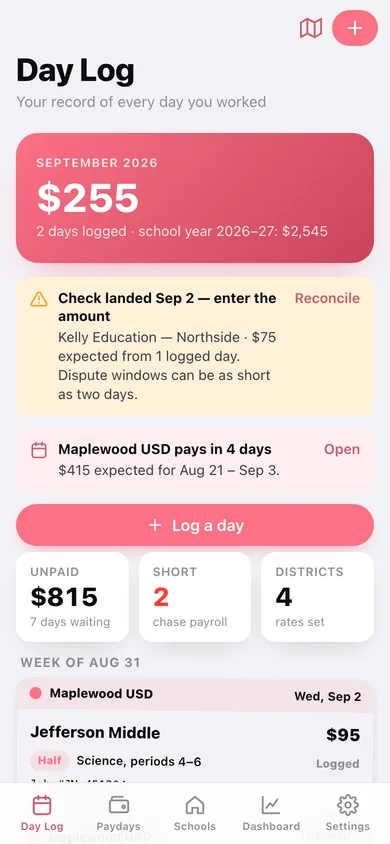
Pick the district, school, half or full day and paste the Frontline or AESOP job number — the rate fills in from the district profile and stays overridable for long-term stints.
Districts and agencies with their own rates
Half, full and long-term day rates, W-2 or 1099 status, and a weekly, biweekly, semimonthly or custom pay calendar for every district and agency you sub for.
Payday reconciliation, day by day
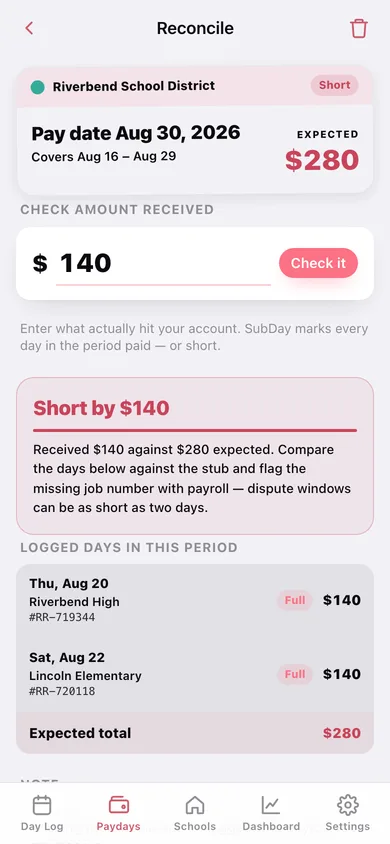
Enter the check amount and see expected versus received for that pay period with every logged day and job number behind the number — a shorted check surfaces while you can still dispute it.
Your private school book
Star rating, favourite or avoid flag, parking, check-in procedure and free-form notes for every school, sorted so the 5:45 AM accept-or-decline decision takes seconds.
Month and school-year earnings
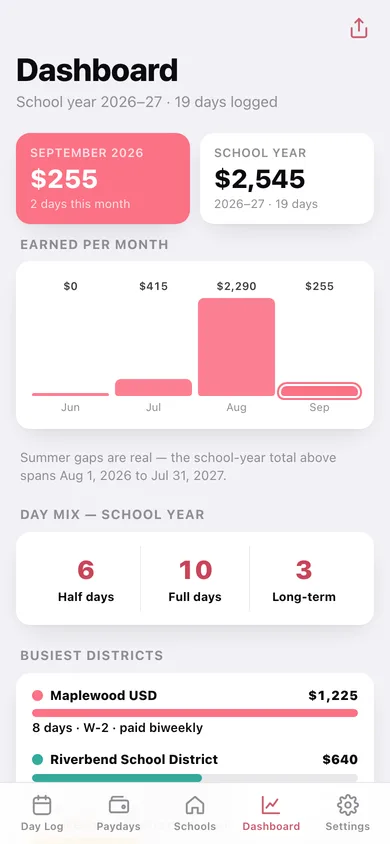
Earned-per-month chart, half / full / long-term day mix, busiest-district bars and the W-2 versus 1099 split across the school year you define.
Year-end export
Download a CSV of every logged day or a per-district, per-tax-status summary sheet for the calendar year, ready to check against each W-2 and agency stub.
Screens
Every screen, rebuilt for the browser
-
1
Day Log
Month earned, next payday, and every logged assignment grouped by week as index cards.
-
2
Day detail
One assignment in full: school, class, job number, district rate, tax status and pay status.
-
3
Log a day
Date, district, school, day type and job confirmation number — the rate auto-fills from the district.
-
4
Paydays
Checks that need reconciling, upcoming pay dates and everything already squared, with the running shortfall.
-
5
Reconcile a check
Expected versus received for one pay period, with every logged day and job number listed underneath.
-
6
Districts & agencies
Every district and agency with its rates, tax status and pay schedule.
-
7
District setup
Half, full and long-term rates, W-2 or 1099, pay schedule and a colour mark.
-
8
Pay calendar
Upcoming pay dates for one district and every pay period already on record.
-
9
Schools
Favourites, the ones you have worked once or twice, and the ones you decline.
-
10
School notes
Rating, flag, parking, check-in and every day you have worked there.
-
11
Edit school
Name, district, star rating, favourite or avoid flag and the three field notes.
-
12
Earnings dashboard
Month and school-year totals, day mix, busiest districts and the W-2 versus 1099 split.
-
13
Year-end export
Per-district calendar-year totals plus CSV, summary sheet and full backup downloads.
-
14
Settings
School-year start month, default day type, job-number display, backup, sample data and erase.
Try it with sample data: Loads four districts and agencies, eight schools with parking and check-in notes, twenty-two logged days across six weeks, and five paychecks — one matched to the cent, one short by a missing day, three still pending. You can start fresh at any time.
Ready? It's free.
No account, no install, no subscription. Everything you do stays in this browser.
Your say
What should SubDay do? Tell us before we build it.
Tell us what to build next.
Comments need a free Google sign-in, so every one is from a real person.
Sign in with Google to commentNo comments yet — be the first to say what this app should do next.
Questions
Is the web version of SubDay free?+
Yes. Every screen is free to use: no subscription, no in-app purchases, no account.
Do I need an account?+
No. Open SubDay and start using it right away. Sign in with Google only if you want to upvote an app, save it to your list, or leave a comment.
Where is my data stored?+
Only in this browser's local storage. Nothing you enter is sent to our servers, so we can't see it, back it up, or restore it. Clearing site data, a private window, or another device starts empty. Export a backup from the in-app menu to keep it.
Is there a SubDay app for iPhone or Android?+
Not yet. SubDay is a community proposal: the browser version is complete, and we build the iPhone and Android app once 100 people upvote it. Upvoters get one email when it ships.