
Web app · Health And Fitness
StrideLab: Run Form
Read your running form like a gait lab — six metrics, targets and drills
Tap out your footfalls for cadence, read overstride, bounce, knee flexion, pelvic drop and foot strike off your own slow-mo, and get a worst-first report with a targeted drill for everything that's off. Free, nothing to install.
Stored in your browser only. Nothing you do in the web version is sent to our servers. Clear your browser data and it's gone — so export a backup from the in-app menu if you want to keep it.
This app is a community proposal.
Try the full browser version now. We build the iPhone and Android app once 100 people upvote it.
We'll email you once, when it ships. Unsubscribe anytime.
In your browser
What you can do in StrideLab: Run Form on the web
Six clinic-style form metrics
Cadence, overstride, foot strike, vertical oscillation, knee flexion and pelvic drop — each against the same target band the iPhone app uses.
Tap-tempo cadence
Tap the pad once per footfall while your clip plays and StrideLab works out your steps per minute, then flags it against 175–185 spm.
Worst-first report with gauges
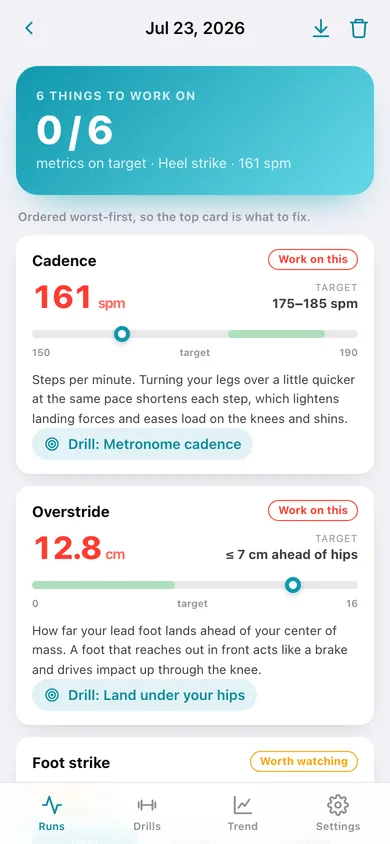
Every metric shows your value, its target, a gauge with the green target band, a green/amber/coral flag and a plain-language why — ordered so the top card is what to fix.
Six targeted drills
Metronome cadence, land under your hips, quieter landings, run tall, soft-knee landings and hip stability — each with how-to steps and a weekly dose.
Form trend against the target band
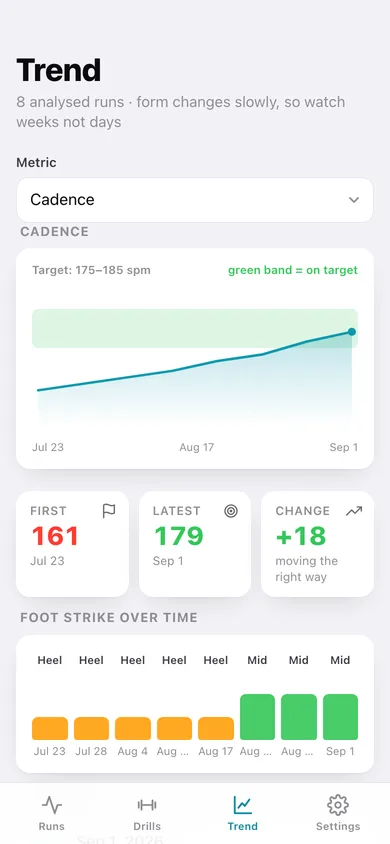
Pick a metric and watch it move week over week on a line chart with the green band drawn behind it, plus first → latest change and a foot-strike history.
Stays in your browser
Every form check is saved locally with no account; export a JSON backup or a plain-text report card any time.
Screens
Every screen, rebuilt for the browser
-
1
Runs
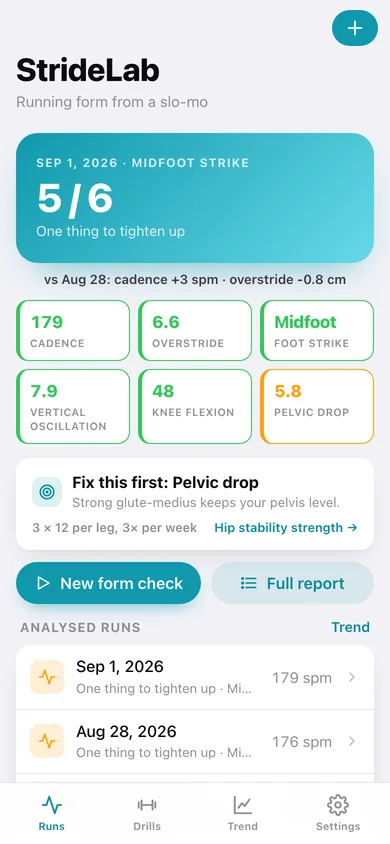
Latest verdict, the six-metric strip, what to fix first and every analysed run.
-
2
New form check
Tap-tempo cadence pad plus sliders for overstride, bounce, knee flexion, pelvic drop and foot strike.
-
3
Form report
Worst-first cards with gauge, target band, flag and why for all six metrics.
-
4
Drills
The drills recommended from your last run, then the full set of six.
-
5
Drill detail
Cue, numbered how-to steps, weekly dose and the metric it fixes.
-
6
Trend
Per-metric line chart drawn against the green target band, first → latest change and foot strike over time.
-
7
Settings
Height, tap tick, default trend metric, backup, sample data and erase.
Try it with sample data: Loads eight analysed runs across the last six weeks with cadence climbing from 161 to 179 spm and overstride, bounce and pelvic drop falling. You can start fresh at any time.
Ready? It's free.
No account, no install, no subscription. Everything you do stays in this browser.
Your say
What should StrideLab: Run Form do? Tell us before we build it.
Tell us what to build next.
Comments need a free Google sign-in, so every one is from a real person.
Sign in with Google to commentNo comments yet — be the first to say what this app should do next.
Questions
Is the web version of StrideLab: Run Form free?+
Yes. Every screen is free to use: no subscription, no in-app purchases, no account.
Do I need an account?+
No. Open StrideLab: Run Form and start using it right away. Sign in with Google only if you want to upvote an app, save it to your list, or leave a comment.
Where is my data stored?+
Only in this browser's local storage. Nothing you enter is sent to our servers, so we can't see it, back it up, or restore it. Clearing site data, a private window, or another device starts empty. Export a backup from the in-app menu to keep it.
Is there a StrideLab: Run Form app for iPhone or Android?+
Not yet. StrideLab: Run Form is a community proposal: the browser version is complete, and we build the iPhone and Android app once 100 people upvote it. Upvoters get one email when it ships.