
Web app · Health And Fitness
Steadier
Find the fall hazards in a home before they find your parent
The occupational-therapist home walkthrough turned into a scored, room-by-room check: 9 rooms, weighted hazard questions, a risk score per room and for the whole home, a fix list ranked by impact ÷ effort, and a trend line as the score comes down. Free, no install.
Stored in your browser only. Nothing you do in the web version is sent to our servers. Clear your browser data and it's gone — so export a backup from the in-app menu if you want to keep it.
This app is a community proposal.
Try the full browser version now. We build the iPhone and Android app once 100 people upvote it.
We'll email you once, when it ships. Unsubscribe anytime.
In your browser
What you can do in Steadier on the web
Guided room walkthrough
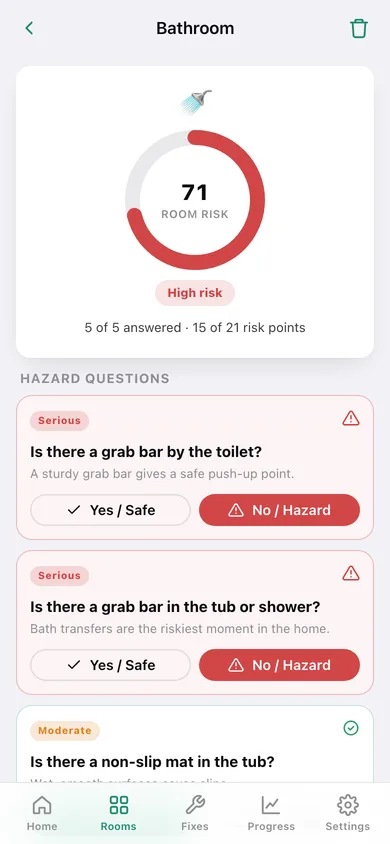
Pick from nine rooms — bathroom, stairs, bedroom, kitchen, hallway, entryway, living room, laundry, garage — and answer plain-language questions like “is there a grab bar in the tub?” with Safe or Hazard.
Weighted risk scoring
A missing handrail counts six points, a missing tub mat three, a cord on the floor one. Each room scores its flagged points against what it could have scored, and the whole home pools every room you checked.
Fix list ranked by impact ÷ effort
Every hazard you flag becomes a fix item with a severity, an effort and a priority score, so the cheap high-impact jobs rise to the top. Move each one Planned → In Progress → Done and the home score follows.
Before / after proof
Attach a marker to each fix before you start and after it is done, so the family can see the grab bar went in — the web build draws a symbol and colour instead of taking a photo.
Re-assessment trend
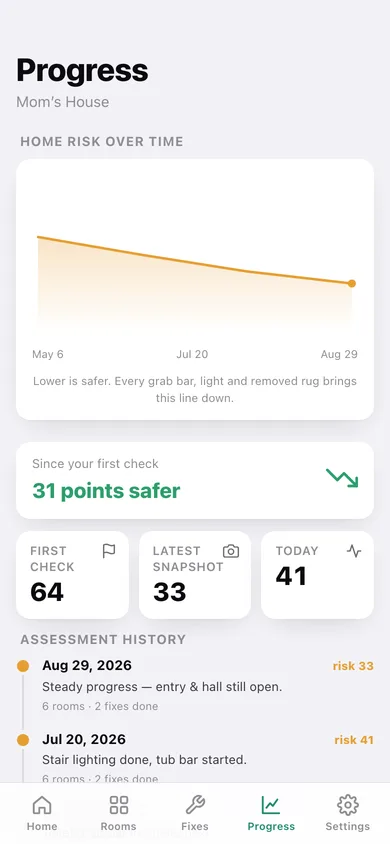
Save a snapshot any time and Progress charts the home risk over months, with the points-safer delta since your first walkthrough and a dated history of every check.
Unlimited homes, nothing behind a paywall
Keep a profile for a parent's house, your own place and a client's apartment — multiple homes, PDF-ready CSV export and the trend charts are all open here.
Screens
Every screen, rebuilt for the browser
-
1
Home score
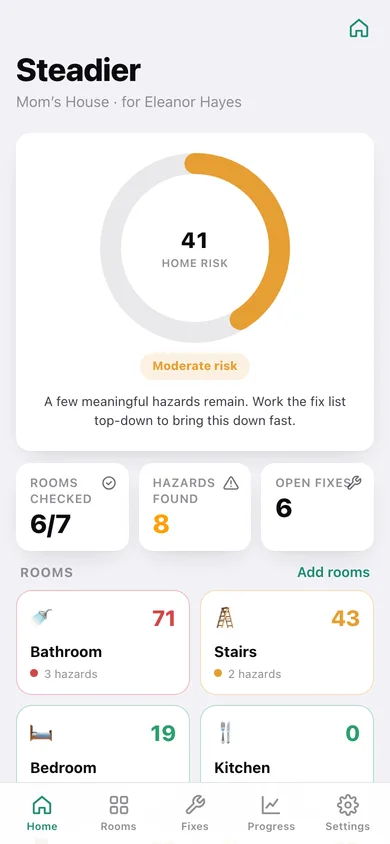
The whole-home risk gauge and band, rooms checked, hazards found, fixes to do, and a tile per room colour-coded by its own score.
-
2
Rooms
Every room in this home with how many questions are answered and its risk score, plus the room picker.
-
3
Room walkthrough
The hazard questions for one room as Safe / Hazard cards, with the live room gauge and the fixes they raised.
-
4
Fix list
The backlog filtered To do / Done / All, ranked by impact ÷ effort, with a progress bar and one-tap status advance.
-
5
Fix detail
Impact, effort and priority for one fix, its status, before/after markers, notes and editing.
-
6
Progress
Home risk over time, points safer since the first check, and a dated timeline of every re-assessment.
-
7
Settings
Home profiles, how the scoring model works, CSV and JSON export, sample data and erase.
Try it with sample data: Loads Mom's House mid-remediation — seven rooms walked (the living room deliberately left to do), eight fixes at every status with before/after markers, and four months of re-assessments taking the score from 64 to 33 — plus a second, freshly-checked apartment profile. You can start fresh at any time.
Ready? It's free.
No account, no install, no subscription. Everything you do stays in this browser.
Your say
What should Steadier do? Tell us before we build it.
Tell us what to build next.
Comments need a free Google sign-in, so every one is from a real person.
Sign in with Google to commentNo comments yet — be the first to say what this app should do next.
Questions
Is the web version of Steadier free?+
Yes. Every screen is free to use: no subscription, no in-app purchases, no account.
Do I need an account?+
No. Open Steadier and start using it right away. Sign in with Google only if you want to upvote an app, save it to your list, or leave a comment.
Where is my data stored?+
Only in this browser's local storage. Nothing you enter is sent to our servers, so we can't see it, back it up, or restore it. Clearing site data, a private window, or another device starts empty. Export a backup from the in-app menu to keep it.
Is there a Steadier app for iPhone or Android?+
Not yet. Steadier is a community proposal: the browser version is complete, and we build the iPhone and Android app once 100 people upvote it. Upvoters get one email when it ships.