
Web app · Business
StatRun
Log every stop, then audit the settlement — the run log that belongs to the driver
Per-contract rate cards, one-tap LOG STOP with automatic timestamps, weekly settlement reconciliation (stops run vs stops paid), a dated chain-of-custody exception log, and a mileage + expense ledger that rolls into a Schedule C year-end summary. Free, in your browser, no account.
Stored in your browser only. Nothing you do in the web version is sent to our servers. Clear your browser data and it's gone — so export a backup from the in-app menu if you want to keep it.
This app is a community proposal.
Try the full browser version now. We build the iPhone and Android app once 100 people upvote it.
We'll email you once, when it ships. Unsubscribe anytime.
In your browser
What you can do in StatRun on the web
Contract rate cards
Set up each courier contract once — company, per-stop, STAT, after-hours and per-mile rates, settlement day, colour tag. Ended contracts keep their history.
One-tap LOG STOP
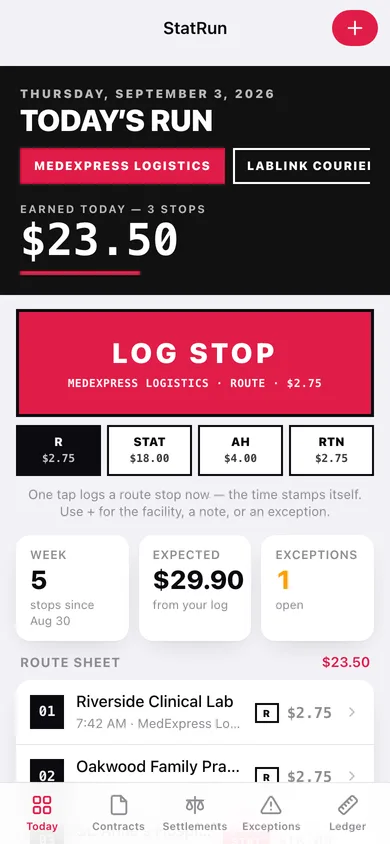
The big rose block logs a stop against the active contract with the time stamped automatically; kind chips switch Route / STAT / AH / Return, and + opens the full editor with facility, note and an exception.
Settlement reconciliation
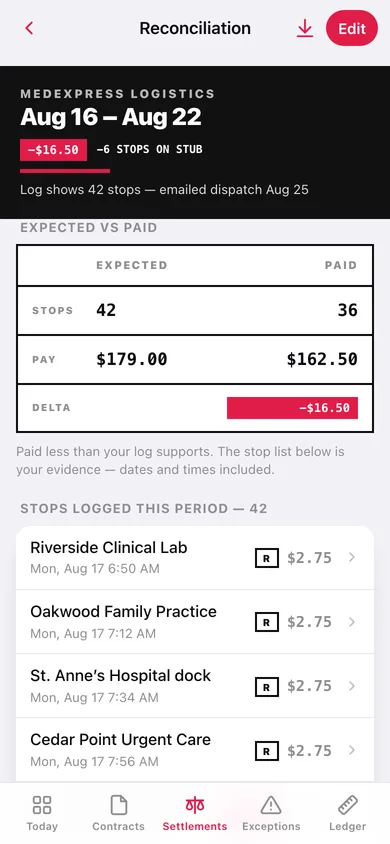
Enter the amount on the stub and StatRun lines it up against your log for that period: stops run vs stops paid, expected vs actual pay, delta flagged in dollars, with the dated stop list as evidence.
Exception log
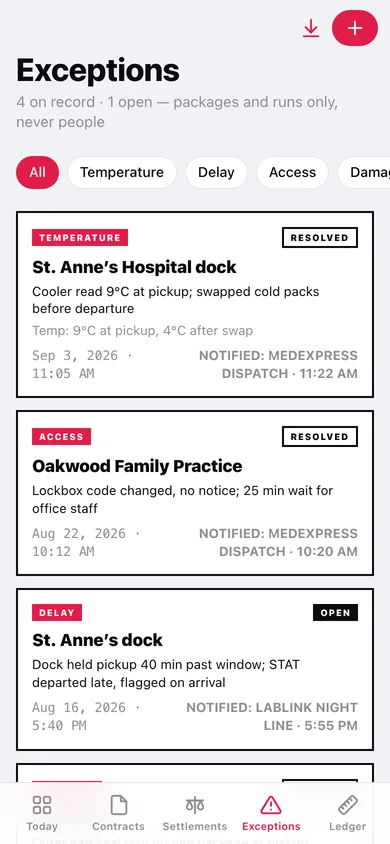
Temperature checks, delays, access problems, damaged or missed packages — with a temperature note, who was notified and when, open/resolved status, category filters and a CSV of the dated history.
Mileage & expense ledger
Miles and vehicle expenses tied to the contract that caused them, with year-to-date deductible miles and spend up top.
Year-end summary
Per-contract income, deductible miles and expenses for any tax year, totalled for Schedule C and exportable as CSV.
Screens
Every screen, rebuilt for the browser
-
1
Today’s run
Ink header with today’s earnings and stop count, contract switcher, the LOG STOP block and the numbered route sheet.
-
2
Stop
One stop’s kind, rate, facility, time, note and any exceptions tied to it.
-
3
Stop editor
Time, contract, kind, facility (with recent-facility chips), rate override, note and an optional exception.
-
4
Contracts
Rate cards with this week’s stops, expected pay and settlement day; active and ended.
-
5
Contract editor
Name, company, rate card, settlement day, colour tag, notes.
-
6
Settlements
Every settlement grouped by company with a MATCHED or short/over delta chip.
-
7
Reconciliation
EXPECTED vs PAID ledger table, delta, and the stops logged in that period.
-
8
Settlement editor
Contract, pay period, amount paid, stops on the stub, note — with a live preview of your log for the period.
-
9
Exceptions
Chain-of-custody record with category filters, open/resolved status and notification trail.
-
10
Exception editor
When, category, contract, facility, details, temperature note, who was notified and when, resolved.
-
11
Ledger
Year-to-date deductible miles and expenses, then the miles or expenses list.
-
12
Ledger entry
Mileage (miles, from, to, purpose) or expense (category, amount, note) against a contract.
-
13
Year-End Summary
Per-contract income, miles and expenses for a tax year with Schedule C totals and CSV export.
-
14
Settings
Default stop kind, backup and CSV exports, sample data, erase.
Try it with sample data: Loads three courier contracts (one ended), about 170 stops across the last four weeks including today’s route sheet, four weekly settlements — one short by six stops — four exceptions, and a month of mileage and expenses. You can start fresh at any time.
Ready? It's free.
No account, no install, no subscription. Everything you do stays in this browser.
Your say
What should StatRun do? Tell us before we build it.
Tell us what to build next.
Comments need a free Google sign-in, so every one is from a real person.
Sign in with Google to commentNo comments yet — be the first to say what this app should do next.
Questions
Is the web version of StatRun free?+
Yes. Every screen is free to use: no subscription, no in-app purchases, no account.
Do I need an account?+
No. Open StatRun and start using it right away. Sign in with Google only if you want to upvote an app, save it to your list, or leave a comment.
Where is my data stored?+
Only in this browser's local storage. Nothing you enter is sent to our servers, so we can't see it, back it up, or restore it. Clearing site data, a private window, or another device starts empty. Export a backup from the in-app menu to keep it.
Is there a StatRun app for iPhone or Android?+
Not yet. StatRun is a community proposal: the browser version is complete, and we build the iPhone and Android app once 100 people upvote it. Upvoters get one email when it ships.