
Web app · Finance
Splitcheck
Split the bill, not the mood — even or by exactly what each person ordered
Type the subtotal, set the tax, drag the tip slider, then split evenly or assign every dish to whoever ate it. Per-person shares update live, the Tip Guide covers 39 countries offline, and every check is saved in your browser. Free, no install, no account.
Stored in your browser only. Nothing you do in the web version is sent to our servers. Clear your browser data and it's gone — so export a backup from the in-app menu if you want to keep it.
This app is a community proposal.
Try the full browser version now. We build the iPhone and Android app once 100 people upvote it.
We'll email you once, when it ships. Unsubscribe anytime.
In your browser
What you can do in Splitcheck on the web
Even split or true by-item split
Divide the grand total equally, or assign each menu item to a diner — everyone's tax and tip share is prorated from the items they actually ordered, and shared plates are totalled separately.
Tip slider with 10/15/18/20/25% presets
Drag from 0 to 40% or tap a preset; the tax field takes any local rate down to three decimals, and the total plus each person's share recalculates as you type.
A result you can hold across the table
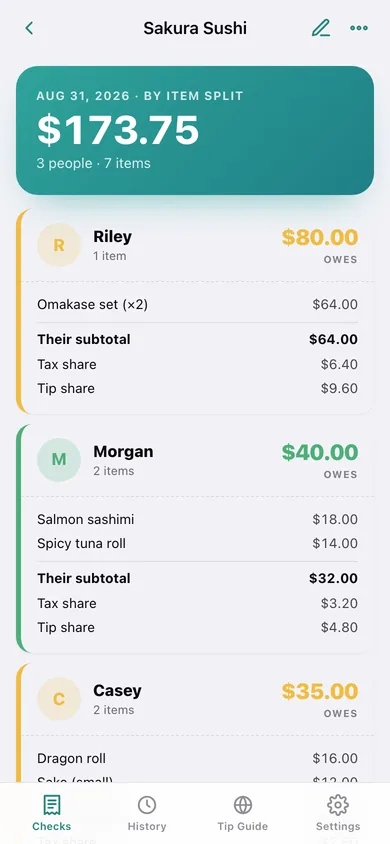
One card per diner in their own colour with a big 'owes' number, expandable to their items, subtotal share, tax share and tip share — copy the whole split to a message in one tap.
Tip Guide for 39 countries
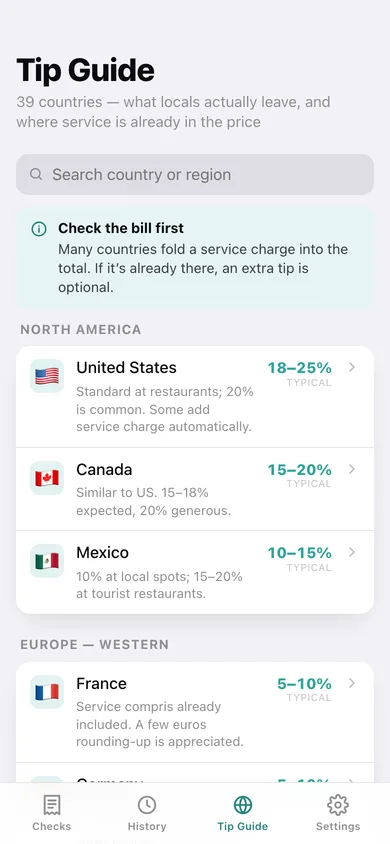
Typical ranges and the local custom for every country in the iPhone app, searchable and fully offline — including where service is already in the price and where tipping is considered rude.
History that remembers the venue
Checks grouped by month with search by restaurant, spend-per-month chart, seats fed, average per person and biggest check — reopen any old check to review or split there again.
Your defaults, your currency
Set the tip, tax and split mode new checks start with, pick from twelve currencies, optionally round every share up, and export the lot as JSON or a per-diner CSV.
Screens
Every screen, rebuilt for the browser
-
1
Checks
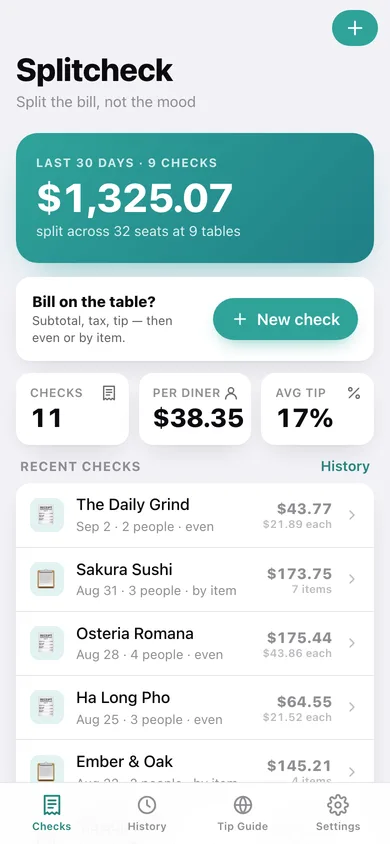
This month's total, average per person and average tip, with your recent checks and a one-tap new check.
-
2
Check editor
Venue, date, split mode, subtotal, tax %, tip slider with presets, diners and menu items — with a live summary.
-
3
The split
Per-diner cards showing what each person owes, their items, and their tax and tip share, over the full bill breakdown.
-
4
Tip Guide
Searchable tipping norms for 39 countries across nine regions, with a tap to adopt a country's rate as your default.
-
5
History
Spend per month, even vs by-item mix, and every saved check grouped by month and searchable by venue.
-
6
Settings
Default tip, tax and split mode, currency, round-up shares, JSON backup, CSV export, sample data and erase.
Try it with sample data: Adds eleven checks from the last six weeks — a by-item sushi dinner with shared plates, a five-person birthday at Maison Bleu, brunch for six and a two-person coffee run — mixing even and by-item splits with real diners and menu items. You can start fresh at any time.
Ready? It's free.
No account, no install, no subscription. Everything you do stays in this browser.
Your say
What should Splitcheck do? Tell us before we build it.
Tell us what to build next.
Comments need a free Google sign-in, so every one is from a real person.
Sign in with Google to commentNo comments yet — be the first to say what this app should do next.
Questions
Is the web version of Splitcheck free?+
Yes. Every screen is free to use: no subscription, no in-app purchases, no account.
Do I need an account?+
No. Open Splitcheck and start using it right away. Sign in with Google only if you want to upvote an app, save it to your list, or leave a comment.
Where is my data stored?+
Only in this browser's local storage. Nothing you enter is sent to our servers, so we can't see it, back it up, or restore it. Clearing site data, a private window, or another device starts empty. Export a backup from the in-app menu to keep it.
Is there a Splitcheck app for iPhone or Android?+
Not yet. Splitcheck is a community proposal: the browser version is complete, and we build the iPhone and Android app once 100 people upvote it. Upvoters get one email when it ships.