
Web app · Education
SpellHive
Spell it out loud, letter by letter — bee practice that coaches every miss
The pronouncer says the word, your speller asks the bee questions (definition, sentence, part of speech, syllables), spells it letter by letter, then types it to lock it in. Every miss gets the rule explained — silent letters, Greek ph, -able vs -ible, doubling. Six levels for ages 6–18, free in the browser.
Stored in your browser only. Nothing you do in the web version is sent to our servers. Clear your browser data and it's gone — so export a backup from the in-app menu if you want to keep it.
This app is a community proposal.
Try the full browser version now. We build the iPhone and Android app once 100 people upvote it.
We'll email you once, when it ships. Unsubscribe anytime.
In your browser
What you can do in SpellHive on the web
The bee ritual, one word at a time
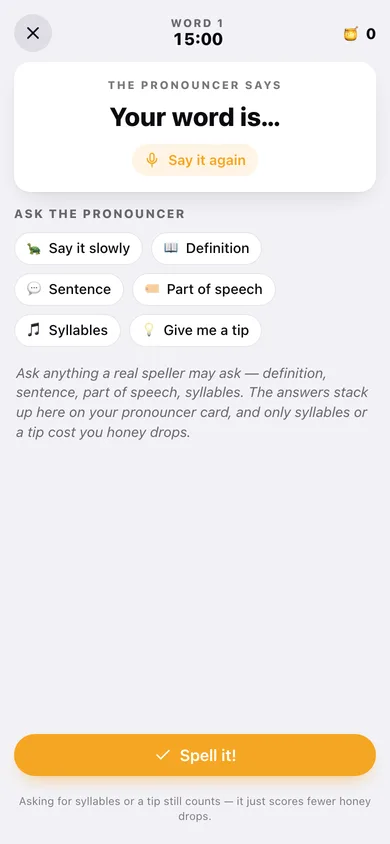
Hear the word, ask the pronouncer anything, spell it out letter by letter with no backspace showing, say “that's my word”, then type it to lock it in.
A coach, not a red X
The same rule-based coach as the iPhone app: it spots switched I and E, missing twins, dropped silent letters, -able versus -ible endings, mumbly schwa vowels and Greek spellings, and explains the pattern in kid language.
Six levels of real bee words
Hatchling to Legend, ages 6–8 through 18+, each word carrying its syllables, part of speech, definition, example sentence and the hazard that trips people up.
Review hive and daily challenge
Missed words queue up automatically and only graduate after two clean spellings; the Daily Challenge deals five words, one shot each, for double honey drops.
Honey drops, streaks and ten badges
Points scale with your streak and drop if you take a hint, and the badge wall runs from First Honey to Hive Librarian.
Grown-ups' corner
Session length, a daily minute limit, a level lock, a full progress report and a CSV of the missed-word list for the fridge door.
Screens
Every screen, rebuilt for the browser
-
1
Practice
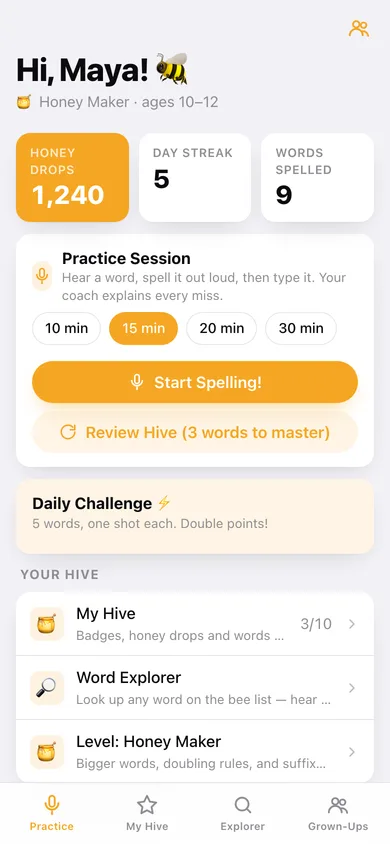
Honey drops, streak, session length, the Daily Challenge and the Review Hive.
-
2
Spelling session
Pronouncer, bee questions, the letter-by-letter spelling pad, coaching and the typed lock-in round.
-
3
Session report
Honey drops earned, words locked in, streak and what is waiting in the review hive.
-
4
My Hive
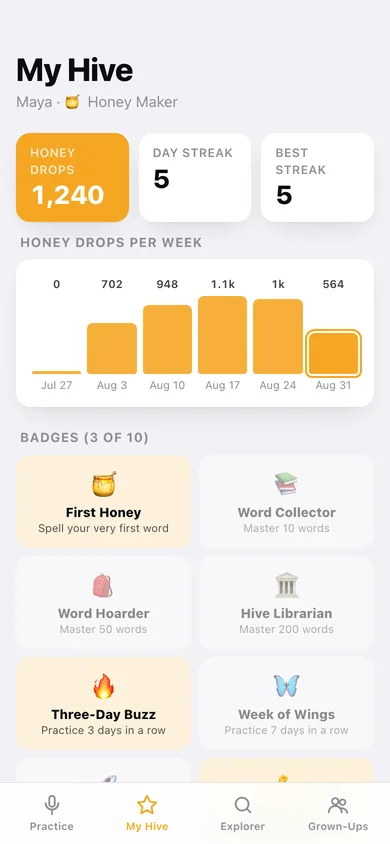
Badges, honey drops per week, words to conquer and the sessions behind them.
-
5
Word Explorer
Search the whole bee list by first letters, filtered by level.
-
6
Word card
One word's syllables, definition, sentence, spell-out, hazard lessons and your history with it.
-
7
Levels
All six levels with ages, blurb and word counts — tap to move the speller.
-
8
Grown-Ups
Session length, daily limit, level lock, voice, progress report, backups and erase.
Try it with sample data: Sets up Maya, a Honey Maker speller with 1,240 honey drops, eleven sessions over the last two weeks, twelve spelled words and a review hive with words still to conquer. You can start fresh at any time.
Ready? It's free.
No account, no install, no subscription. Everything you do stays in this browser.
Your say
What should SpellHive do? Tell us before we build it.
Tell us what to build next.
Comments need a free Google sign-in, so every one is from a real person.
Sign in with Google to commentNo comments yet — be the first to say what this app should do next.
Questions
Is the web version of SpellHive free?+
Yes. Every screen is free to use: no subscription, no in-app purchases, no account.
Do I need an account?+
No. Open SpellHive and start using it right away. Sign in with Google only if you want to upvote an app, save it to your list, or leave a comment.
Where is my data stored?+
Only in this browser's local storage. Nothing you enter is sent to our servers, so we can't see it, back it up, or restore it. Clearing site data, a private window, or another device starts empty. Export a backup from the in-app menu to keep it.
Is there a SpellHive app for iPhone or Android?+
Not yet. SpellHive is a community proposal: the browser version is complete, and we build the iPhone and Android app once 100 people upvote it. Upvoters get one email when it ships.