
Web app · Business
Solostack
Invoicing, time, expenses, mileage and quarterly tax — one calm Today screen
Run a one-person business from the browser: send and track invoices, start a project timer that bills in 15-minute blocks, capture deductible expenses and IRS-rate mileage, and see what to set aside for your next 1040-ES payment. Free, no install, everything included.
Stored in your browser only. Nothing you do in the web version is sent to our servers. Clear your browser data and it's gone — so export a backup from the in-app menu if you want to keep it.
This app is a community proposal.
Try the full browser version now. We build the iPhone and Android app once 100 people upvote it.
We'll email you once, when it ships. Unsubscribe anytime.
In your browser
What you can do in Solostack on the web
Today at a glance
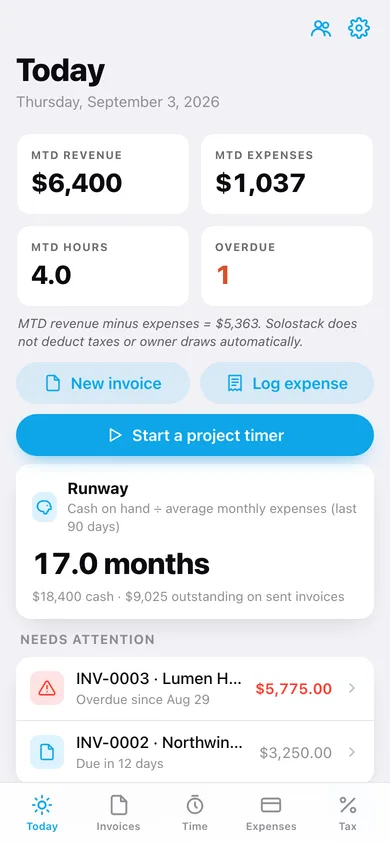
MTD revenue, MTD expenses, hours tracked, overdue count, runway months, expenses captured this week and every invoice that needs attention.
Invoices with a status flow
Draft → sent → paid (or overdue automatically once the due date passes), hand-entered amounts or line items, a printable invoice view, and one-tap invoice from any time block.
Project timer in 15-minute blocks
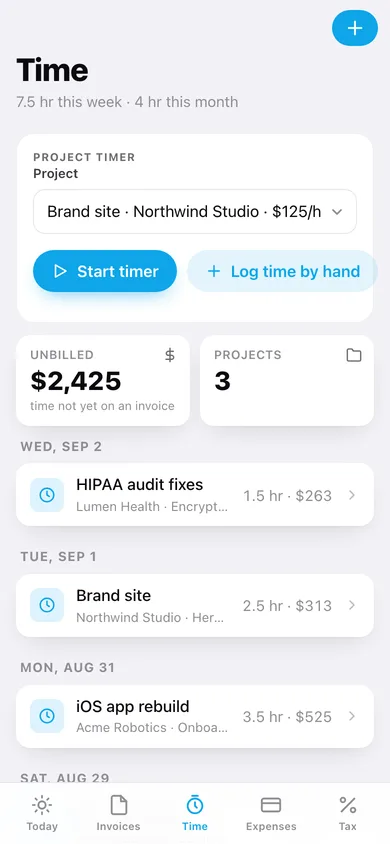
Start and stop a timer on any project; the block rounds up to the next 15 minutes at the project's hourly rate and shows unbilled time.
Expenses and mileage
Five expense categories with a deductible tag and a month-by-category donut, plus a mileage log priced at the bundled 2026 IRS standard rate ($0.70/mi).
Quarterly tax estimator
Enter state, filing status, last year's tax and your effective rate; Solostack projects the lower of 110% of last year or 90% of this year and shows the next 1040-ES due date.
Schedule C summary
Export the year's paid invoices, deductible expenses and mileage as a CSV for your preparer, plus a full JSON backup.
Screens
Every screen, rebuilt for the browser
-
1
Today
MTD stats, runway, running timer, invoices needing attention and this week's expenses.
-
2
Invoices
All invoices filtered by status with outstanding and paid-this-year totals.
-
3
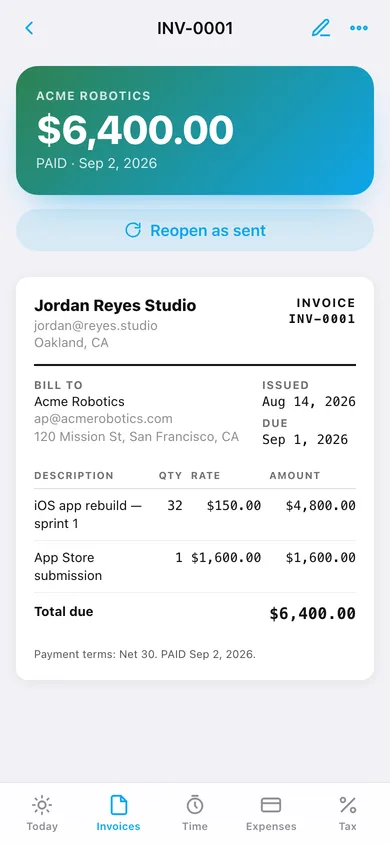
Invoice
Printable invoice with line items, mark paid / sent, duplicate, download.
-
4
New invoice
Client, hand-entered amount or line items, dates, status and notes.
-
5
Time
Project timer, unbilled total and time blocks grouped by day.
-
6
Time block
Project, rate, date, 15-minute stepper, note and create-invoice.
-
7
Expenses
Month-by-category donut, mileage summary and expenses grouped by month.
-
8
Expense
Label, amount, category, date and the deductible toggle.
-
9
Mileage
Business miles this year at the IRS rate and every logged drive.
-
10
Drive
From → to, miles, purpose, date and rate per mile.
-
11
Clients
Every client with lifetime paid revenue, projects and open invoices.
-
12
Client
Lifetime paid, open balance, hours, projects with hourly rates, and invoices.
-
13
Client
Name, billing email and address.
-
14
Tax
Quarterly set-aside, safe-harbor projection and the 1040-ES calendar.
-
15
Settings
Business details for invoices, cash on hand, defaults, backup, Schedule C CSV, sample data and erase.
Try it with sample data: Adds three clients with projects, five invoices (paid, sent, overdue and draft), ten time blocks, fourteen expenses and four drives across the last six weeks, plus last year's tax and cash on hand. You can start fresh at any time.
Ready? It's free.
No account, no install, no subscription. Everything you do stays in this browser.
Your say
What should Solostack do? Tell us before we build it.
Tell us what to build next.
Comments need a free Google sign-in, so every one is from a real person.
Sign in with Google to commentNo comments yet — be the first to say what this app should do next.
Questions
Is the web version of Solostack free?+
Yes. Every screen is free to use: no subscription, no in-app purchases, no account.
Do I need an account?+
No. Open Solostack and start using it right away. Sign in with Google only if you want to upvote an app, save it to your list, or leave a comment.
Where is my data stored?+
Only in this browser's local storage. Nothing you enter is sent to our servers, so we can't see it, back it up, or restore it. Clearing site data, a private window, or another device starts empty. Export a backup from the in-app menu to keep it.
Is there a Solostack app for iPhone or Android?+
Not yet. Solostack is a community proposal: the browser version is complete, and we build the iPhone and Android app once 100 people upvote it. Upvoters get one email when it ships.