
Web app · Utilities
Sofa
The TV remote with a real keyboard — try the whole thing in your browser
D-pad, trackpad and number pad, one-tap app launching, rooms full of Roku, Samsung, LG and Vizio TVs, and the Type screen that ends spelling out searches one arrow at a time. Drives Sofa's built-in Demo TV, free, no install.
Stored in your browser only. Nothing you do in the web version is sent to our servers. Clear your browser data and it's gone — so export a backup from the in-app menu if you want to keep it.
In your browser
What you can do in Sofa on the web
Type instead of spelling
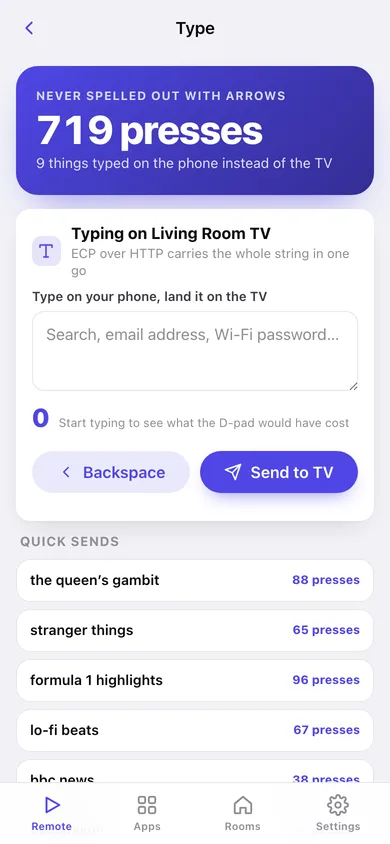
Write a search, an email address or a Wi-Fi password on your keyboard and watch it land on the TV — with a live count of the D-pad presses it would have cost on the TV's own 6-wide alphabetical grid.
Three input styles
The classic D-pad with a big OK, a swipe trackpad (swipe to move, tap to select) and a number pad with channel up/down — the same three the iPhone remote has.
A TV that answers back
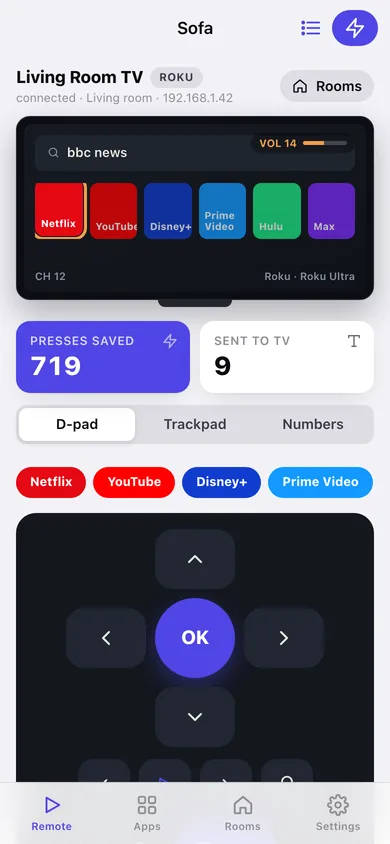
Sofa's built-in Demo TV is on screen: arrows move the highlight, OK opens an app, volume and mute show on the panel, power turns it off, and what you type appears in the search box.
Every platform's real launch ids
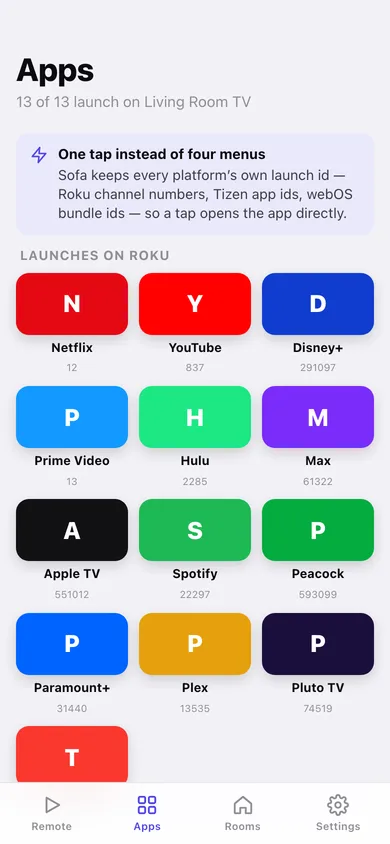
All 13 streaming shortcuts carry their Roku channel numbers, Tizen app ids and webOS bundle ids, and the Apps grid greys out what a platform simply cannot launch.
Rooms, pairing and wake-on-Wi-Fi
Save every TV by room, brand and IP, pair with an on-screen approval or a 4-digit Vizio PIN, and store a MAC address so the power button can wake a TV that is fully off.
The connection log
Every press writes the exact command the iPhone app puts on the wire — Roku ECP posts, Samsung KEY_ names, LG SSAP calls, Vizio codesets — so you can see why a TV isn't answering.
Screens
Every screen, rebuilt for the browser
-
1
Remote
The Demo TV panel, presses saved, the input-style switch, app shortcuts and the full button layout.
-
2
Type
The reason Sofa exists — type on your phone, send it to the TV, and see the D-pad presses you skipped.
-
3
Apps
Every streaming shortcut with the launch id this TV's platform actually uses, and the ones it can't launch.
-
4
Rooms
Every TV in the house, add one by brand and IP, and what Sofa supports on each platform.
-
5
TV detail
One TV: brand, port, pairing state, text and launch support, power-on MAC address, reconnect and re-pair.
-
6
Connection log
Newest-first log of every key, text send, app launch, pairing and wake, with the wire command for each.
-
7
Settings
Default input style, click sound, the works-with table, backup, sample data and erase.
Try it with sample data: Loads a three-TV house — a Roku Ultra in the living room, a Samsung Frame in the bedroom and an LG C2 in the basement — plus two weeks of real use: searches typed from the phone, app launches, pairings and a saved power-on address. You can start fresh at any time.
Ready? It's free.
No account, no install, no subscription. Everything you do stays in this browser.
Your say
Is Sofa useful? Tell us what to build next.
Sign in with Google to vote.
Tell us what to build next.
Comments need a free Google sign-in, so every one is from a real person.
Sign in with Google to commentNo comments yet — be the first to say what this app should do next.
Questions
Is the web version of Sofa free?+
Yes. Every screen is free to use: no subscription, no in-app purchases, no account.
Do I need an account?+
No. Open Sofa and start using it right away. Sign in with Google only if you want to upvote an app, save it to your list, or leave a comment.
Where is my data stored?+
Only in this browser's local storage. Nothing you enter is sent to our servers, so we can't see it, back it up, or restore it. Clearing site data, a private window, or another device starts empty. Export a backup from the in-app menu to keep it.
How is the web version different from the Sofa phone app?+
A browser tab cannot open a socket to a device on your Wi-Fi, so the web version drives Sofa's built-in Demo TV: buttons move a simulated TV screen and log the exact command the iPhone app would send. Controlling a real Roku, Samsung, LG or Vizio needs the phone app. For the same reason there is no network scan — you add TVs by brand and IP by hand, and pairing and Wake-on-LAN are demonstrated rather than performed. The iPhone app reads a real Roku's own channel list with each app's artwork; the web version shows the 13-app shortcut catalogue with coloured tiles. Your rooms, TVs and connection log are saved in this browser only — no account, no server copy, and clearing site data erases them.