
Web app · Business
SkyGig
Was the drone job actually worth it? See every flight’s true margin in your browser
Log a job in thirty seconds and see the real margin after mileage, expenses and your amortized cost per flight hour, plus the effective hourly rate you truly earned. Floor-rate engine, clients, quotes and invoices, season dashboard and a Schedule C-ready year export. Free, no install.
Stored in your browser only. Nothing you do in the web version is sent to our servers. Clear your browser data and it's gone — so export a backup from the in-app menu if you want to keep it.
This app is a community proposal.
Try the full browser version now. We build the iPhone and Android app once 100 people upvote it.
We'll email you once, when it ships. Unsubscribe anytime.
In your browser
What you can do in SkyGig on the web
Margin waterfall on every job
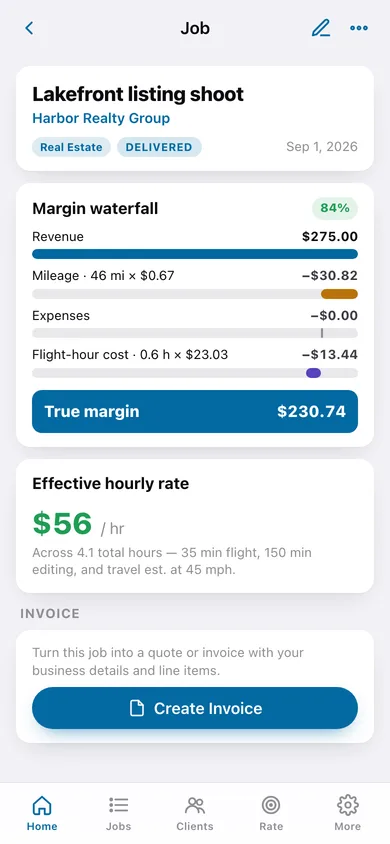
Revenue minus mileage at your rate, minus expenses, minus amortized flight-hour cost equals true margin — drawn as a waterfall with the margin percentage.
Effective hourly rate
Margin divided by flight, editing and estimated travel time (45 mph), so a $250 shoot with a 70-mile drive shows what an hour really paid.
Floor-rate engine
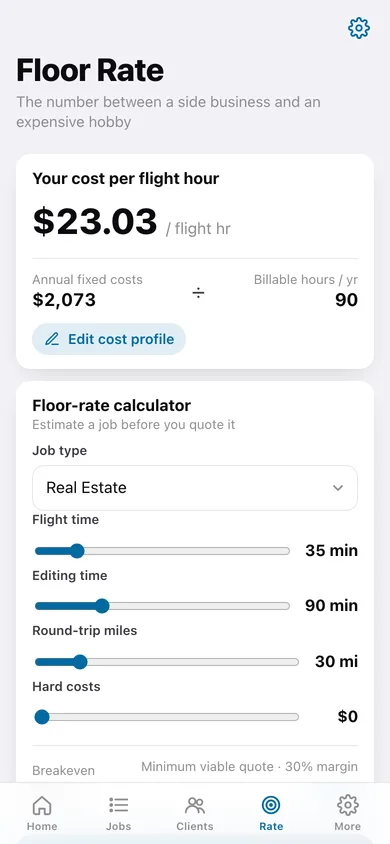
Enter aircraft amortization, insurance, training, software and realistic billable hours; get your cost per flight hour, breakeven and the minimum viable quote at your target margin.
Client book
Lifetime revenue, average margin and outstanding balances per client, sorted by who actually pays well.
Quotes and invoices
Turn any job into a numbered quote or invoice with your business details, optional billed mileage and pass-through expenses; mark paid, download or copy the document.
Season dashboard and tax export
Income vs true margin by month, season totals and highlights, plus a Schedule C-style CSV and year summary for your preparer.
Screens
Every screen, rebuilt for the browser
-
1
Home
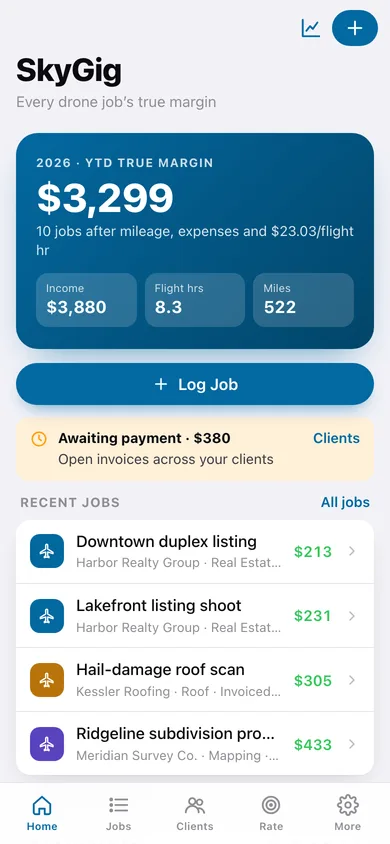
YTD true margin hero with income, flight hours and miles, awaiting-payment banner, recent jobs and your floor rate.
-
2
Jobs
Month-grouped ledger with each job's client, type, status and computed margin.
-
3
Job detail
Margin waterfall, effective hourly rate, expenses and the job's quote or invoice.
-
4
Log Job
Thirty-second entry: title, type, date, status, client, revenue, miles, flight and editing minutes, expenses, notes.
-
5
Clients
Clients sorted by lifetime revenue with unpaid balances and average margin.
-
6
Client detail
Contact, lifetime revenue, average margin, outstanding, and the client's job history.
-
7
Floor Rate
Cost per flight hour and a slider calculator for breakeven and minimum viable quote.
-
8
Cost Profile
Mileage rate, billable hours, target margin, annual fixed costs (with purchase amortization) and business details.
-
9
Quote / Invoice
Build, preview, mark paid and download a quote or invoice for a job.
-
10
Season Dashboard
Income vs true margin by month, season totals, best client and best job type.
-
11
Tax Export
Year summary of gross receipts, miles, mileage amount and expenses with CSV and summary downloads.
-
12
More
Business details, cost profile, dashboard, tax export, backup, sample data and erase.
Try it with sample data: Loads Ridgeline Aerials LLC's cost profile (five fixed costs), four clients and ten jobs across the last six weeks including two invoices, one paid and one outstanding, and a quote. You can start fresh at any time.
Ready? It's free.
No account, no install, no subscription. Everything you do stays in this browser.
Your say
What should SkyGig do? Tell us before we build it.
Tell us what to build next.
Comments need a free Google sign-in, so every one is from a real person.
Sign in with Google to commentNo comments yet — be the first to say what this app should do next.
Questions
Is the web version of SkyGig free?+
Yes. Every screen is free to use: no subscription, no in-app purchases, no account.
Do I need an account?+
No. Open SkyGig and start using it right away. Sign in with Google only if you want to upvote an app, save it to your list, or leave a comment.
Where is my data stored?+
Only in this browser's local storage. Nothing you enter is sent to our servers, so we can't see it, back it up, or restore it. Clearing site data, a private window, or another device starts empty. Export a backup from the in-app menu to keep it.
Is there a SkyGig app for iPhone or Android?+
Not yet. SkyGig is a community proposal: the browser version is complete, and we build the iPhone and Android app once 100 people upvote it. Upvoters get one email when it ships.