
Web app · Finance
Sidemarket
A calm watchlist for Kalshi and Polymarket — bring your own EV
Keep your fair value next to the market price, run the EV and Kelly math with the formulas written out, check a base-rate library with sources, and journal every position with the lesson it taught you. Not connected to any broker, free, no account.
Stored in your browser only. Nothing you do in the web version is sent to our servers. Clear your browser data and it's gone — so export a backup from the in-app menu if you want to keep it.
This app is a community proposal.
Try the full browser version now. We build the iPhone and Android app once 100 people upvote it.
We'll email you once, when it ships. Unsubscribe anytime.
In your browser
What you can do in Sidemarket on the web
Watchlist with a price tape
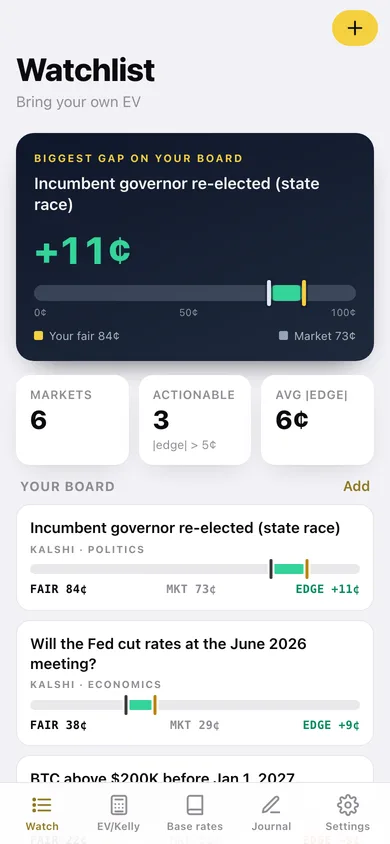
Every market you follow shows your perceived fair value and the last price you observed on one 0–100¢ tape, with the gap between them shaded green or red — so the size of your edge is a picture, not arithmetic.
EV + Kelly calculator, open math
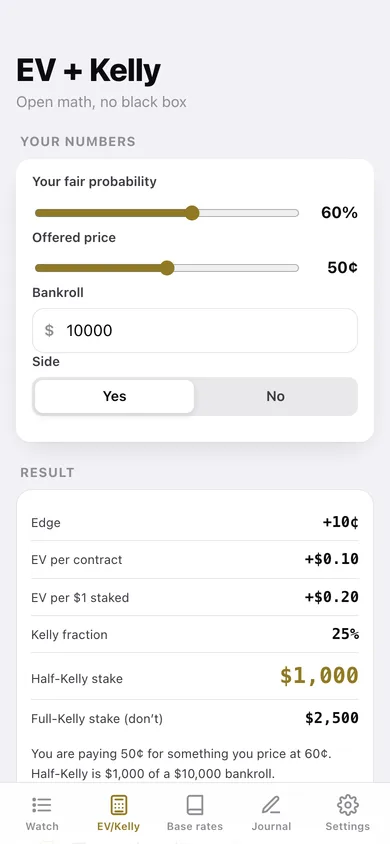
Set your fair probability, the offered price and your bankroll, pick Yes or No, and get edge, EV per contract, EV per dollar staked, the Kelly fraction and a half-Kelly stake — with the four formulas printed underneath.
Base-rate library with sources
20 curated base rates across politics, economics, sports, crypto, weather and culture — incumbent win rates, yield-curve recessions, #1 seeds reaching the Final Four — each with the source named so you can check it.
Trade journal
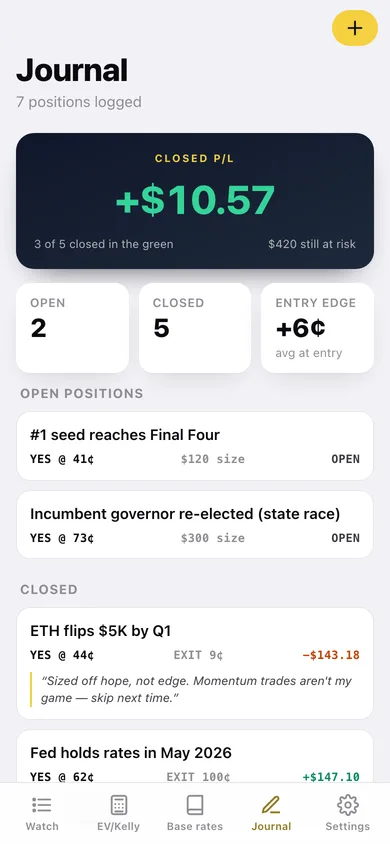
Log each position with entry price, your fair value at entry and size; close it with the exit price and Sidemarket computes the contract count, payout and P/L, plus your closed P/L and average entry edge.
The lessons log
Every trade carries one sentence on what you would do differently. The Lessons screen collects them all and flags the ones that came from a loss — those are the expensive rules.
It cannot trade
No broker connection, no account, no API key, no price fetching. You read the prices and type them in; everything stays in your browser, and you can export the journal or watchlist as CSV.
Screens
Every screen, rebuilt for the browser
-
1
Watchlist
Your biggest gap on the tape, then every market with fair value, market price and edge.
-
2
Market detail
The full price tape, the verdict, EV and half-Kelly, your reasoning and any positions you hold there.
-
3
Add or edit a market
Label, source, category, URL, and two sliders for your fair value against the market price.
-
4
EV + Kelly
Fair probability, offered price, bankroll and side, with edge, EV, Kelly and stakes plus the math.
-
5
Base rates
20 base rates by category, each with its historical value and named source.
-
6
Journal
Closed P/L, open positions still at risk, and every trade with its lesson attached.
-
7
Trade detail
Entry, edge at entry, contracts, payout, P/L and return on stake for one position.
-
8
Log a trade
Market, side, entry, fair at entry, size, and the exit price when you close it.
-
9
Lessons
The learned-rules log — every one-line lesson, with the ones that cost you money flagged.
-
10
Settings
The promises, default bankroll, CSV and JSON export, sample data and erase.
Try it with sample data: Loads six markets across the Fed, BTC, a recession, the Super Bowl, an Atlantic storm and a governor's race, plus six journal positions — four closed with lessons, two still open. You can start fresh at any time.
Ready? It's free.
No account, no install, no subscription. Everything you do stays in this browser.
Your say
What should Sidemarket do? Tell us before we build it.
Tell us what to build next.
Comments need a free Google sign-in, so every one is from a real person.
Sign in with Google to commentNo comments yet — be the first to say what this app should do next.
Questions
Is the web version of Sidemarket free?+
Yes. Every screen is free to use: no subscription, no in-app purchases, no account.
Do I need an account?+
No. Open Sidemarket and start using it right away. Sign in with Google only if you want to upvote an app, save it to your list, or leave a comment.
Where is my data stored?+
Only in this browser's local storage. Nothing you enter is sent to our servers, so we can't see it, back it up, or restore it. Clearing site data, a private window, or another device starts empty. Export a backup from the in-app menu to keep it.
Is there a Sidemarket app for iPhone or Android?+
Not yet. Sidemarket is a community proposal: the browser version is complete, and we build the iPhone and Android app once 100 people upvote it. Upvoters get one email when it ships.