
Web app · Finance
ShotLedger
Track what you actually paid for every GLP-1 fill
Log the pharmacy, the payment path and the price on the receipt. ShotLedger meters your savings card's monthly and annual caps, counts down to the December 31 expiry, and compares every path by true cost per week of supply. Free, private, no account.
Stored in your browser only. Nothing you do in the web version is sent to our servers. Clear your browser data and it's gone — so export a backup from the in-app menu if you want to keep it.
This app is a community proposal.
Try the full browser version now. We build the iPhone and Android app once 100 people upvote it.
We'll email you once, when it ships. Unsubscribe anytime.
In your browser
What you can do in ShotLedger on the web
Fill ledger
Every purchase in seconds — date, pharmacy, medication, one of six payment paths (insurance + card, cash card, direct vial, direct pen, discount card, insurance only), weeks of supply and the price on the receipt. A new fill prefills from your last one.
Cap meter
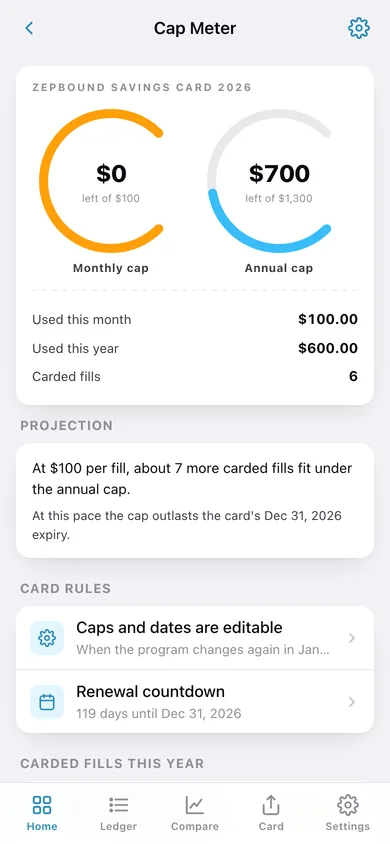
Two live arc gauges show how much of the monthly and annual savings-card caps you have left. Card rules are editable defaults, so when the program changes again in January you adjust two numbers yourself.
Cap projection
At your typical card draw, ShotLedger says how many more carded fills fit under the annual cap and roughly which fill will cross it and suddenly cost more at the counter.
Renewal countdown
A days-to-expiry ring, a three-step re-enrollment checklist, and a one-tap roll to next year — because a lapsed card is what turns a $25 fill into a $550 one.
Path compare
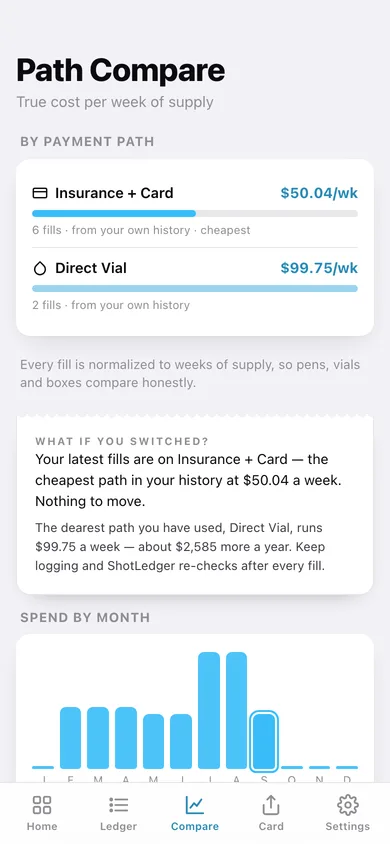
Every fill is normalized to true cost per week of supply so pens, vials and boxes compare honestly, then your current path is measured against the cheapest one you have used, in dollars per year.
Spend Card and year export
A screenshot-ready receipt card with your year-to-date total (or your switch saving) plus month sparkbars, and an HSA/FSA-ready CSV or printable summary of every fill.
Screens
Every screen, rebuilt for the browser
-
1
Home
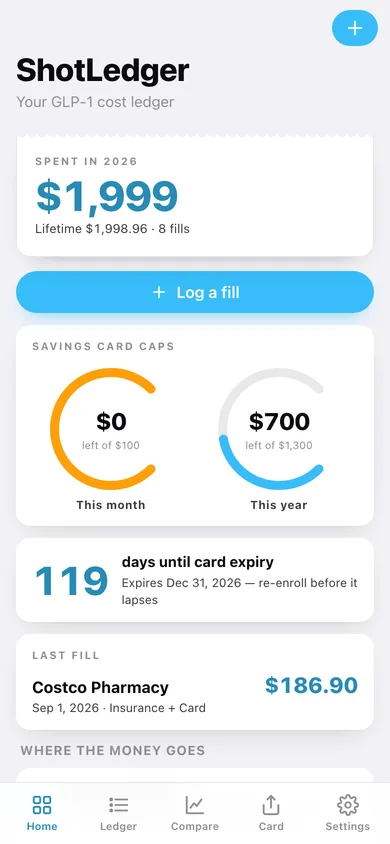
Year-to-date spend, both cap gauges, the expiry countdown and your last fill.
-
2
Fill Ledger
Year-to-date and lifetime totals, then every fill grouped by month with subtotals.
-
3
Fill detail
One receipt: price, cost per week, path, card savings applied and the note you left.
-
4
Log a fill
Date, pharmacy, medication, payment path, card savings, price and weeks of supply.
-
5
Cap Meter
Monthly and annual cap gauges, how much the card has drawn, and which fill crosses the cap.
-
6
Card Rules
Name, monthly cap, annual cap, enrollment and expiry dates — all editable.
-
7
Renewal
Days-to-expiry ring, re-enrollment checklist and a roll-to-next-year button.
-
8
Path Compare
True cost per week by payment path, the projected switch saving, and spend by month.
-
9
Path detail
Average, cheapest and priciest week on one payment path, with every fill on it.
-
10
Spend Card
The screenshot-ready receipt card with your year total or your switch saving.
-
11
Year Export
Per-year totals, card savings drawn, and a CSV or printable summary for HSA/FSA.
-
12
Settings
Medications, card setup, default weeks of supply, exports, sample data and erase.
Try it with sample data: Loads the 2026 story: Zepbound with a savings card, and eight fills over 30 weeks — the January cap cut, a transfer to a cheaper pharmacy, an insurance lapse onto direct vials, then back on the card. You can start fresh at any time.
Ready? It's free.
No account, no install, no subscription. Everything you do stays in this browser.
Your say
What should ShotLedger do? Tell us before we build it.
Tell us what to build next.
Comments need a free Google sign-in, so every one is from a real person.
Sign in with Google to commentNo comments yet — be the first to say what this app should do next.
Questions
Is the web version of ShotLedger free?+
Yes. Every screen is free to use: no subscription, no in-app purchases, no account.
Do I need an account?+
No. Open ShotLedger and start using it right away. Sign in with Google only if you want to upvote an app, save it to your list, or leave a comment.
Where is my data stored?+
Only in this browser's local storage. Nothing you enter is sent to our servers, so we can't see it, back it up, or restore it. Clearing site data, a private window, or another device starts empty. Export a backup from the in-app menu to keep it.
Is there a ShotLedger app for iPhone or Android?+
Not yet. ShotLedger is a community proposal: the browser version is complete, and we build the iPhone and Android app once 100 people upvote it. Upvoters get one email when it ships.