
Web app · Business
ShiftProof
Your posted schedule changed — here’s what your city says that’s worth
Lock a timestamped record of every posted schedule, log each added, moved, cut, or cancelled shift, and see it priced under offline Fair Workweek rule packs for all 12 covered jurisdictions — plus a clopening detector, Owed Counter share card, and complaint-ready evidence packet. Free, no install.
Stored in your browser only. Nothing you do in the web version is sent to our servers. Clear your browser data and it's gone — so export a backup from the in-app menu if you want to keep it.
This app is a community proposal.
Try the full browser version now. We build the iPhone and Android app once 100 people upvote it.
We'll email you once, when it ships. Unsubscribe anytime.
In your browser
What you can do in ShiftProof on the web
Locked schedule snapshots
Type in the shifts as posted the day the schedule goes up; ShiftProof stamps and locks them with the notice window checked against your city’s 14-day rule.
Change log priced per ordinance
Log added, moved, hours-cut, cancelled, or sent-home-early shifts with how and when you were told — each one carries a live estimate and the rule citation.
All 12 rule packs, offline
NYC, Chicago, LA city and county, Philadelphia, Seattle, San Francisco, Berkeley, Emeryville, Evanston, Euless, and Oregon: notice windows, clopening thresholds, coverage, agency, and effective dates.
Owed Counter + share card
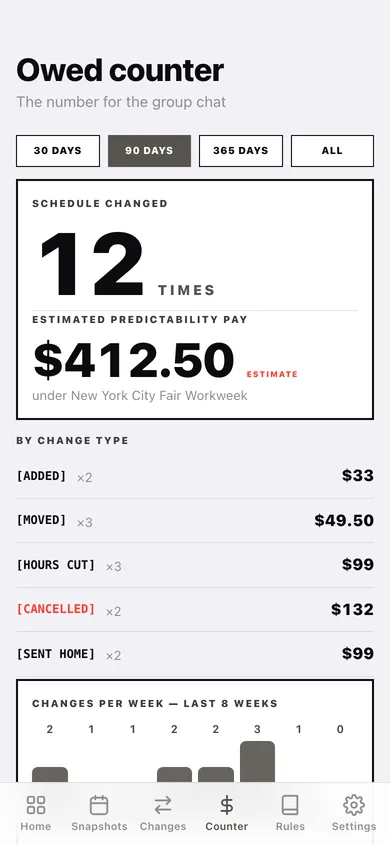
How many times the schedule changed in 30/90/365 days and the estimated predictability pay, with a breakdown by type, a changes-per-week chart, and a copyable card for the store group chat.
Clopening detector
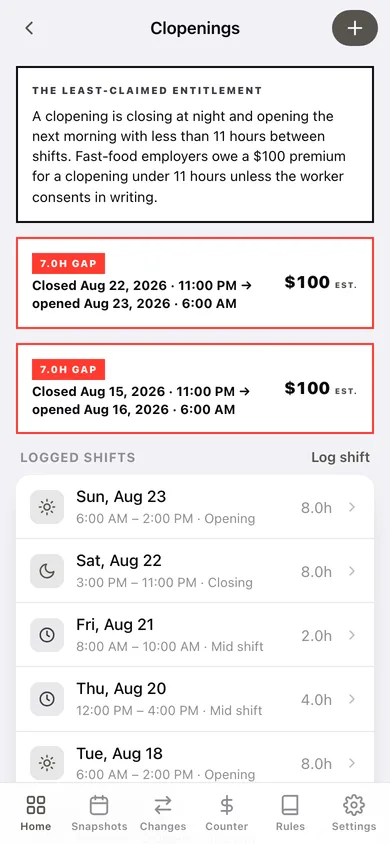
Log closing and opening shifts; turnarounds under your city’s 9/10/11-hour threshold are flagged with the premium the ordinance attaches.
Evidence packet
A dated, downloadable packet — worker declaration, chronological change log with citations, clopening findings, and snapshot exhibits — organized the way NYC DCWP and Chicago BACP ask for it.
Screens
Every screen, rebuilt for the browser
-
1
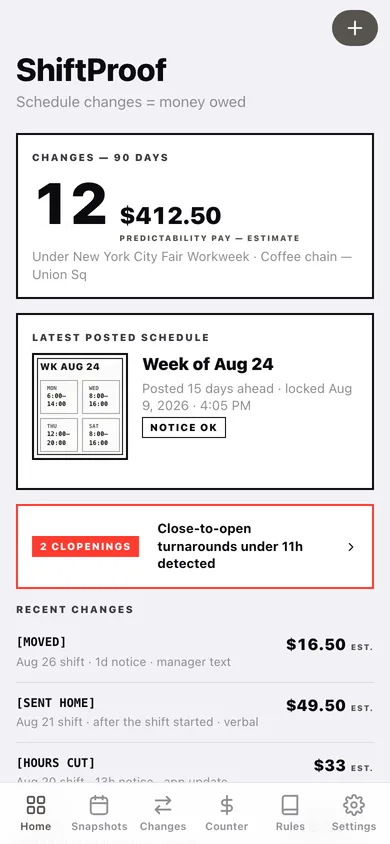
Home
90-day Owed Counter, latest locked snapshot, clopening alert, recent changes, and tools.
-
2
Snapshots
Every locked posted schedule with its notice-window verdict.
-
3
Snapshot
The locked sheet, timestamp record, notice verdict, and changes logged against that week.
-
4
New snapshot
Type the posted shifts, when the schedule was posted, and lock it.
-
5
Change log
Ruled ledger of every change with type filters and a running estimate total.
-
6
Change record
As posted vs after the change, notice given, the rule that applies, and the estimate.
-
7
Log a change
Change type, times, how you found out, linked snapshot — with a live estimate.
-
8
Owed counter
Big counter with a 30/90/365-day window, breakdown by type, weekly chart, and the share card.
-
9
Clopenings
Detected close-to-open turnarounds and the logged shifts they came from.
-
10
Evidence packet
Date range, sections, live preview, and download of the complaint-ready packet.
-
11
Rule packs
All 12 covered jurisdictions with notice, clopening threshold, and effective date.
-
12
Rule pack
Plain-English summary, the numbers, clopening rule, coverage, and set-as-mine.
-
13
Am I covered?
Three-question screen against the active jurisdiction’s thresholds.
-
14
Settings
Workplace, hourly wage, jurisdiction (re-prices every estimate), backup, sample data, erase.
Try it with sample data: Loads an NYC coffee-shop trail: three locked weekly snapshots, twelve logged changes over seven weeks, and ten shifts including one 7-hour clopening. You can start fresh at any time.
Ready? It's free.
No account, no install, no subscription. Everything you do stays in this browser.
Your say
What should ShiftProof do? Tell us before we build it.
Tell us what to build next.
Comments need a free Google sign-in, so every one is from a real person.
Sign in with Google to commentNo comments yet — be the first to say what this app should do next.
Questions
Is the web version of ShiftProof free?+
Yes. Every screen is free to use: no subscription, no in-app purchases, no account.
Do I need an account?+
No. Open ShiftProof and start using it right away. Sign in with Google only if you want to upvote an app, save it to your list, or leave a comment.
Where is my data stored?+
Only in this browser's local storage. Nothing you enter is sent to our servers, so we can't see it, back it up, or restore it. Clearing site data, a private window, or another device starts empty. Export a backup from the in-app menu to keep it.
Is there a ShiftProof app for iPhone or Android?+
Not yet. ShiftProof is a community proposal: the browser version is complete, and we build the iPhone and Android app once 100 people upvote it. Upvoters get one email when it ships.