
Web app · Food And Drink
Shaker
Your bar, tonight's cocktails — tick your bottles, see what you can pour
Mark the bottles in your cabinet and Shaker instantly lists every cocktail you can make right now, plus a One Away shelf that names the single bottle standing between you and the next three drinks. 31 curated recipes, free, offline, no account.
Stored in your browser only. Nothing you do in the web version is sent to our servers. Clear your browser data and it's gone — so export a backup from the in-app menu if you want to keep it.
This app is a community proposal.
Try the full browser version now. We build the iPhone and Android app once 100 people upvote it.
We'll email you once, when it ships. Unsubscribe anytime.
In your browser
What you can do in Shaker on the web
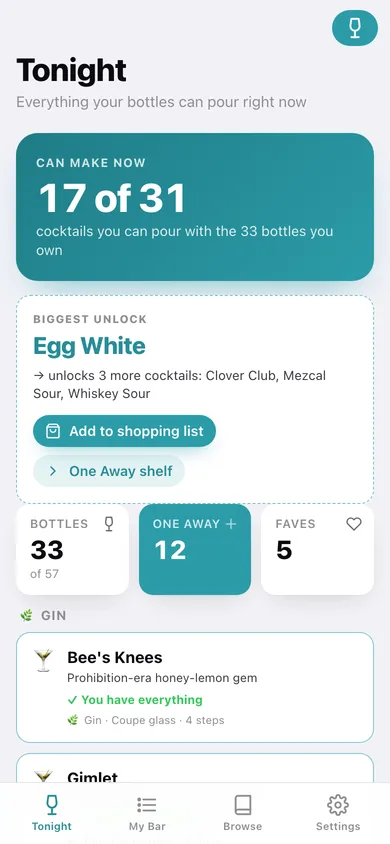
Can Make Now
The full catalog filtered against the bottles you own, grouped by base spirit and updated the moment you tick something in My Bar.
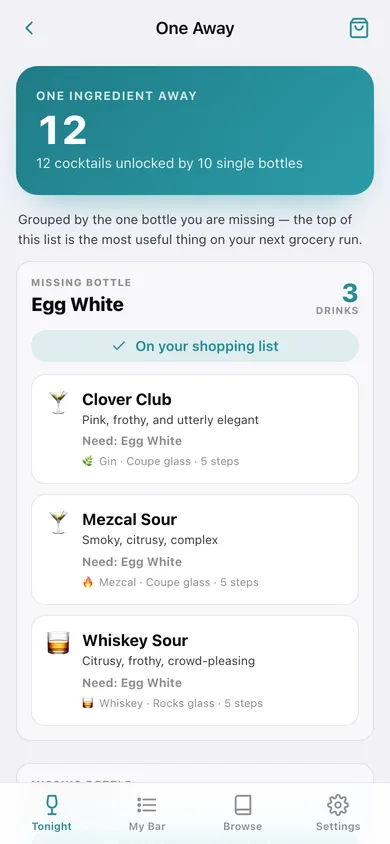
One Away shelf
Cocktails missing exactly one ingredient, grouped by the missing bottle and ranked by how many drinks each one unlocks.
A shopping list that earns its place
Add a missing bottle and Shaker shows what it unlocks; tick it off when you buy it and the bottle flips on in My Bar.
My Bar
All 57 catalog ingredients across spirits, liqueurs, mixers, citrus, bitters and garnishes, each a toggle, searchable and filterable to what you own.
Real recipes
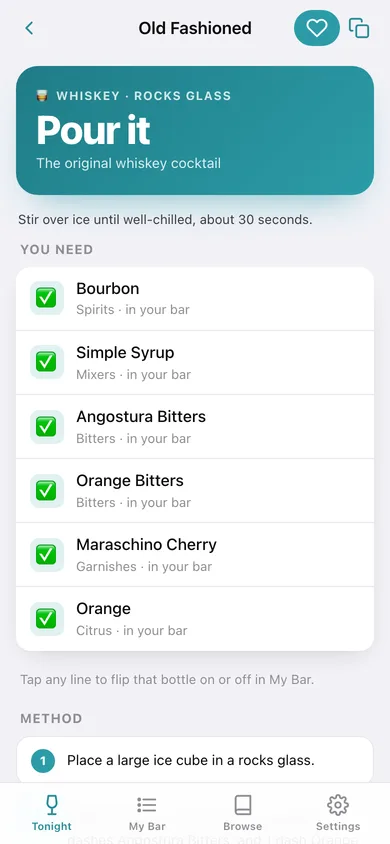
Every cocktail carries its tagline, glass, garnish, technique note and numbered steps with measurements — Old Fashioned to Sazerac.
Favourites and full browse
Heart any recipe to pin it, or browse all 31 by spirit, ingredient or by whether you can pour it tonight.
Screens
Every screen, rebuilt for the browser
-
1
Tonight
How many of the 31 cocktails your bottles cover, the single bottle that unlocks the most drinks, and every pourable recipe grouped by spirit.
-
2
One Away
Every cocktail one ingredient short, grouped by the missing bottle with the count of drinks each unlocks.
-
3
Cocktail
Glass, garnish, technique, the ingredient list marked owned or missing, and the numbered method.
-
4
My Bar
Bottles owned versus not yet stocked, with a toggle for every ingredient in six categories.
-
5
Browse
The whole catalog with search, spirit chips and Can make / One away filters.
-
6
Favourites
The recipes you pinned, and how many of them you can pour right now.
-
7
Shopping list
Bottles to buy, what each one unlocks, and a one-tap I bought it that stocks My Bar.
-
8
Settings
Home-screen options, empty or restock the bar, catalog counts, backup, sample data and erase.
Try it with sample data: Stocks a well-used cabinet — 33 bottles and mixers on top of the starter bar — which makes 17 cocktails pourable and 12 one bottle away, pins five favourites, and puts five bottles on the shopping list. You can start fresh at any time.
Ready? It's free.
No account, no install, no subscription. Everything you do stays in this browser.
Your say
What should Shaker do? Tell us before we build it.
Tell us what to build next.
Comments need a free Google sign-in, so every one is from a real person.
Sign in with Google to commentNo comments yet — be the first to say what this app should do next.
Questions
Is the web version of Shaker free?+
Yes. Every screen is free to use: no subscription, no in-app purchases, no account.
Do I need an account?+
No. Open Shaker and start using it right away. Sign in with Google only if you want to upvote an app, save it to your list, or leave a comment.
Where is my data stored?+
Only in this browser's local storage. Nothing you enter is sent to our servers, so we can't see it, back it up, or restore it. Clearing site data, a private window, or another device starts empty. Export a backup from the in-app menu to keep it.
Is there a Shaker app for iPhone or Android?+
Not yet. Shaker is a community proposal: the browser version is complete, and we build the iPhone and Android app once 100 people upvote it. Upvoters get one email when it ships.