
Web app · Finance
SetAside
Skim the IRS's share at every payday — a tax jar for 1099 income
Log a client deposit and SetAside instantly moves your set-aside rate into a virtual tax jar, counts down the four 1040-ES due dates, and draws a safe-harbor progress ring to the 90 / 100 / 110% mark. Free, no account, nothing leaves your browser.
Stored in your browser only. Nothing you do in the web version is sent to our servers. Clear your browser data and it's gone — so export a backup from the in-app menu if you want to keep it.
This app is a community proposal.
Try the full browser version now. We build the iPhone and Android app once 100 people upvote it.
We'll email you once, when it ships. Unsubscribe anytime.
In your browser
What you can do in SetAside on the web
Deposit auto-skim
Log a gross deposit with its source and date; SetAside splits it into jar money and spendable money using your federal + state + self-employment rates, or a custom rate for that one payment.
The four 1040-ES periods, exactly as the IRS defines them
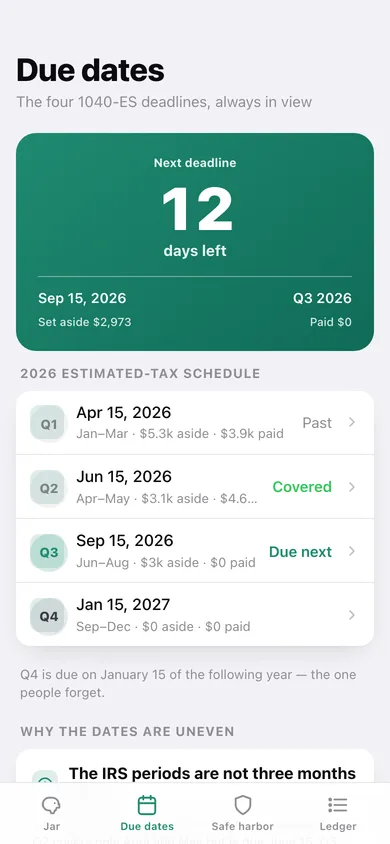
Q1 covers Jan–Mar (due Apr 15), Q2 only Apr–May (due Jun 15), Q3 Jun–Aug (due Sep 15) and Q4 Sep–Dec (due Jan 15 of the next year). Every deposit files into the period its date actually falls in.
Live next-deadline countdown
A big day counter for the next estimated-tax due date, with how much you have set aside for it and how much you have already paid in.
Safe-harbor progress ring
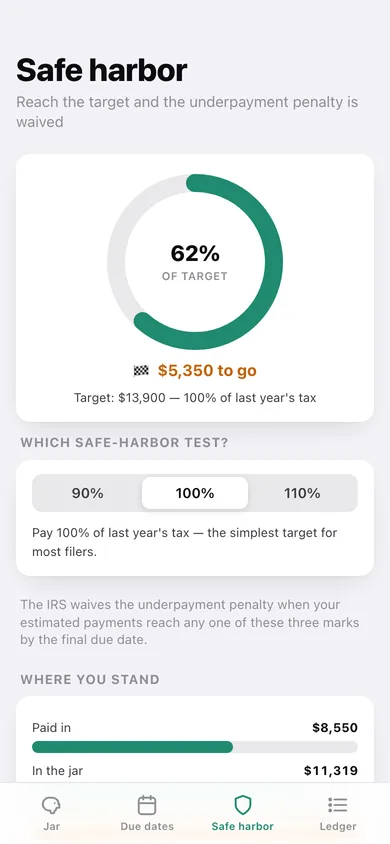
Pick the 90% of this year, 100% of last year, or 110% higher-earner test, enter your tax figures, and watch a ring fill toward penalty-proof — plus a bar chart of paid vs jar vs target.
Quarterly ledger, reconciled
Record every estimated payment against its quarter with a confirmation note; the ledger charts money set aside against money actually paid in, quarter by quarter, and marks each period covered.
CSV export for your accountant
Download every deposit (gross, rate, reserved, spendable, quarter) or every payment (date, kind, quarter, due date, amount) as CSV, or a full JSON backup.
Screens
Every screen, rebuilt for the browser
-
1
Tax jar
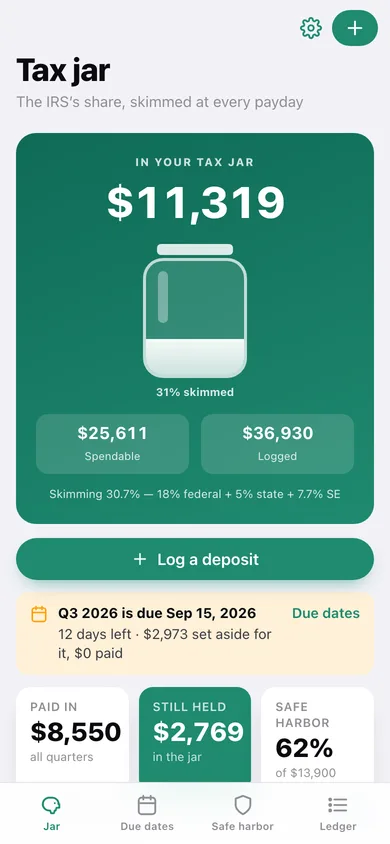
The jar filling up, spendable vs logged, the next deadline banner and your recent deposits.
-
2
Log deposit
Amount, source, date and a live preview of what goes to the jar versus what you can spend.
-
3
Deposit detail
The jar / spendable split for one payment, which quarter it lands in and when that quarter is due.
-
4
Due dates
Days-to-deadline countdown and the whole four-date 1040-ES schedule with set-aside and paid totals.
-
5
Quarter detail
Set aside, paid and remaining for one estimated-tax period, with its income and payments.
-
6
Record payment
Mark a federal, state or self-employment payment as made against a quarter.
-
7
Safe harbor
Progress ring to the 90 / 100 / 110% target, the test picker and where paid, jar and target stand.
-
8
Rates & targets
Federal, state and self-employment skim rates plus last year's tax and this year's estimate.
-
9
Ledger
Set aside vs paid by quarter as a chart, per-quarter progress cards, payment history and CSV export.
-
10
Settings
Reminder lead time, jar totals, backup, sample data and erase.
Try it with sample data: Loads a freelancer's year: twelve deposits from clients, rideshare, Etsy and delivery apps across Q1–Q3, plus four estimated-tax payments already made. You can start fresh at any time.
Ready? It's free.
No account, no install, no subscription. Everything you do stays in this browser.
Your say
What should SetAside do? Tell us before we build it.
Tell us what to build next.
Comments need a free Google sign-in, so every one is from a real person.
Sign in with Google to commentNo comments yet — be the first to say what this app should do next.
Questions
Is the web version of SetAside free?+
Yes. Every screen is free to use: no subscription, no in-app purchases, no account.
Do I need an account?+
No. Open SetAside and start using it right away. Sign in with Google only if you want to upvote an app, save it to your list, or leave a comment.
Where is my data stored?+
Only in this browser's local storage. Nothing you enter is sent to our servers, so we can't see it, back it up, or restore it. Clearing site data, a private window, or another device starts empty. Export a backup from the in-app menu to keep it.
Is there a SetAside app for iPhone or Android?+
Not yet. SetAside is a community proposal: the browser version is complete, and we build the iPhone and Android app once 100 people upvote it. Upvoters get one email when it ships.