
Web app · Education
Servicehours
Prove your volunteer hours without a paper log — NHS, CAS, scholarships
Log each activity in seconds — organization, date, hours, role, what you did, supervisor sign-off — and watch a progress ring fill for every goal you have to hit. When the form lands, the Summary is already written. Free, no account, no install.
Stored in your browser only. Nothing you do in the web version is sent to our servers. Clear your browser data and it's gone — so export a backup from the in-app menu if you want to keep it.
This app is a community proposal.
Try the full browser version now. We build the iPhone and Android app once 100 people upvote it.
We'll email you once, when it ships. Unsubscribe anytime.
In your browser
What you can do in Servicehours on the web
A ring per goal, filling as you log
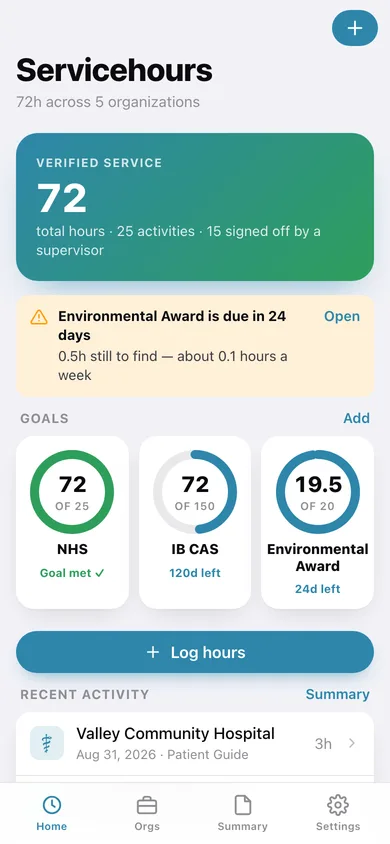
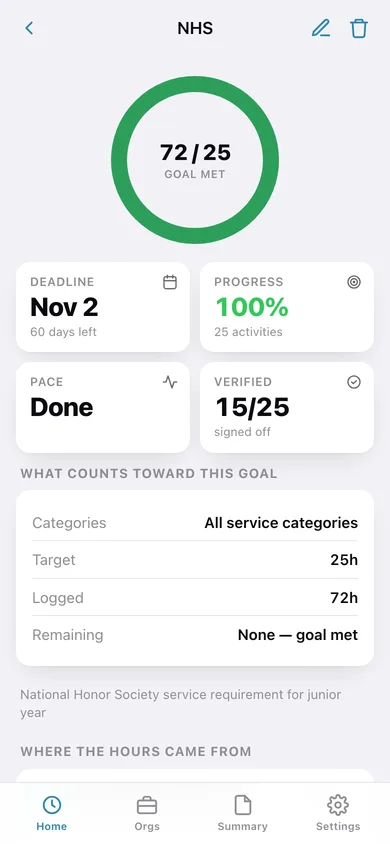
NHS 25 hours, IB CAS 50, a scholarship target or a court order — each with its own deadline countdown and the hours-per-week pace you need to hold.
Entries that survive an advisor's questions
Organization, date, hours, your role, a real description of what you did, the service category, and a line for your supervisor's verification.
Organizations with supervisor contacts
Save each place once with the supervisor who can confirm your hours and their email or phone — then logging there takes seconds and the contact is on the form.
Category-specific awards handled properly
A goal can count only Environment hours, or only Healthcare — so a green award and your overall NHS total stay separate and both stay honest.
The Summary you copy onto the form
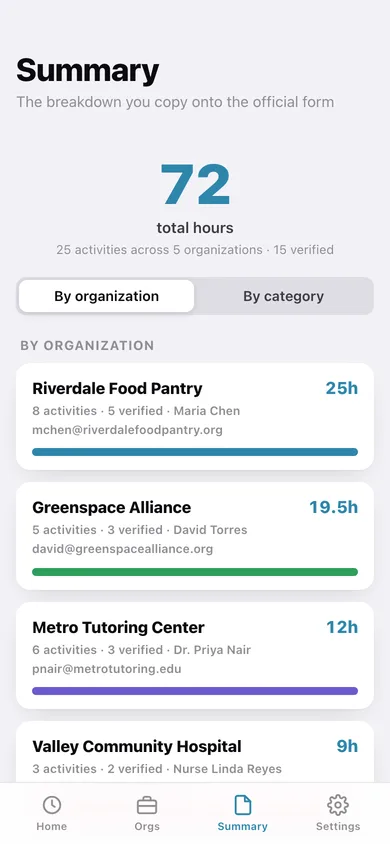
Total hours grouped by organization or by category, with supervisor names, a hours-per-month chart, and one tap to copy it as text or export a CSV for your advisor.
Nothing leaves this browser
No account, no cloud, no ads — the whole logbook lives on your device with a JSON backup whenever you want one.
Screens
Every screen, rebuilt for the browser
-
1
Home
Total verified hours, a ring per goal with its deadline, and your recent activities.
-
2
Goal
One goal's big ring, deadline countdown, weekly pace and where the hours came from.
-
3
Log hours
The entry form: organization, date, hours, role, category, description and verification.
-
4
Activity
One activity in full, with the supervisor contact and every goal it counts toward.
-
5
Organizations
Every place you serve with hours logged and when you were last there.
-
6
Organization
Supervisor name and contact, hours by category, and every activity there.
-
7
Edit organization
Name, supervisor, email or phone and shift notes.
-
8
Summary
Total hours grouped by organization or category, hours a month, copy and CSV.
-
9
Settings
Default hours, your goals, export, sample logbook and erase.
Try it with sample data: Loads a full semester: five organizations from a food pantry to a hospital with real supervisor contacts, twenty-five activities across sixteen weeks with roles and descriptions, most signed off, and three live goals — NHS, IB CAS and an Environment-only award with a deadline three weeks out. You can start fresh at any time.
Ready? It's free.
No account, no install, no subscription. Everything you do stays in this browser.
Your say
What should Servicehours do? Tell us before we build it.
Tell us what to build next.
Comments need a free Google sign-in, so every one is from a real person.
Sign in with Google to commentNo comments yet — be the first to say what this app should do next.
Questions
Is the web version of Servicehours free?+
Yes. Every screen is free to use: no subscription, no in-app purchases, no account.
Do I need an account?+
No. Open Servicehours and start using it right away. Sign in with Google only if you want to upvote an app, save it to your list, or leave a comment.
Where is my data stored?+
Only in this browser's local storage. Nothing you enter is sent to our servers, so we can't see it, back it up, or restore it. Clearing site data, a private window, or another device starts empty. Export a backup from the in-app menu to keep it.
Is there a Servicehours app for iPhone or Android?+
Not yet. Servicehours is a community proposal: the browser version is complete, and we build the iPhone and Android app once 100 people upvote it. Upvoters get one email when it ships.