
Web app · Business
ServeProof
The evidence chain behind every affidavit — stamped at the door, in any browser
Keep a case file for every job, stamp each attempt with the time and coordinates, record who answered and what happened, then assemble the attempt chain into a declaration of due diligence and a fee-and-mileage ledger. Free, no account, no install.
Stored in your browser only. Nothing you do in the web version is sent to our servers. Clear your browser data and it's gone — so export a backup from the in-app menu if you want to keep it.
This app is a community proposal.
Try the full browser version now. We build the iPhone and Android app once 100 people upvote it.
We'll email you once, when it ships. Unsubscribe anytime.
In your browser
What you can do in ServeProof on the web
Case binder
Case number, court, parties, documents to serve, servee description, address, issuing law firm, fee and due date — segmented into Active, Served and Archived, with search by servee, case number or firm.
Doorstep attempt logger
One screen stamps the date, time and your browser's GPS fix (or coordinates typed by hand), then takes outcome — No Answer, Evaded, Bad Address, Substituted, Served — who answered, notes, miles and photo notes.
Evidence chain
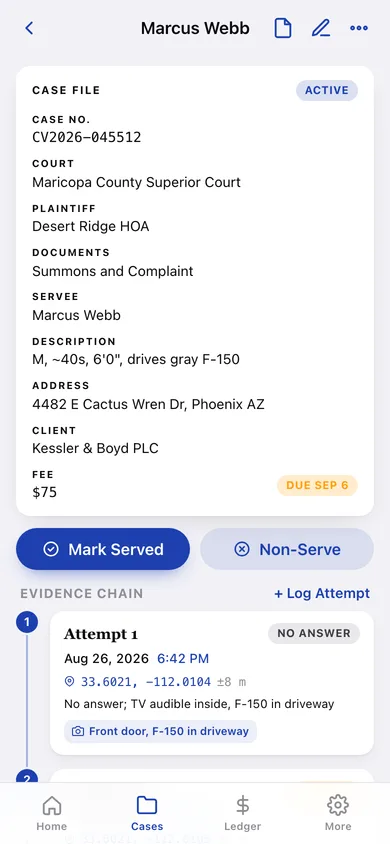
Every case shows its numbered, chronological chain of attempts with time, coordinate stamp, outcome tag and notes, so three documented attempts are visible at a glance.
Declaration of due diligence
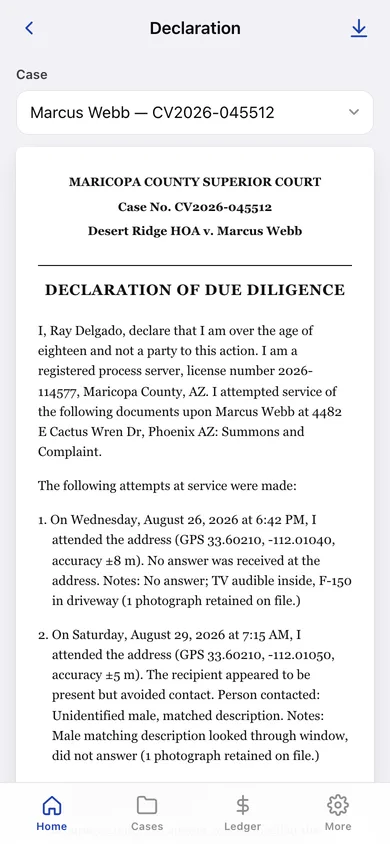
Assembles the caption block, preamble, numbered attempts with dates, times, GPS and narrative, the service statement and your signature block into a ready-to-sign document you can copy or download.
Fee & mileage ledger
Served cases and attempt miles roll into monthly groups, with a year summary of serves, fees, attempts, miles, average attempts per serve, busiest month and a CSV download for tax time.
Server profile
Your name, business, license number, jurisdiction and contact details populate the signature block on every declaration.
Screens
Every screen, rebuilt for the browser
-
1
Home
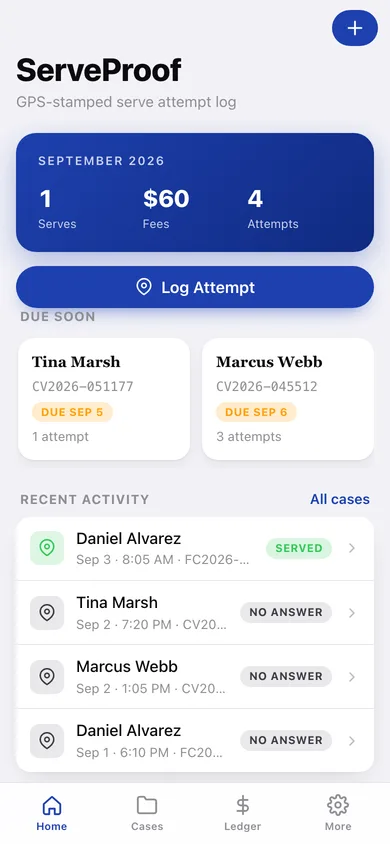
This month's serves, fees and attempts, the Log Attempt button, cases due soon and recent activity.
-
2
Cases
Active, Served and Archived case files with search.
-
3
Case file
Facts, status controls and the numbered evidence chain of attempts.
-
4
Case editor
Create or edit a case: servee, address, case number, court, plaintiff, documents, client firm, fee and due date.
-
5
Log Attempt
The doorstep screen: time and coordinate stamp, outcome, who answered, notes, miles and photo notes.
-
6
Attempt record
The fixed stamp plus editable outcome, person contacted and notes.
-
7
Declaration
The assembled declaration of due diligence for a case, with copy and download.
-
8
Ledger
Serves, fees and miles by month.
-
9
Year summary
Year totals, average attempts per serve, busiest month and attempts-by-month chart.
-
10
Server profile
Name, business, license, jurisdiction and contact details for the signature block.
-
11
Archive
Closed non-serves and archived cases kept on record.
-
12
More
Profile, record counts, backup, sample data and erase.
Try it with sample data: Loads a Phoenix-area server profile and seven case files — active, served, substituted and archived — with twelve stamped attempts across the last four weeks. You can start fresh at any time.
Ready? It's free.
No account, no install, no subscription. Everything you do stays in this browser.
Your say
What should ServeProof do? Tell us before we build it.
Tell us what to build next.
Comments need a free Google sign-in, so every one is from a real person.
Sign in with Google to commentNo comments yet — be the first to say what this app should do next.
Questions
Is the web version of ServeProof free?+
Yes. Every screen is free to use: no subscription, no in-app purchases, no account.
Do I need an account?+
No. Open ServeProof and start using it right away. Sign in with Google only if you want to upvote an app, save it to your list, or leave a comment.
Where is my data stored?+
Only in this browser's local storage. Nothing you enter is sent to our servers, so we can't see it, back it up, or restore it. Clearing site data, a private window, or another device starts empty. Export a backup from the in-app menu to keep it.
Is there a ServeProof app for iPhone or Android?+
Not yet. ServeProof is a community proposal: the browser version is complete, and we build the iPhone and Android app once 100 people upvote it. Upvoters get one email when it ships.