
Web app · Health And Fitness
Roundbell
The interval timer you can read from across the room — now in any browser
Tabata, EMOM, boxing rounds and your own circuits with a full-screen colour-per-interval player, bell and 3-2-1 beeps, voice cues, and a history that tracks your streak and weekly minutes. Free, no install.
Stored in your browser only. Nothing you do in the web version is sent to our servers. Clear your browser data and it's gone — so export a backup from the in-app menu if you want to keep it.
In App Review — coming to the App Store
Roundbell is with Apple now. You can use the full browser version today, and we'll email you the day the app is live.
0 waiting for launch
We'll email you once, when it ships. Unsubscribe anytime.
In your browser
What you can do in Roundbell on the web
Quick start in three taps
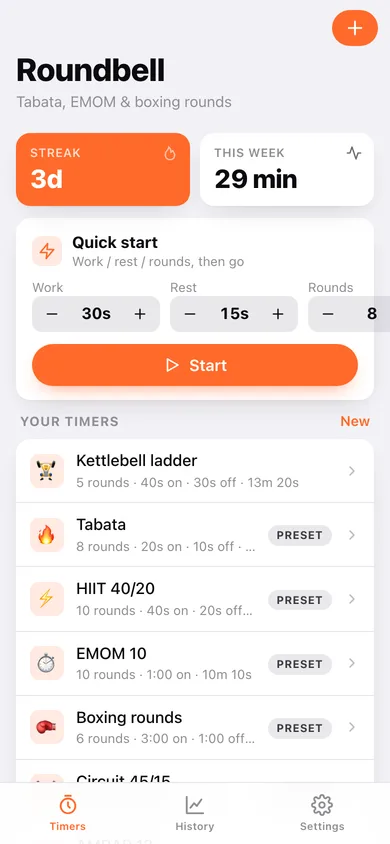
Set work, rest and rounds with steppers and hit Start — no setup screen, no account.
8 presets + unlimited custom timers
Tabata, HIIT 40/20, EMOM, boxing rounds, circuit, AMRAP, run/walk and stretch, or build your own with named, coloured intervals, round rest, get-ready and cool-down.
Full-screen player
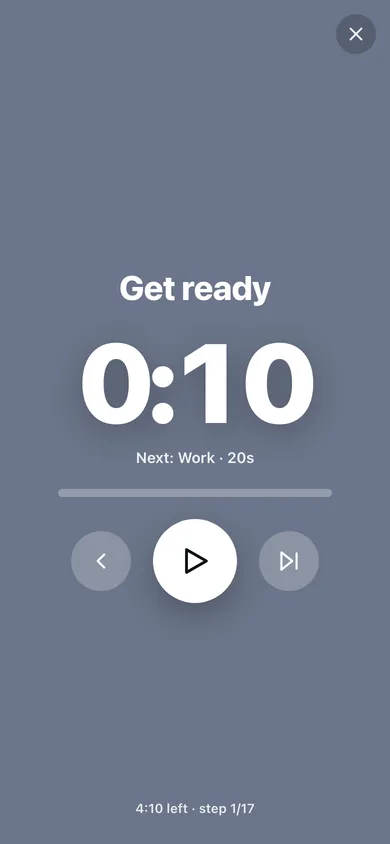
The whole screen changes colour per interval with a huge countdown, next-up, round counter, progress bar, skip and back.
Bell, beeps and voice
A bell on every change, 3-2-1 beeps, spoken interval names and an optional halfway cue — all generated in your browser.
History, streak and weekly minutes
Every finished (or stopped) workout is logged with a bar chart of minutes per week and a 12-week heatmap.
Stays in your browser
Timers and history are saved locally; export a JSON backup any time.
Screens
Every screen, rebuilt for the browser
-
1
Timers
Streak and weekly minutes, quick start, and all your presets and custom timers.
-
2
Timer detail
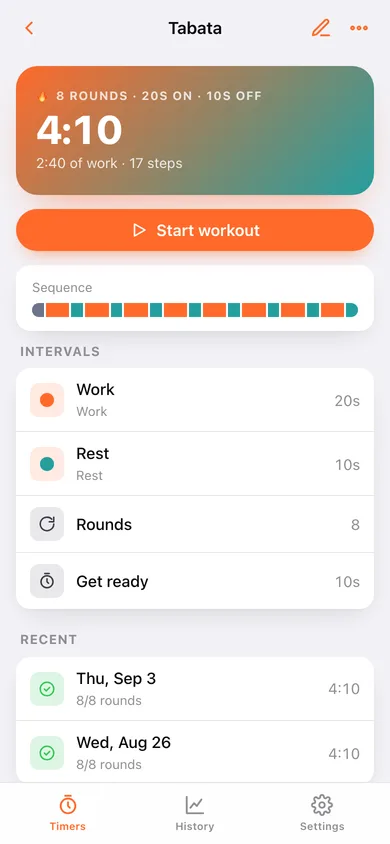
Sequence preview, intervals, rounds and recent runs of one timer.
-
3
Timer editor
Name, emoji, coloured intervals, rounds, round rest, get-ready and cool-down.
-
4
Player
Full-screen colour-per-interval countdown with cues and controls.
-
5
Summary
Duration, rounds completed, streak and weekly totals after a workout.
-
6
History
Minutes per week, 12-week heatmap and every logged workout.
-
7
Settings
Cues, get-ready length, backup, sample data and erase.
Try it with sample data: Loads the 8 presets, a custom kettlebell ladder and nine logged workouts across the last two weeks. You can start fresh at any time.
Ready? It's free.
No account, no install, no subscription. Everything you do stays in this browser.
Your say
What should Roundbell do? Tell us before we build it.
Tell us what to build next.
Comments need a free Google sign-in, so every one is from a real person.
Sign in with Google to commentNo comments yet — be the first to say what this app should do next.
Questions
Is the web version of Roundbell free?+
Yes. Every screen is free to use: no subscription, no in-app purchases, no account.
Do I need an account?+
No. Open Roundbell and start using it right away. Sign in with Google only if you want to upvote an app, save it to your list, or leave a comment.
Where is my data stored?+
Only in this browser's local storage. Nothing you enter is sent to our servers, so we can't see it, back it up, or restore it. Clearing site data, a private window, or another device starts empty. Export a backup from the in-app menu to keep it.
When is the Roundbell iPhone app out?+
Roundbell is in App Review with Apple now. Tap “Notify me at launch” and we'll email you once, the day it's live.