
Web app · Finance
Rosca
Run your savings circle without the arguments over the notebook
Committee, chit fund, susu, tanda or hui — Rosca tracks the members, the contribution, who has paid each cycle, the size of the pot and whose turn it is to collect, so the whole group can see the same record. Free, no install, no account.
Stored in your browser only. Nothing you do in the web version is sent to our servers. Clear your browser data and it's gone — so export a backup from the in-app menu if you want to keep it.
This app is a community proposal.
Try the full browser version now. We build the iPhone and Android app once 100 people upvote it.
We'll email you once, when it ships. Unsubscribe anytime.
In your browser
What you can do in Rosca on the web
Set up a circle in one screen
Name it, set the contribution per member, pick weekly, bi-weekly or monthly, choose how many cycles and type in the members — the pot is worked out as you go.
Tick off contributions per cycle
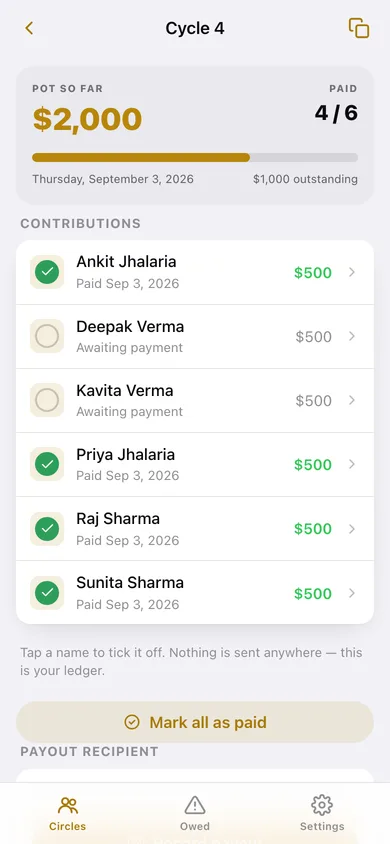
Every cycle opens a list of members; tap a name to mark them paid, watch the pot fill, and see exactly how much is still outstanding.
The rota, at a glance
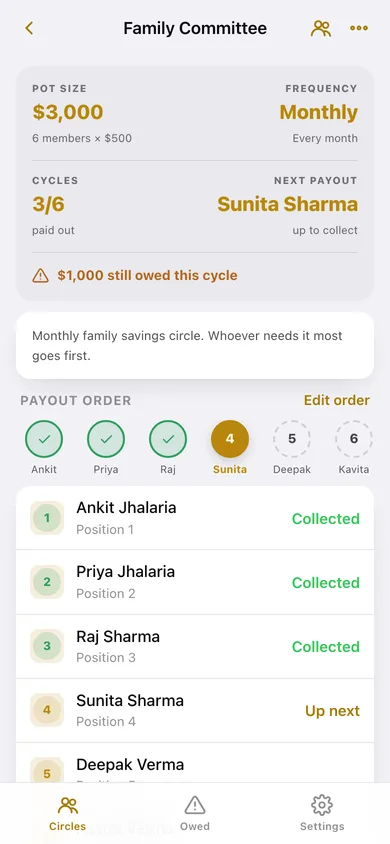
A strip of positions shows who has already collected, who is up next, and who is still waiting — with an order you set by hand or draw at random the way circles do at the first meeting.
Record the payout
When every contribution is in, record who took the pot. Rosca marks them collected, moves the rota on, and blocks anyone from collecting twice.
Chase list across every circle
One screen showing every unpaid contribution in every circle, the amounts outstanding per person, and which pot is due next.
A record you can share
Copy the whole circle summary or one cycle's list as plain text and paste it straight into the group chat. Export everything as CSV whenever you like.
Screens
Every screen, rebuilt for the browser
-
1
Circles
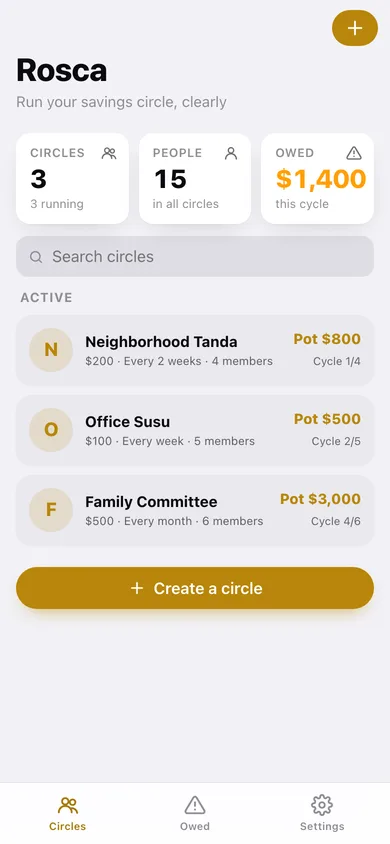
Every circle with its contribution, frequency, member count, pot size and how many cycles have paid out.
-
2
Circle detail
Pot size, frequency, cycles completed, who is up next, what is still owed, the rota strip and every cycle.
-
3
Cycle
The pot so far with a paid/unpaid bar, every member's contribution to tick off, and the payout recipient.
-
4
Payout Order
Arrange who collects first, or draw the order at random; positions already collected are marked.
-
5
Members
Add, rename or remove members — new joiners get a contribution row in every open cycle.
-
6
New Circle
Name, contribution, frequency, start date, number of cycles, member names and a live pot preview.
-
7
Owed
Every unpaid contribution across all your circles, the biggest amounts outstanding, and the next pots due.
-
8
Settings
Circle totals, CSV and JSON export, sample data, erase, and how a rotating circle works.
Try it with sample data: Loads three circles at different stages: a monthly $500 Family Committee in cycle 4 of 6 with two members still to pay, a weekly $100 Office Susu whose second pot is fully collected and waiting on a payout, and a bi-weekly $200 Neighborhood Tanda whose payout order has not been drawn yet. You can start fresh at any time.
Ready? It's free.
No account, no install, no subscription. Everything you do stays in this browser.
Your say
What should Rosca do? Tell us before we build it.
Tell us what to build next.
Comments need a free Google sign-in, so every one is from a real person.
Sign in with Google to commentNo comments yet — be the first to say what this app should do next.
Questions
Is the web version of Rosca free?+
Yes. Every screen is free to use: no subscription, no in-app purchases, no account.
Do I need an account?+
No. Open Rosca and start using it right away. Sign in with Google only if you want to upvote an app, save it to your list, or leave a comment.
Where is my data stored?+
Only in this browser's local storage. Nothing you enter is sent to our servers, so we can't see it, back it up, or restore it. Clearing site data, a private window, or another device starts empty. Export a backup from the in-app menu to keep it.
Is there a Rosca app for iPhone or Android?+
Not yet. Rosca is a community proposal: the browser version is complete, and we build the iPhone and Android app once 100 people upvote it. Upvoters get one email when it ships.