
Web app · Business
Robowatch
A grid view for the humanoids on your floor — status, battery and tasks, in any browser
The small-business fleet viewer: a cafe with two humanoids, a vet office with one, a hotel with three. Each robot gets a tile with status, battery and task count, a manual journal of status changes, battery reads, finished tasks and notes, and a fleet stats page. Free, no account, no telemetry required.
Stored in your browser only. Nothing you do in the web version is sent to our servers. Clear your browser data and it's gone — so export a backup from the in-app menu if you want to keep it.
This app is a community proposal.
Try the full browser version now. We build the iPhone and Android app once 100 people upvote it.
We'll email you once, when it ships. Unsubscribe anytime.
In your browser
What you can do in Robowatch on the web
Fleet grid
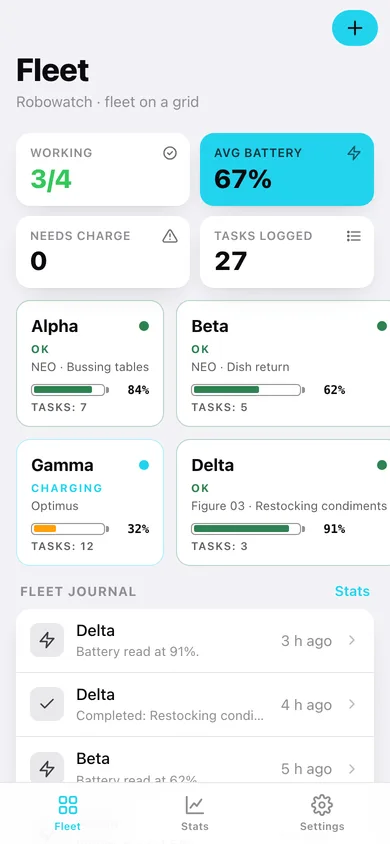
One tile per robot — name, model (NEO, Optimus, Figure 03, Digit, UBTECH Walker), status colour, battery gauge, current task and task count.
Working / needs-charge at a glance
Working count, average battery, robots at or below the low-battery threshold and total tasks logged, plus an attention banner for faults, maintenance and flat batteries.
Per-robot journal
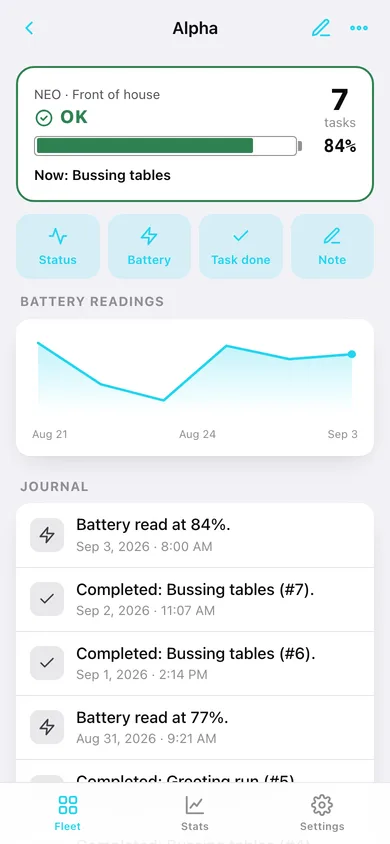
Set status (OK, charging, idle, maintenance, fault), log a battery reading, tick off a completed task or write a note — every entry is timestamped and kept.
Battery history
A line of each robot's logged battery readings, and a fleet-wide ranking from emptiest to fullest.
Fleet stats
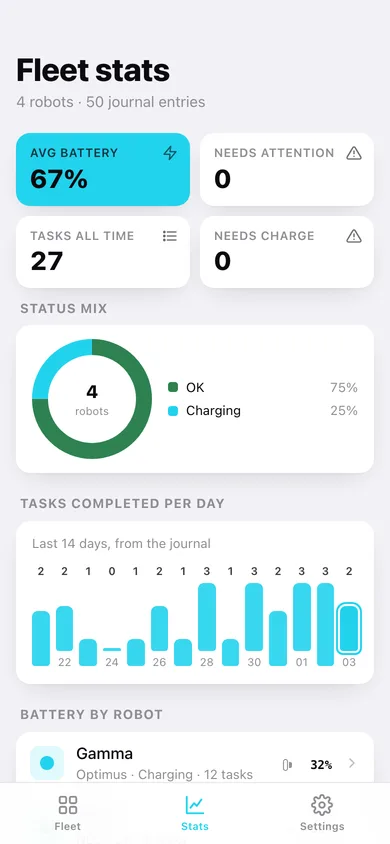
Status mix donut, tasks completed per day over two weeks, battery by robot and the models on the floor.
Exports
Journal as CSV and a full JSON backup — all stored in this browser only.
Screens
Every screen, rebuilt for the browser
-
1
Fleet
Fleet stats, attention banner, the robot tile grid and the latest journal entries.
-
2
Robot
Status, big battery gauge, task count, quick actions, battery readings line and the journal.
-
3
Fleet stats
Status mix, tasks per day, battery by robot, models.
-
4
Settings
Low-battery threshold, promises, journal CSV, backup, sample data, erase.
Try it with sample data: Loads a four-robot cafe fleet — two NEOs, an Optimus on the dock and a Figure 03 — with two weeks of journal entries: battery reads, finished tasks, a maintenance ticket and notes. You can start fresh at any time.
Ready? It's free.
No account, no install, no subscription. Everything you do stays in this browser.
Your say
What should Robowatch do? Tell us before we build it.
Tell us what to build next.
Comments need a free Google sign-in, so every one is from a real person.
Sign in with Google to commentNo comments yet — be the first to say what this app should do next.
Questions
Is the web version of Robowatch free?+
Yes. Every screen is free to use: no subscription, no in-app purchases, no account.
Do I need an account?+
No. Open Robowatch and start using it right away. Sign in with Google only if you want to upvote an app, save it to your list, or leave a comment.
Where is my data stored?+
Only in this browser's local storage. Nothing you enter is sent to our servers, so we can't see it, back it up, or restore it. Clearing site data, a private window, or another device starts empty. Export a backup from the in-app menu to keep it.
Is there a Robowatch app for iPhone or Android?+
Not yet. Robowatch is a community proposal: the browser version is complete, and we build the iPhone and Android app once 100 people upvote it. Upvoters get one email when it ships.