
Web app · Health And Fitness
Resonate: Voice Trainer
See pitch and resonance together on one voice map, and practise into your zone
The 2D map from the iPhone app — pitch running low to high, resonance running dark to bright — with Feminine, Masculine, Androgynous and Custom target zones, four guided drills that draw a dotted path, and a time-in-zone score for every session. Free, private, no install.
Stored in your browser only. Nothing you do in the web version is sent to our servers. Clear your browser data and it's gone — so export a backup from the in-app menu if you want to keep it.
This app is a community proposal.
Try the full browser version now. We build the iPhone and Android app once 100 people upvote it.
We'll email you once, when it ships. Unsubscribe anytime.
In your browser
What you can do in Resonate: Voice Trainer on the web
The 2D voice map
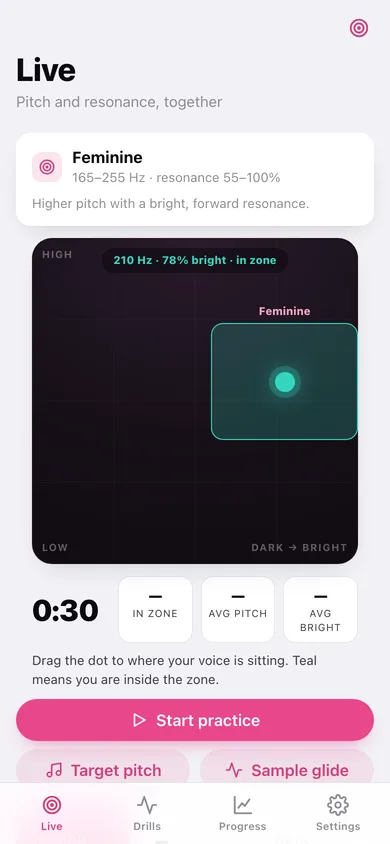
Pitch (70–320 Hz) up the side, resonance/brightness across the bottom. The dot turns teal the moment it lands inside your target zone, exactly as on iPhone.
Four target zones
Feminine 165–255 Hz at 55–100% bright, Masculine 85–155 Hz at 0–45%, Androgynous 145–190 Hz at 40–66%, plus a Custom band you set yourself with four sliders.
All four guided drills
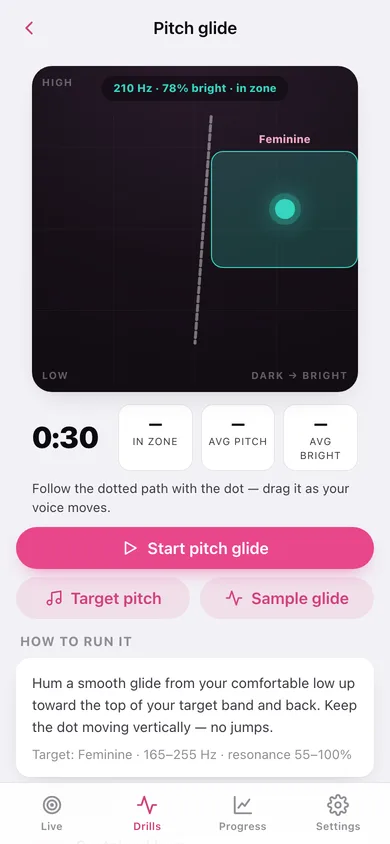
Pitch glide, sustained hum, big dog / small dog and the resonance siren — each draws its real dotted guide path across the map and runs its own timer.
Time-in-zone scoring
Every run samples your position ten times a second, then scores average pitch, average brightness and the percentage of the session spent inside the zone.
The bundled sample glide
The same synthesized-but-organic trajectory the iPhone app plays when there is no live signal — watch the dot climb from dark and low into a bright band and back.
Progress and range map
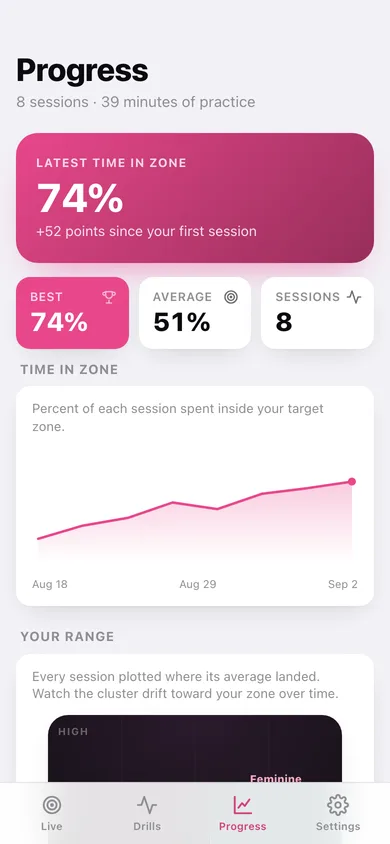
A time-in-zone trend line, your best and average, and a range map where every session lands as a dot so you can watch the cluster drift toward your target.
A reference pitch to match
Tap Play target pitch and the browser sounds the middle of your zone so you can hum against it.
Screens
Every screen, rebuilt for the browser
-
1
Live
The voice map with your target zone, a practice timer, live in-zone percentage and the sample glide.
-
2
Target zone
Pick Feminine, Masculine, Androgynous or Custom, and fine-tune your own band with four sliders.
-
3
Drills
The four guided drills with your best time-in-zone on each, and recent sessions.
-
4
Drill
One drill: its dotted guide path on the map, its timer, how to run it and your past attempts.
-
5
Progress
Time-in-zone trend, best and average, the range map of every session, and full history.
-
6
Session
One finished session: time in zone, where it averaged on the map, and what to fix next.
-
7
Settings
Target zone, free-practice length, reference tone, the science, export, sample data and erase.
Try it with sample data: Adds the four target zones with Feminine active, plus eight practice sessions over the last two and a half weeks that climb from 22% to 74% time in zone. You can start fresh at any time.
Ready? It's free.
No account, no install, no subscription. Everything you do stays in this browser.
Your say
What should Resonate: Voice Trainer do? Tell us before we build it.
Tell us what to build next.
Comments need a free Google sign-in, so every one is from a real person.
Sign in with Google to commentNo comments yet — be the first to say what this app should do next.
Questions
Is the web version of Resonate: Voice Trainer free?+
Yes. Every screen is free to use: no subscription, no in-app purchases, no account.
Do I need an account?+
No. Open Resonate: Voice Trainer and start using it right away. Sign in with Google only if you want to upvote an app, save it to your list, or leave a comment.
Where is my data stored?+
Only in this browser's local storage. Nothing you enter is sent to our servers, so we can't see it, back it up, or restore it. Clearing site data, a private window, or another device starts empty. Export a backup from the in-app menu to keep it.
Is there a Resonate: Voice Trainer app for iPhone or Android?+
Not yet. Resonate: Voice Trainer is a community proposal: the browser version is complete, and we build the iPhone and Android app once 100 people upvote it. Upvoters get one email when it ships.