
Web app · Health And Fitness
RepSheet
Your PT's paper sheet, turned into a daily checklist you actually finish
Type in the program your therapist wrote — sets, reps, hold seconds, band colour, side, once or twice daily — and RepSheet schedules it, ticks it off, records a 0–10 pain score per exercise, and builds the summary your therapist asks for at the next visit. Free, no clinic code, no account.
Stored in your browser only. Nothing you do in the web version is sent to our servers. Clear your browser data and it's gone — so export a backup from the in-app menu if you want to keep it.
This app is a community proposal.
Try the full browser version now. We build the iPhone and Android app once 100 people upvote it.
We'll email you once, when it ships. Unsubscribe anytime.
In your browser
What you can do in RepSheet on the web
Program builder that matches the handout
Each exercise exactly as written: sets × reps, hold seconds, side, equipment such as a green band, and the therapist's own note — rendered as one prescription line.
Morning and evening check-off
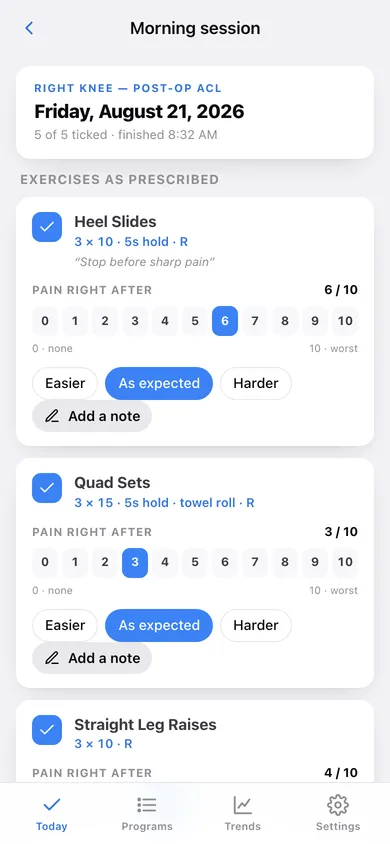
Today's prescribed sessions appear as a checklist. Tick each exercise, tap a 0–10 pain number and Easier / As expected / Harder while the sensation is still fresh.
Rest days and taper
Mark the weekdays your therapist wrote off, and set a taper date — the plan steps down to once daily, then to every other day after four weeks.
Adherence calendar
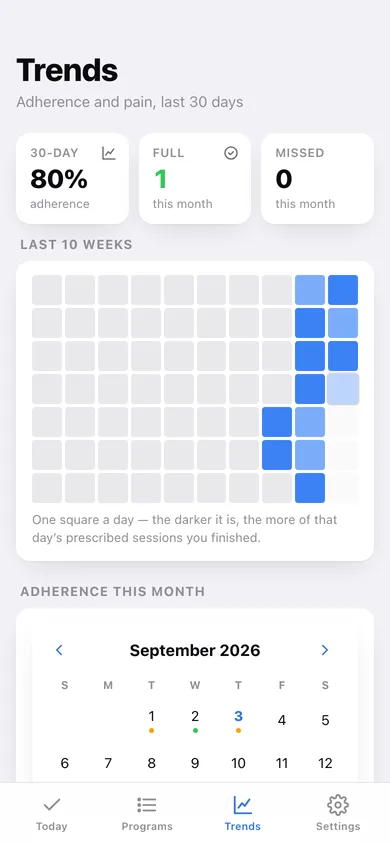
A month grid where every day is coloured all-done, partly done, missed or prescribed rest, plus your 14- and 30-day adherence percentage.
Pain trend per exercise
Every movement keeps its own 0–10 line, a first → last comparison, your difficulty tags and the notes you left along the way.
Visit summary for your PT
Sessions completed since your last visit, the exercises you skipped most, the pain trend for each movement and your notes — copyable in one tap.
Screens
Every screen, rebuilt for the browser
-
1
Today
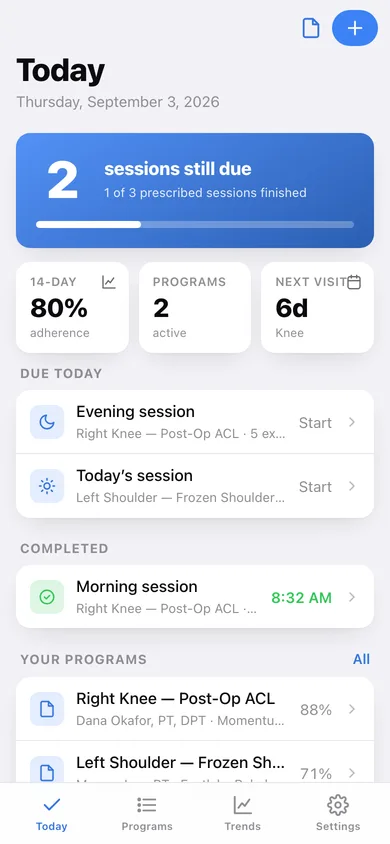
Sessions still due and finished, 14-day adherence and the countdown to your next visit.
-
2
Session check-off
Each prescribed exercise with its sets/reps line, a tick box, the 0–10 pain scale and a difficulty tag.
-
3
Trends
Adherence calendar for the month plus a pain sparkline for every exercise.
-
4
Programs
Every program you keep, active or discharged, with its adherence.
-
5
Program
One program's sheet, therapist, clinic, exercises and logged clinic visits.
-
6
Program editor
Recreate the handout: exercises, sets, reps, hold, side, equipment, frequency, rest days and taper.
-
7
Exercise history
One movement's pain line over 60 days, how it felt, and every logged score.
-
8
For your PT
Sessions completed since the last visit, most-skipped exercises and pain trends.
-
9
Settings
Programs, JSON backup, session CSV, sample data and erase.
Try it with sample data: Loads two in-flight programs — a twice-daily post-op ACL knee program with Sundays off and twelve days of logs, and a once-daily frozen shoulder program — each with real pain scores, skipped sessions and clinic visit notes. You can start fresh at any time.
Ready? It's free.
No account, no install, no subscription. Everything you do stays in this browser.
Your say
What should RepSheet do? Tell us before we build it.
Tell us what to build next.
Comments need a free Google sign-in, so every one is from a real person.
Sign in with Google to commentNo comments yet — be the first to say what this app should do next.
Questions
Is the web version of RepSheet free?+
Yes. Every screen is free to use: no subscription, no in-app purchases, no account.
Do I need an account?+
No. Open RepSheet and start using it right away. Sign in with Google only if you want to upvote an app, save it to your list, or leave a comment.
Where is my data stored?+
Only in this browser's local storage. Nothing you enter is sent to our servers, so we can't see it, back it up, or restore it. Clearing site data, a private window, or another device starts empty. Export a backup from the in-app menu to keep it.
Is there a RepSheet app for iPhone or Android?+
Not yet. RepSheet is a community proposal: the browser version is complete, and we build the iPhone and Android app once 100 people upvote it. Upvoters get one email when it ships.