
Web app · Finance
RenewGap
Diff every insurance renewal — and see what loyalty has actually cost you
Log each policy's declarations at every renewal and RenewGap compares consecutive terms line by line, flags the deductible that quietly doubled, and renders your compounded increase from any baseline year as a shareable Gap Card. Free, no install, no policy linking.
Stored in your browser only. Nothing you do in the web version is sent to our servers. Clear your browser data and it's gone — so export a backup from the in-app menu if you want to keep it.
In App Review — coming to the App Store
RenewGap is with Apple now. You can use the full browser version today, and we'll email you the day the app is live.
0 waiting for launch
We'll email you once, when it ships. Unsubscribe anytime.
In your browser
What you can do in RenewGap on the web
Renewal-vs-renewal diffs
Premium, coverage limits and deductibles compared line by line, with the previous value struck through and every silent change labelled Added, Removed, Changed or Deductible up.
Deductible warnings
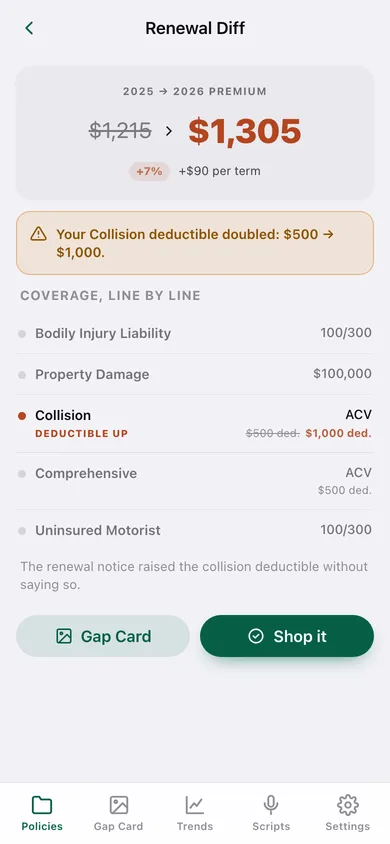
When a deductible rises between terms — the change carriers never announce — it gets its own amber banner: 'Your Collision deductible doubled: $500 → $1,000.'
The Gap Card
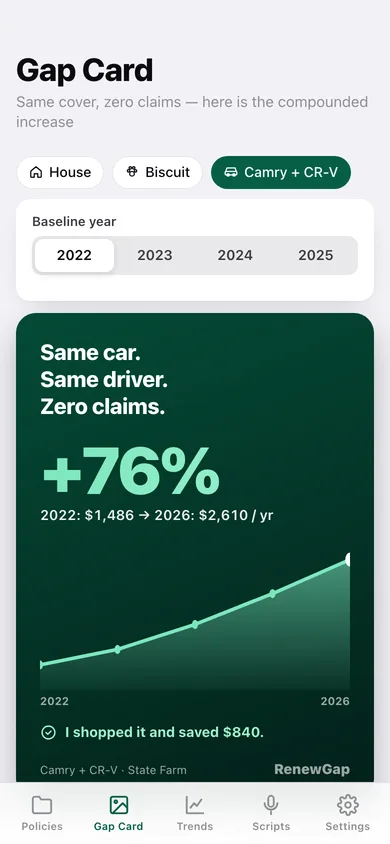
Pick a baseline year and see 'Same car. Same driver. Zero claims.' over the compounded increase, an emerald area chart of every annualized premium, and your logged savings — copyable in one tap.
The 45-day shop trigger
A countdown ring per policy that turns amber inside your shop window, opening a six-step checklist across discounts, quotes and the retention call, with an outcome you log at the end.
Call scripts and a quote packet
Fourteen tested lines for the discount, quote and retention phases, plus a one-page packet listing your exact limits and deductibles so every quote is apples-to-apples.
Auto, home, renters, pet and umbrella
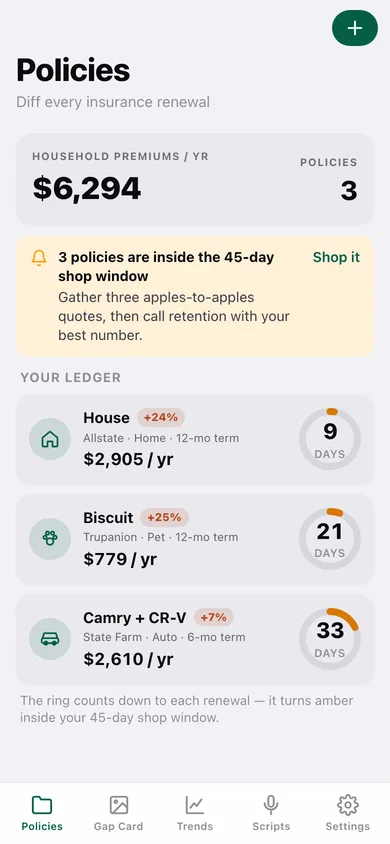
Every household policy in one ledger, with terms shorter than a year annualized so a six-month auto policy compares fairly with a twelve-month home policy.
Screens
Every screen, rebuilt for the browser
-
1
Policies
Household premiums per year, every policy with its renewal countdown ring and the change since its last term.
-
2
Gap Card
The shareable card: kicker, compounded increase, area chart of annualized premiums and your logged savings.
-
3
Renewal Diff
Two consecutive terms compared: premium then versus now, deductible warnings, and coverage line by line.
-
4
Policy detail
Annualized premium, renewal countdown, national-average benchmark for auto, and the full renewal history.
-
5
Log Renewal
Term dates, premium and coverage lines — all prefilled from the previous term so a no-change renewal takes a minute.
-
6
Shop This Renewal
The six-step shop checklist across discounts, quotes and the retention call, with a progress ring and an outcome log.
-
7
Shopping Packet
Your exact current coverages, limits and deductibles on one page, ready to read out on a quote call.
-
8
Trends
Household premiums per year, a compounded index per policy from any baseline, and each policy's increase since then.
-
9
Call Scripts
Fourteen lines for discounts, quote gathering and the retention desk — tap any one to copy it.
-
10
New Policy
Name, kind, carrier, term length and next renewal date.
-
11
Settings
Shop-window length, ledger totals, CSV and JSON export, sample data and erase.
Try it with sample data: Loads a three-policy household: an auto policy with nine six-month terms rising 76% since its baseline year (including a collision deductible that quietly doubled) and a completed shop cycle that saved $840, a home policy whose wind/hail deductible went from 1% to 2% of dwelling, and a pet policy already inside the shop window with two checklist steps done. You can start fresh at any time.
Ready? It's free.
No account, no install, no subscription. Everything you do stays in this browser.
Your say
What should RenewGap do? Tell us before we build it.
Tell us what to build next.
Comments need a free Google sign-in, so every one is from a real person.
Sign in with Google to commentNo comments yet — be the first to say what this app should do next.
Questions
Is the web version of RenewGap free?+
Yes. Every screen is free to use: no subscription, no in-app purchases, no account.
Do I need an account?+
No. Open RenewGap and start using it right away. Sign in with Google only if you want to upvote an app, save it to your list, or leave a comment.
Where is my data stored?+
Only in this browser's local storage. Nothing you enter is sent to our servers, so we can't see it, back it up, or restore it. Clearing site data, a private window, or another device starts empty. Export a backup from the in-app menu to keep it.
When is the RenewGap iPhone app out?+
RenewGap is in App Review with Apple now. Tap “Notify me at launch” and we'll email you once, the day it's live.