
Web app · Food And Drink
Recipo
Your recipe box, offline — no ads, no life story before the recipe
Keep the meals you actually make with ingredients, steps, time and servings. Scale any recipe to a different number of people and every quantity rescales, fractions and all. Pick a few recipes and Recipo builds one combined shopping list. Free, no account.
Stored in your browser only. Nothing you do in the web version is sent to our servers. Clear your browser data and it's gone — so export a backup from the in-app menu if you want to keep it.
This app is a community proposal.
Try the full browser version now. We build the iPhone and Android app once 100 people upvote it.
We'll email you once, when it ships. Unsubscribe anytime.
In your browser
What you can do in Recipo on the web
A real recipe box
Add, edit and duplicate recipes with ingredients, numbered steps, prep and cook time, servings, tags and an emoji — searchable and filterable by tag.
Instant serving scaling
Move the servings stepper and every quantity rescales, rendered as proper fractions — ¼ cup doubled reads ½ cup, not 0.5.
Plan the week
Tick several recipes, scale each one, and Recipo merges the ingredients into a single list, adding up the amounts that share a unit.
Checkable shopping list
To get and Got it sections, one-tap ticking, manual additions, copy the list as text, and Clear checked when you get home.
Cook mode
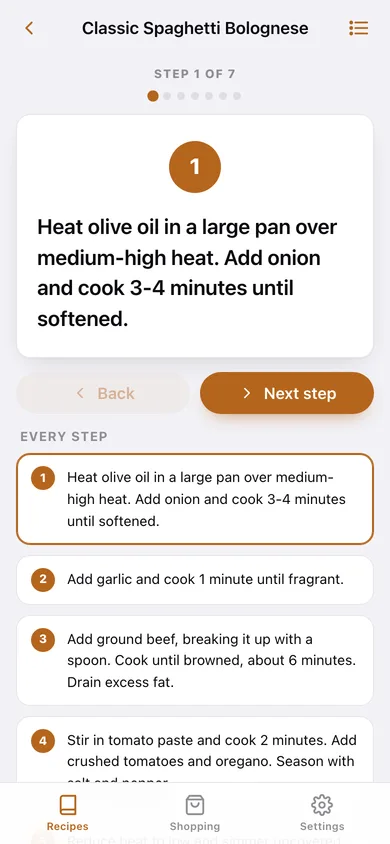
One big step at a time with a numbered badge, progress dots, back/next, a tap-to-jump step list and the ingredients a tap away.
Nothing leaves your browser
No account, no ads, no popups; export everything as JSON or as plain-text recipes you can paste anywhere.
Screens
Every screen, rebuilt for the browser
-
1
Recipe box
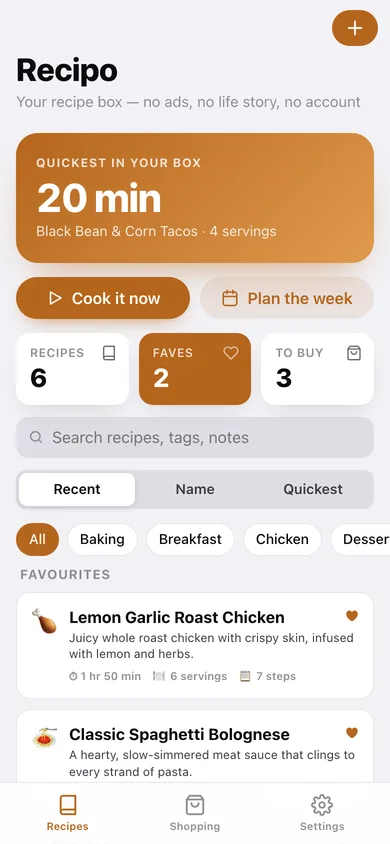
The quickest recipe in your box, counts, search, tag chips and sort, then every recipe as a card with time, servings and steps.
-
2
Recipe
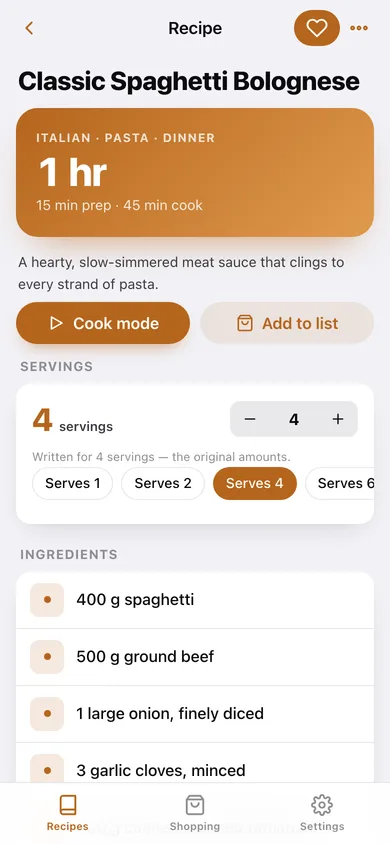
Time and tags, the servings scaler, all ingredients rescaled live, the numbered method, and buttons for cook mode and the shopping list.
-
3
Add or edit a recipe
Name, emoji, description, servings, prep and cook time, tags, a row-by-row ingredient editor and a step editor.
-
4
Cook mode
One step at a time in large type with progress dots, back and next, and the full step list to jump around.
-
5
Plan the week
Tick the meals you are cooking, scale each one, and preview the combined shopping list before adding it.
-
6
Shopping list
What is left to get, what is already in the basket, manual additions, copy and clear.
-
7
Settings
Cook-mode sounds, default servings, text and JSON export, sample data and erase.
Try it with sample data: Loads six family recipes — spaghetti bolognese, lemon garlic roast chicken, banana oat pancakes, black bean tacos, tomato basil soup and chocolate chip cookies — with full ingredients and steps, plus a part-ticked shopping list. You can start fresh at any time.
Ready? It's free.
No account, no install, no subscription. Everything you do stays in this browser.
Your say
What should Recipo do? Tell us before we build it.
Tell us what to build next.
Comments need a free Google sign-in, so every one is from a real person.
Sign in with Google to commentNo comments yet — be the first to say what this app should do next.
Questions
Is the web version of Recipo free?+
Yes. Every screen is free to use: no subscription, no in-app purchases, no account.
Do I need an account?+
No. Open Recipo and start using it right away. Sign in with Google only if you want to upvote an app, save it to your list, or leave a comment.
Where is my data stored?+
Only in this browser's local storage. Nothing you enter is sent to our servers, so we can't see it, back it up, or restore it. Clearing site data, a private window, or another device starts empty. Export a backup from the in-app menu to keep it.
Is there a Recipo app for iPhone or Android?+
Not yet. Recipo is a community proposal: the browser version is complete, and we build the iPhone and Android app once 100 people upvote it. Upvoters get one email when it ships.