
Web app · Education
QuickDeck Study
Flashcards with real FSRS-6 spaced repetition — free, in your browser, no paywall ever
Make decks and cards, study with Again / Good / Easy, and let the open-source FSRS-6 scheduler decide when each card comes back. Import a Quizlet CSV or paste cards, track your streak and retention per deck. Everything is saved in this browser and nothing is ever gated.
Stored in your browser only. Nothing you do in the web version is sent to our servers. Clear your browser data and it's gone — so export a backup from the in-app menu if you want to keep it.
This app is a community proposal.
Try the full browser version now. We build the iPhone and Android app once 100 people upvote it.
We'll email you once, when it ships. Unsubscribe anytime.
In your browser
What you can do in QuickDeck Study on the web
FSRS-6 scheduling, faithfully ported
The 21 default FSRS-6 weights, 90% target retention, stability and difficulty per card, lapses on Again — the same maths as the iPhone app.
Study with three buttons
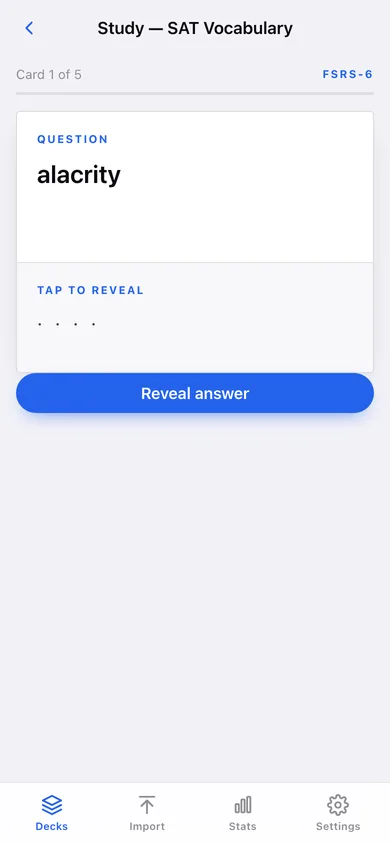
Tap to reveal, then Again / Good / Easy. Each button shows the interval it would schedule before you press it.
Decks and cards in seconds
Name a deck, add question and answer, edit or delete any card, reset a deck’s scheduling, export a deck as CSV.
Quizlet CSV import and pasted cards
Pick a CSV/TSV export or paste one card per line — commas, tabs, semicolons and quoted fields all work.
Stats that say what you actually know
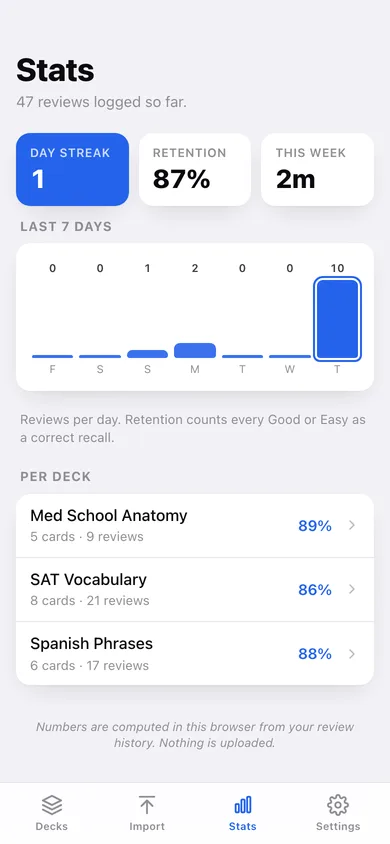
Day streak, retention rate, minutes studied this week, reviews per day for the last 7 days and retention per deck.
Due badges everywhere
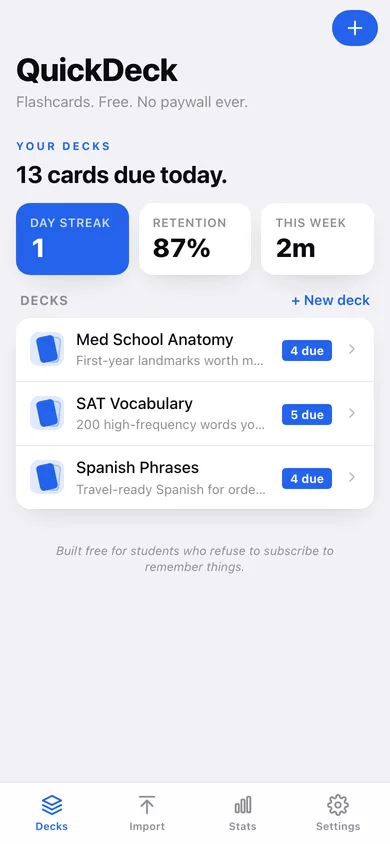
Home says how many cards are due today; each deck shows its due count; every card shows NEW, DUE NOW or DUE IN n DAYS.
Screens
Every screen, rebuilt for the browser
-
1
Decks
Cards due today, streak, retention and every deck with its due badge.
-
2
Deck
Card count, due now, reviewed today, Study now, add card, and every card with its schedule.
-
3
Study
One card at a time — reveal the answer, then Again / Good / Easy with FSRS-6 intervals.
-
4
Import
Pick a Quizlet CSV or paste cards to create a new deck.
-
5
Stats
Streak, retention, time this week, last 7 days and per-deck retention.
-
6
Settings
Library counts, algorithm details, export, sample data and erase.
Try it with sample data: Adds three decks (SAT Vocabulary, Spanish Phrases, Med School Anatomy) with 19 cards and about three weeks of replayed reviews, so some cards are due now and the stats have a streak. You can start fresh at any time.
Ready? It's free.
No account, no install, no subscription. Everything you do stays in this browser.
Your say
What should QuickDeck Study do? Tell us before we build it.
Tell us what to build next.
Comments need a free Google sign-in, so every one is from a real person.
Sign in with Google to commentNo comments yet — be the first to say what this app should do next.
Questions
Is the web version of QuickDeck Study free?+
Yes. Every screen is free to use: no subscription, no in-app purchases, no account.
Do I need an account?+
No. Open QuickDeck Study and start using it right away. Sign in with Google only if you want to upvote an app, save it to your list, or leave a comment.
Where is my data stored?+
Only in this browser's local storage. Nothing you enter is sent to our servers, so we can't see it, back it up, or restore it. Clearing site data, a private window, or another device starts empty. Export a backup from the in-app menu to keep it.
Is there a QuickDeck Study app for iPhone or Android?+
Not yet. QuickDeck Study is a community proposal: the browser version is complete, and we build the iPhone and Android app once 100 people upvote it. Upvoters get one email when it ships.