
Web app · Finance
Qist
Every loan, every EMI, every rupee of interest — in one browser tab
Add a home, car, personal, gold, education or family loan and Qist computes the reducing-balance EMI, builds the full amortization schedule, and tracks each payment's principal and interest split against your outstanding balance. Free, no install, no bank login.
Stored in your browser only. Nothing you do in the web version is sent to our servers. Clear your browser data and it's gone — so export a backup from the in-app menu if you want to keep it.
This app is a community proposal.
Try the full browser version now. We build the iPhone and Android app once 100 people upvote it.
We'll email you once, when it ships. Unsubscribe anytime.
In your browser
What you can do in Qist on the web
Reducing-balance EMI, computed as you type
Enter principal, annual rate and tenure and Qist shows the EMI, the total interest and the total payable before you save — the same P·r·(1+r)ⁿ ÷ ((1+r)ⁿ − 1) formula your lender uses.
The full amortization schedule
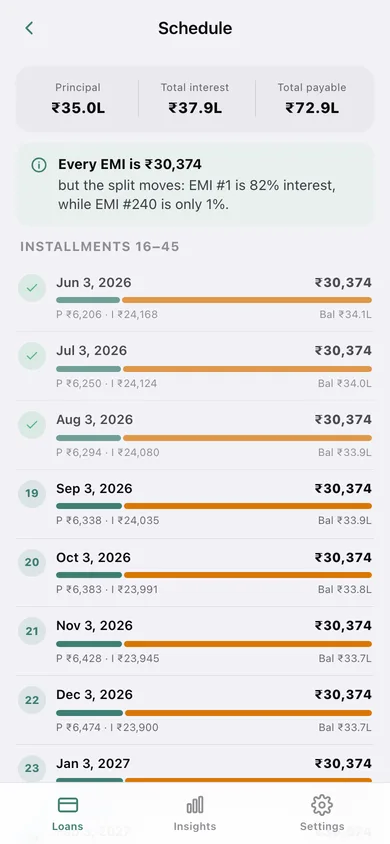
Every installment with its due date, principal part, interest part and closing balance, each row showing the split as a two-colour bar so you can watch interest give way to principal.
Payments with a real split
Log an EMI and Qist takes the principal and interest components straight from the schedule, marks that month settled and moves your outstanding balance.
The whole loan book at once
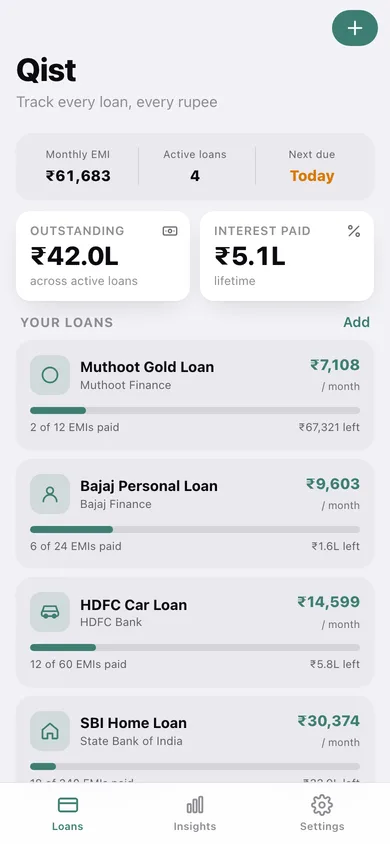
Combined monthly outgo across every active loan, total outstanding, interest paid so far, interest still ahead of you, and the next due date sorted by urgency.
Six loan types, including informal ones
Home, car, personal, gold, education and family or committee loans all live in the same ledger — not just the ones a bank app knows about.
Export what you have
Download any loan's schedule or every logged payment as CSV, or take a JSON backup of the lot.
Screens
Every screen, rebuilt for the browser
-
1
Loans
Combined monthly EMI, active loan count and next due date, with a progress card per loan.
-
2
Loan detail
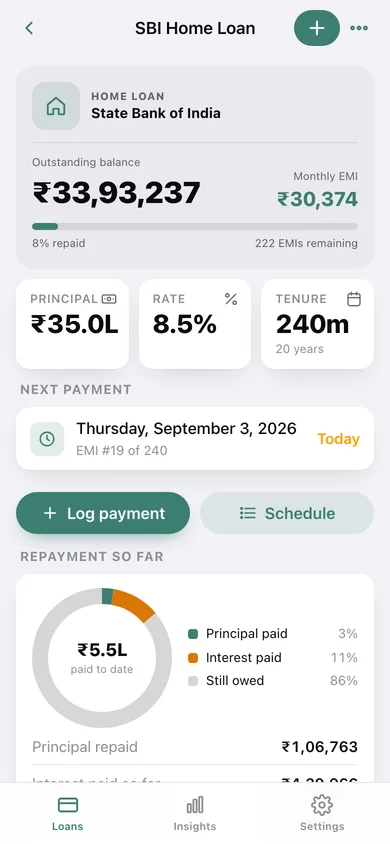
Outstanding balance, EMI, principal, rate and tenure, next payment, a paid-versus-owed donut and the payment history.
-
3
Amortization schedule
Installment by installment with due date, principal and interest split bar, closing balance, and CSV export.
-
4
Log Payment
The next EMI with its principal and interest components, closing balance after paying, date and note.
-
5
New Loan
Name, lender, type, start date, principal, rate, tenure and payment day — with a live EMI preview.
-
6
Insights
Combined outgo, interest paid and interest ahead, EMI by loan, upcoming due dates and payoff progress.
-
7
Settings
Loan book counts, CSV and JSON export, sample data, erase, and exactly how Qist computes.
Try it with sample data: Loads four loans with real repayment history — a ₹35L SBI home loan 18 EMIs in, a ₹7L HDFC car loan 12 in, a ₹2L Bajaj personal loan 6 in and an ₹80K Muthoot gold loan 2 in — every payment split into principal and interest from its own schedule. You can start fresh at any time.
Ready? It's free.
No account, no install, no subscription. Everything you do stays in this browser.
Your say
What should Qist do? Tell us before we build it.
Tell us what to build next.
Comments need a free Google sign-in, so every one is from a real person.
Sign in with Google to commentNo comments yet — be the first to say what this app should do next.
Questions
Is the web version of Qist free?+
Yes. Every screen is free to use: no subscription, no in-app purchases, no account.
Do I need an account?+
No. Open Qist and start using it right away. Sign in with Google only if you want to upvote an app, save it to your list, or leave a comment.
Where is my data stored?+
Only in this browser's local storage. Nothing you enter is sent to our servers, so we can't see it, back it up, or restore it. Clearing site data, a private window, or another device starts empty. Export a backup from the in-app menu to keep it.
Is there a Qist app for iPhone or Android?+
Not yet. Qist is a community proposal: the browser version is complete, and we build the iPhone and Android app once 100 people upvote it. Upvoters get one email when it ships.