
Web app · Business
PumpTicket
The carbon-copy pad, but permanent — septic trip tickets, manifests and a five-year vault in your browser
Log a load while the tank drains: customer, source address, gallons, waste type, disposal site, truck — auto-numbered and stamped. Sign on glass, hand over a manifest, search every ticket by customer, address, county, site or date, and roll up gallons by disposal site for state filings. Free, no account.
Stored in your browser only. Nothing you do in the web version is sent to our servers. Clear your browser data and it's gone — so export a backup from the in-app menu if you want to keep it.
This app is a community proposal.
Try the full browser version now. We build the iPhone and Android app once 100 people upvote it.
We'll email you once, when it ships. Unsubscribe anytime.
In your browser
What you can do in PumpTicket on the web
Thirty-second trip ticket
Pick the customer and the address, county and waste type fill in; type gallons, pick the disposal site and save — serial-numbered TKT-000xxx and date-stamped like the paper pad.
Manifest and sign-on-glass
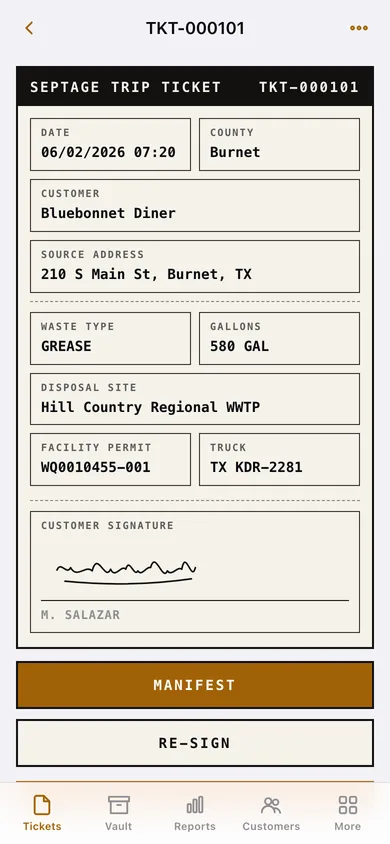
A letter-style septage manifest laid out like the carbonless form with hauler permit, source, waste, receiving facility and certification; capture the customer's signature with a finger or mouse.
Five-year vault search
Search customer, address, county or serial, filter by waste type, disposal site and date range, and export the filtered set as an audit-packet CSV in seconds.
Gallons and site reports
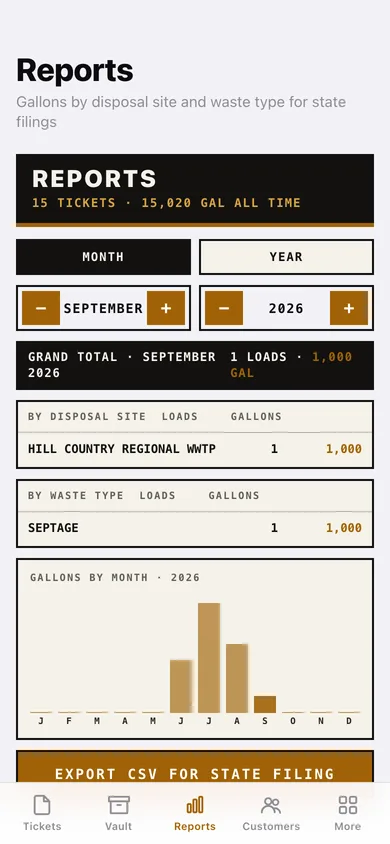
Month or year totals by disposal site and by waste type, a gallons-by-month chart, and a CSV for state filing with per-ticket rows plus totals.
Customer book with next-pump-due
Tank size and pump interval compute the next due date from the last ticket; overdue and due-within-60-days customers are flagged on the list and the home screen.
Disposal sites that furnish their own ticket
Flag a facility and its tickets gain a copy-across view with oversized numbers for the plant's paper form — your permanent copy still lives in the vault.
Screens
Every screen, rebuilt for the browser
-
1
Tickets
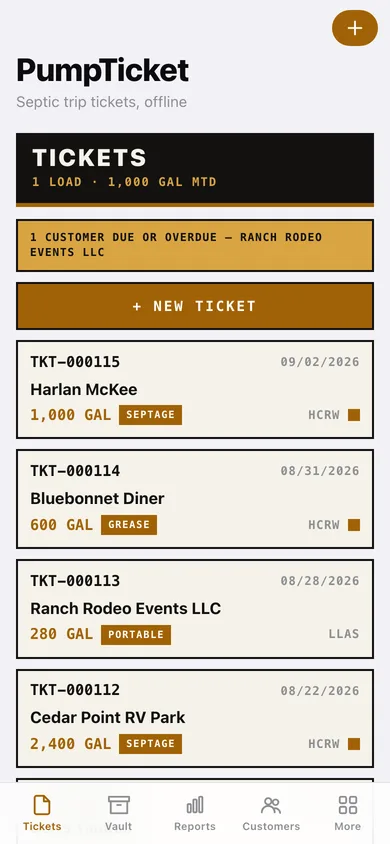
Month-to-date loads and gallons, due customers, and the reverse-chronological ticket ledger.
-
2
Trip ticket
The full record laid out like the printed form with signature block, manifest, sign and copy-across actions.
-
3
New ticket
Customer, source address, county, gallons, waste type, disposal site, truck and notes.
-
4
Signature
Sign-on-glass canvas with a hard rule line and signer name.
-
5
Manifest
Plant-ready manifest page with download and copy.
-
6
Vault
Search and filters across every ticket ever logged, with audit-packet export.
-
7
Reports
Month or year gallons by disposal site and waste type, monthly chart, CSV export.
-
8
Customers
The book with tank size, last pumped and DUE / OVERDUE chips.
-
9
Customer
Site details, adjustable interval, next pump due with reminder toggle, full pump history.
-
10
New customer
Name, site address, county, system type, tank size, pump interval, notes.
-
11
Disposal sites
Facilities with permit numbers, own-ticket flags and running load totals.
-
12
More
Hauler profile that prints on every manifest, reminder lead time, vault CSV, backup, sample data, erase.
Try it with sample data: Loads Bar W Septic Service's book: two disposal sites (one that furnishes its own tickets), seven customers with tank sizes and intervals, and fifteen signed trip tickets across the last three months. You can start fresh at any time.
Ready? It's free.
No account, no install, no subscription. Everything you do stays in this browser.
Your say
What should PumpTicket do? Tell us before we build it.
Tell us what to build next.
Comments need a free Google sign-in, so every one is from a real person.
Sign in with Google to commentNo comments yet — be the first to say what this app should do next.
Questions
Is the web version of PumpTicket free?+
Yes. Every screen is free to use: no subscription, no in-app purchases, no account.
Do I need an account?+
No. Open PumpTicket and start using it right away. Sign in with Google only if you want to upvote an app, save it to your list, or leave a comment.
Where is my data stored?+
Only in this browser's local storage. Nothing you enter is sent to our servers, so we can't see it, back it up, or restore it. Clearing site data, a private window, or another device starts empty. Export a backup from the in-app menu to keep it.
Is there a PumpTicket app for iPhone or Android?+
Not yet. PumpTicket is a community proposal: the browser version is complete, and we build the iPhone and Android app once 100 people upvote it. Upvoters get one email when it ships.