
Web app · Food And Drink
Saleproof
Is that sale actually a deal? Your own grocery price book, in the browser
Log what the shelf says — item, store, price, package size — and Saleproof normalises everything to a unit price, then judges the next yellow tag against your own receipts: Real Deal, Typical, or Worse Than Usual. Free, offline, no account.
Stored in your browser only. Nothing you do in the web version is sent to our servers. Clear your browser data and it's gone — so export a backup from the in-app menu if you want to keep it.
This app is a community proposal.
Try the full browser version now. We build the iPhone and Android app once 100 people upvote it.
We'll email you once, when it ships. Unsubscribe anytime.
In your browser
What you can do in Saleproof on the web
Ten-second price logging
Pick or create an item, choose the store, type the tag price and the package size in oz, lb, fl oz or count — the unit price appears as you type.
The deal check verdict
Enter what the shelf says and get a plain verdict computed from your logged minimum, median and most recent price at that store and across stores.
Unit-price compare across stores
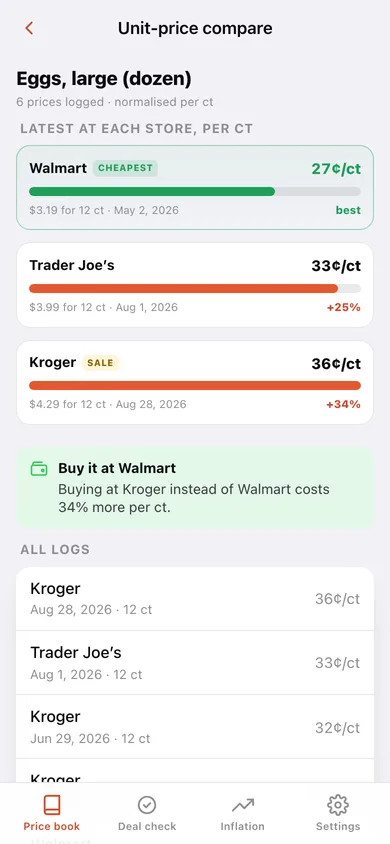
The latest price at every store, ranked cheapest first, with how much more the priciest one costs per unit.
Shrinkflation watch
When the same store's newest log has a smaller package and a higher unit price, the item gets a shrink alert with the exact before-and-after.
My inflation
Month-over-month cost of your tracked basket, the five fastest-rising items, and per-store drift versus your typical price — your receipts, not the national CPI.
Everything stays in your browser
No account, no flyer feed, nothing sent to a server; export the whole price book as JSON or CSV any time.
Screens
Every screen, rebuilt for the browser
-
1
Price book
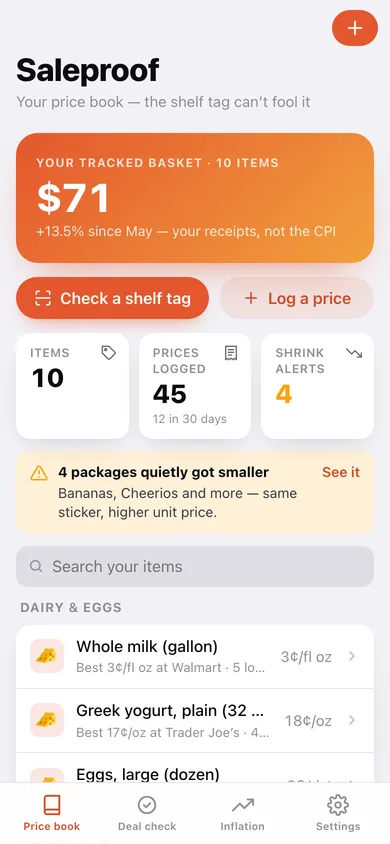
Your basket's cost and its change, items tracked, prices logged, shrink alerts, and every item grouped by aisle with its best price and store.
-
2
Item detail
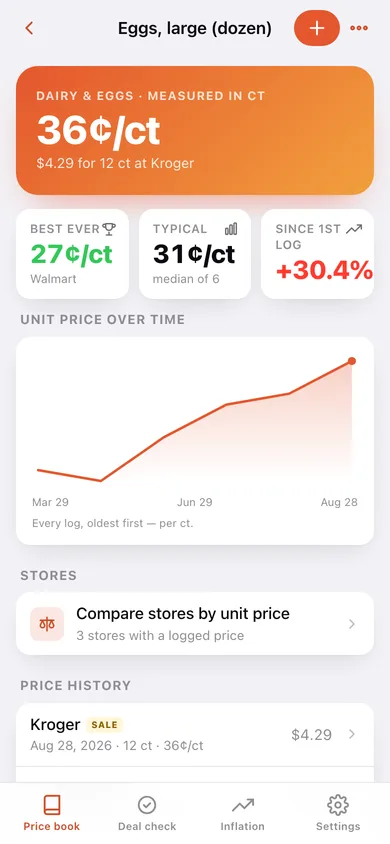
Best ever, typical and latest unit price, change since the first log, the unit-price line chart and the full price history.
-
3
Edit item
Rename an item, move it to another aisle, or change the unit it is measured in.
-
4
Unit-price compare
Latest price at each store as ranked bars, the cheapest flagged, plus the shrinkflation watch for that item.
-
5
Log a price
Item (or a new one), store (or a new one), tag price, package size, date and the sale flag, with the unit price computed live.
-
6
Stores
Every shop you log at, how many prices it holds and how far its prices drift from your typical.
-
7
Deal check
The at-the-shelf verdict card — Real Deal, Typical Price or Worse Than Usual — over your best-ever, typical and last-time-here prices.
-
8
My inflation
Basket cost per month as a bar chart, the fastest-rising items and per-store drift, plus CSV export.
-
9
Settings
Deal-check thresholds, basket months, default aisle, store management, backup, sample data and erase.
Try it with sample data: Loads ten staples — eggs, chicken thighs, milk, Cheerios, coffee, bananas, olive oil, peanut butter, paper towels and Greek yogurt — with about 45 prices logged at Kroger, Walmart and Trader Joe's over the last five months, including two real shrinkflation events. You can start fresh at any time.
Ready? It's free.
No account, no install, no subscription. Everything you do stays in this browser.
Your say
What should Saleproof do? Tell us before we build it.
Tell us what to build next.
Comments need a free Google sign-in, so every one is from a real person.
Sign in with Google to commentNo comments yet — be the first to say what this app should do next.
Questions
Is the web version of Saleproof free?+
Yes. Every screen is free to use: no subscription, no in-app purchases, no account.
Do I need an account?+
No. Open Saleproof and start using it right away. Sign in with Google only if you want to upvote an app, save it to your list, or leave a comment.
Where is my data stored?+
Only in this browser's local storage. Nothing you enter is sent to our servers, so we can't see it, back it up, or restore it. Clearing site data, a private window, or another device starts empty. Export a backup from the in-app menu to keep it.
Is there a Saleproof app for iPhone or Android?+
Not yet. Saleproof is a community proposal: the browser version is complete, and we build the iPhone and Android app once 100 people upvote it. Upvoters get one email when it ships.