
Web app · Music
Practice Log
What you practiced, at what tempo, and how it improved
A practice journal with a real metronome built in: log every session with its BPM, subdivision and note, then watch each piece's tempo-vs-date curve climb. Free, no account, no subscription.
Stored in your browser only. Nothing you do in the web version is sent to our servers. Clear your browser data and it's gone — so export a backup from the in-app menu if you want to keep it.
This app is a community proposal.
Try the full browser version now. We build the iPhone and Android app once 100 people upvote it.
We'll email you once, when it ships. Unsubscribe anytime.
In your browser
What you can do in Practice Log on the web
Repertoire library
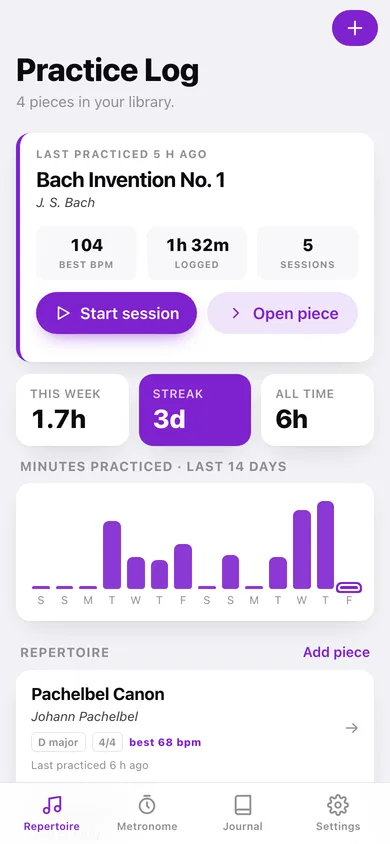
Every piece with composer, key (all 24 signatures), time signature, best tempo, total practice time and when you last touched it.
Per-piece tempo curve
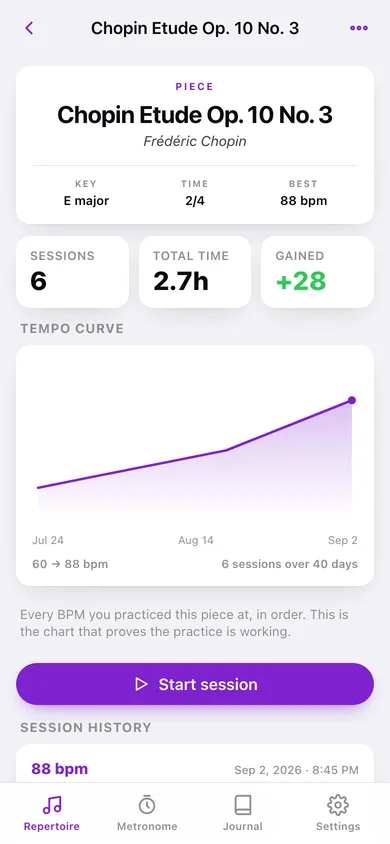
Every BPM you practiced a piece at, plotted in order — the chart that proves the practice is working, plus how many bpm you have gained.
Metronome with subdivisions and accents
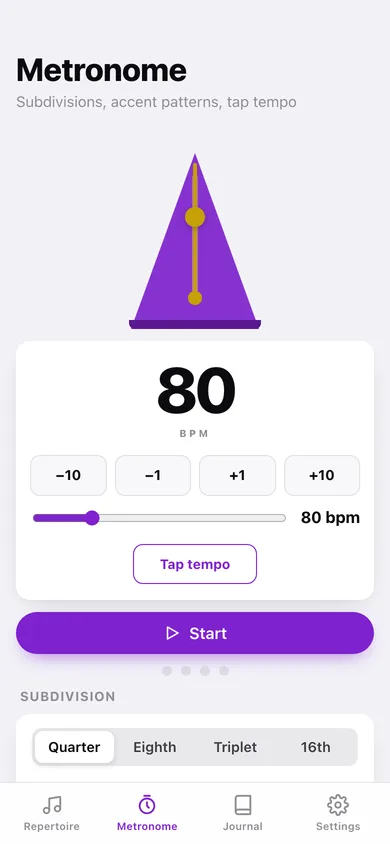
Quarter, eighth, triplet and sixteenth clicks at 30–260 BPM, with downbeat-only, 2-and-4 or every-beat accents and a tap-tempo pad — the same click-scheduling logic as the iPhone engine.
Session logging with an elapsed timer
Start a session on a piece, run the click, and save it with tempo, subdivision, accent pattern, minutes practiced and a one-line note.
Searchable journal
Every session note across every piece, grouped by day and searchable by note text, piece title or composer.
Streak and weekly minutes
A rolling 7-day total, your practice streak and a 14-day bar chart of minutes on the home screen — supportive, with no streak-lost guilt.
Screens
Every screen, rebuilt for the browser
-
1
Repertoire
Pick up where you left off, this week's minutes and streak, a 14-day practice chart, and every piece.
-
2
Piece
Key, time signature, best tempo, total hours, the tempo curve and the full session history.
-
3
New piece
Title, composer, key, time signature and an optional starting tempo.
-
4
Session
Big BPM display, steppers, tap tempo, subdivision and accent, the click, an elapsed timer and a note.
-
5
Metronome
Standalone metronome with a swinging pendulum, tap tempo, subdivisions, accent patterns and beats per bar.
-
6
Journal
Every session note, grouped by day and searchable.
-
7
Settings
Click sound, default subdivision, your local data counts, CSV and JSON export, erase.
Try it with sample data: Loads four pieces — a Chopin etude, a Bach invention, Stand By Me and the Pachelbel Canon — with nineteen sessions and notes spanning the last six weeks, so every tempo curve is already climbing. You can start fresh at any time.
Ready? It's free.
No account, no install, no subscription. Everything you do stays in this browser.
Your say
What should Practice Log do? Tell us before we build it.
Tell us what to build next.
Comments need a free Google sign-in, so every one is from a real person.
Sign in with Google to commentNo comments yet — be the first to say what this app should do next.
Questions
Is the web version of Practice Log free?+
Yes. Every screen is free to use: no subscription, no in-app purchases, no account.
Do I need an account?+
No. Open Practice Log and start using it right away. Sign in with Google only if you want to upvote an app, save it to your list, or leave a comment.
Where is my data stored?+
Only in this browser's local storage. Nothing you enter is sent to our servers, so we can't see it, back it up, or restore it. Clearing site data, a private window, or another device starts empty. Export a backup from the in-app menu to keep it.
Is there a Practice Log app for iPhone or Android?+
Not yet. Practice Log is a community proposal: the browser version is complete, and we build the iPhone and Android app once 100 people upvote it. Upvoters get one email when it ships.