
Music
Practice Log: music practice journal
What you practiced. How it improved.
No account, no install. What you do stays in your browser.
This app is a community proposal.
Try the full browser version now. We build the iPhone and Android app once 100 people upvote it.
We'll email you once, when it ships. Unsubscribe anytime.
| Price | Free, no subscription |
|---|---|
| Account | None needed to try |
| Works offline | Yes |
| Data | On your device, never on our servers |
| Platforms | Browser |
| Status | Community proposal (built for phones at 100 upvotes) |
| Last updated | 2026-04-14 |
Accessibility: Larger Text · iPad layout · Browser version How we checked →
 Try it live
The full Practice Log, right here in your browser.
No account and no install. What you enter is saved in this browser only, never on our servers.
Open Practice Log →
Try it live
The full Practice Log, right here in your browser.
No account and no install. What you enter is saved in this browser only, never on our servers.
Open Practice Log →


About this app
What Practice Log does
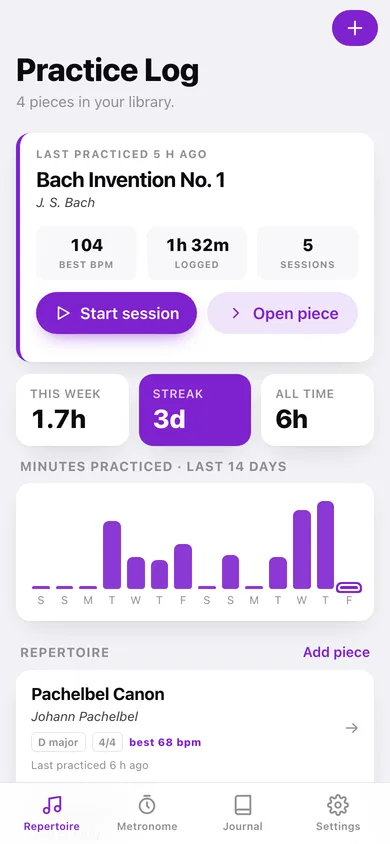
Practice Log is the offline practice journal for the 65 million Americans who play guitar, piano, or any instrument. It pairs every practice session with the on-device metronome's BPM history so each piece gets a tempo-vs-date curve — the chart that explains why you're better today than last month. What Practice Log does: — Start a session. Pick the piece. Pick the tempo. Hit Go. The built-in metronome (AVAudioEngine) clicks at your BPM with subdivisions and accent patterns you choose. Practice. Tap Done. — Tempo curve per piece. Every BPM you practiced at is saved. Open a piece, see a Swift Charts line showing how fast you've worked your way up. The reason every paid app paywalls this is because it's the chart that proves the practice is working. — Session journal. Optional one-line note per session — what you focused on, what didn't click. Searchable later. — Repertoire library. All your pieces in one place: composer, key, time signature, current tempo, last practiced. Tap to start a new session on any piece. — Streak. Days practiced this week, this month. Supportive, no streak-lost guilt. — Per-piece total time. How many hours have you spent on this Chopin etude? The number you want to know on a bad day. — No account, no cloud, no subscription. Modacity is $12.99/month or $129/year and aggressive about auto-renew — your practice notebook should not be a recurring bill. For the 16 million Americans who picked up guitar in the last two years, the ~94M lifetime piano players, and the adult returners who just want their notebook back.
Features
Built to be useful, not noisy.
Repertoire
All pieces; tap to practice
New session
Pick piece + tempo + duration goal
Metronome
AVAudioEngine, subdivisions, accent patterns, taps to set BPM
Tempo curve
Swift Charts per-piece BPM over time
Journal
Per-session one-line notes, searchable
Why it exists
The problem
Serious amateurs want a private durable log of practice + tempo progress but Modacity is $129/year with auto-renew complaints, Andante is cheap but tempo-tracking-light, and Anytune doesn't journal at all.
What's different
How Practice Log stands out
Practice Log is the only iOS practice journal that auto-pairs each session with the on-device metronome's BPM history (Swift Charts per-piece tempo-vs-date), runs AVAudioEngine for subdivisions + accent patterns, and stores everything in SwiftData on this device — Modacity is $12.99/mo subscription with auto-renew com…
You might also like
All apps →


FAQ
Questions about Practice Log
How much does Practice Log cost?▾
Practice Log is free. All features are included from day one — no subscription, no in-app purchases, no paid tiers. Everything you see in this listing works the moment you install it.
Where does Practice Log store my data?▾
On your device. Practice Log is built privacy-first: no account is required, no analytics SDKs, no third-party trackers. Nothing is uploaded to a server we control — the app works without one.
What platforms does Practice Log support?▾
iOS, on iPhone and iPad. You can find the latest availability on this page.
How do I get support for Practice Log?▾
Use the Support link on this page, or email support@allthingsn.com. We answer every message and keep responses on the same thread.
Related guide
Best iPhone apps with no subscription (one-time purchase & free), 2026
More music & practice apps with no subscription →
More in Music

