
Web app · Food And Drink
Pourover
Dial in your V60, AeroPress, Chemex or Kalita — in the browser
A live dose→water ratio calculator, a step pour timer that walks you through bloom, pours and draw-down, star ratings with tasting notes, and a bean cellar that tells you when a bag is in its 7–35 day peak. Free, offline, no install.
Stored in your browser only. Nothing you do in the web version is sent to our servers. Clear your browser data and it's gone — so export a backup from the in-app menu if you want to keep it.
This app is a community proposal.
Try the full browser version now. We build the iPhone and Android app once 100 people upvote it.
We'll email you once, when it ships. Unsubscribe anytime.
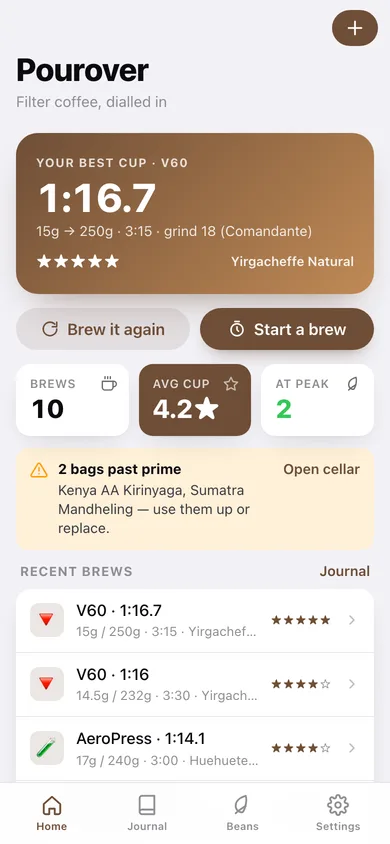
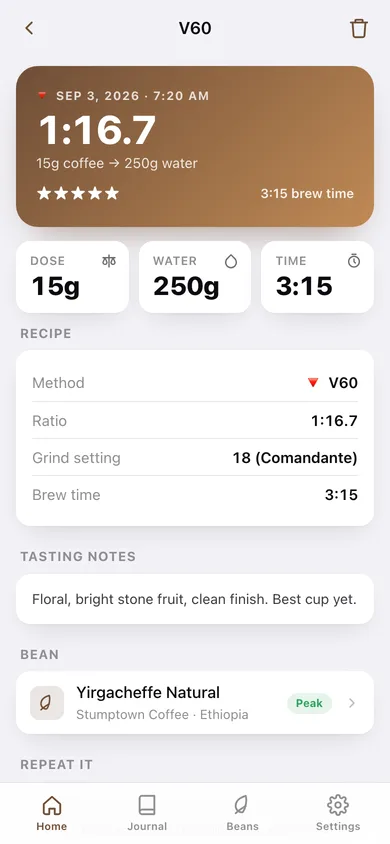
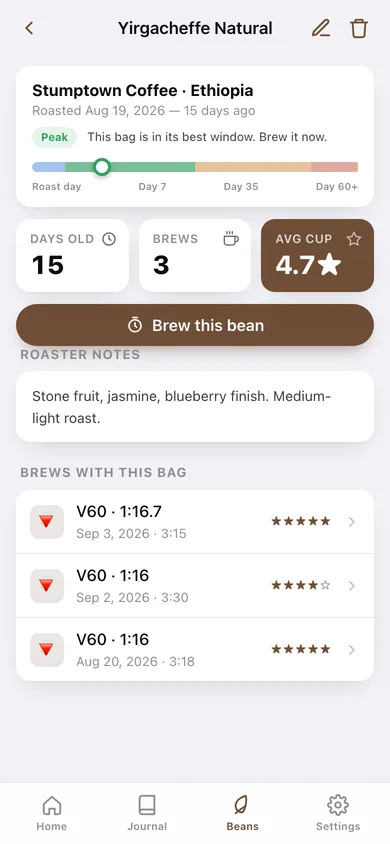
In your browser
What you can do in Pourover on the web
Live ratio calculator
Type a dose and the water weight snaps to your ratio; type a water weight and the ratio recalculates. Slide anywhere from 1:10 to 1:20.
Step pour timer
Each method carries its real pour plan — V60 bloom 45s, Chemex three pours, AeroPress stir-and-press — with a countdown ring, cumulative pour targets, a bell at every step and 3-2-1 beeps.
Brew journal you can search
Method, dose, water, ratio, grind setting, brew time, stars and tasting notes on every session, grouped by day and filterable by method.
Bean cellar with a freshness timeline
Track each bag by roaster, origin and roast date; a colour-coded timeline shows too fresh, peak (days 7–35), past peak and stale.
Insights on what actually works
Average rating by method, your best-rated ratio, a rating trend line and a bean league table — plus CSV export of the whole history.
Brew it again
Any five-star session loads straight back into a new brew with the same dose, water, ratio, grind and bean so you change one variable at a time.
Screens
Every screen, rebuilt for the browser
-
1
Home
Your best cup as a hero recipe, brew and bean counts, past-prime bag warnings, recent brews and the four method tiles.
-
2
New brew
Method picker, ratio calculator, grind and bean, the pour plan preview, then the live step timer and the rating screen.
-
3
Brew detail
One logged brew: ratio hero, dose/water/time/grind, tasting notes, the bean it used, and a one-tap repeat.
-
4
Journal
Every session grouped by day, searchable by notes, grind or bean and filterable by method.
-
5
Insights
Rating by method, your best ratio, the last cups rated as a trend line, beans ranked by rating, and CSV export.
-
6
Bean cellar
Every bag sorted by freshness, with peak and past-prime counts.
-
7
Bean detail
Roast date, days since roast, the freshness timeline, average cup rating and every brew made with that bag.
-
8
Add or edit a bag
Bean, roaster, origin, roast date and roaster tasting notes.
-
9
Settings
Default method and starting ratio, sound and voice cues, the method reference, backup, sample data and erase.
Try it with sample data: Loads five bags — from a 4-day-old Geisha to a 68-day-old Sumatra — and ten rated brews across the last two weeks on all four methods. You can start fresh at any time.
Ready? It's free.
No account, no install, no subscription. Everything you do stays in this browser.
Your say
What should Pourover do? Tell us before we build it.
Tell us what to build next.
Comments need a free Google sign-in, so every one is from a real person.
Sign in with Google to commentNo comments yet — be the first to say what this app should do next.
Questions
Is the web version of Pourover free?+
Yes. Every screen is free to use: no subscription, no in-app purchases, no account.
Do I need an account?+
No. Open Pourover and start using it right away. Sign in with Google only if you want to upvote an app, save it to your list, or leave a comment.
Where is my data stored?+
Only in this browser's local storage. Nothing you enter is sent to our servers, so we can't see it, back it up, or restore it. Clearing site data, a private window, or another device starts empty. Export a backup from the in-app menu to keep it.
Is there a Pourover app for iPhone or Android?+
Not yet. Pourover is a community proposal: the browser version is complete, and we build the iPhone and Android app once 100 people upvote it. Upvoters get one email when it ships.