
Web app · Business
Poolfair
Split the tip pool six ways, hold managers out, and keep a signed sheet — in your browser
Enter the envelope, add the crew with hours or points, and divide by equal share, hours, points, role %, hybrid or a flat tip-out off sales. Penny rounding always reconciles to the pool, managers are held out automatically, and every close becomes a dated, signable split sheet in History. Free, no account.
Stored in your browser only. Nothing you do in the web version is sent to our servers. Clear your browser data and it's gone — so export a backup from the in-app menu if you want to keep it.
This app is a community proposal.
Try the full browser version now. We build the iPhone and Android app once 100 people upvote it.
We'll email you once, when it ships. Unsubscribe anytime.
In your browser
What you can do in Poolfair on the web
Six split methods
Equal, by hours, by points, role percentages (servers 60 / bussers 20 / bar 15 / runners 10 / barbacks 10 / host 5), a 50/50 hours-plus-points hybrid, or a flat tip-out % of sales to support staff.
Penny-perfect rounding
Largest-remainder allocation hands leftover cents out one at a time, so the payouts always sum back to the dollar you started with.
Manager-exclusion rule
Flag anyone as a manager or supervisor; they stay on the shift roster but are held out of the distribution to match federal FLSA tip-pool rules.
Signed, dated split sheet
Every close shows the pool, method, each person's hours or points, their payout and who was excluded — review it, sign it with your name, copy or download it.
Searchable close-out history
Browse past distributions by month, search names, methods and notes, see pooled dollars per week, and reopen any close as a new draft.
Saved crew roster
Keep your regulars with their role, default point weight and manager flag, then drop them into a split in one tap.
Screens
Every screen, rebuilt for the browser
-
1
New Split
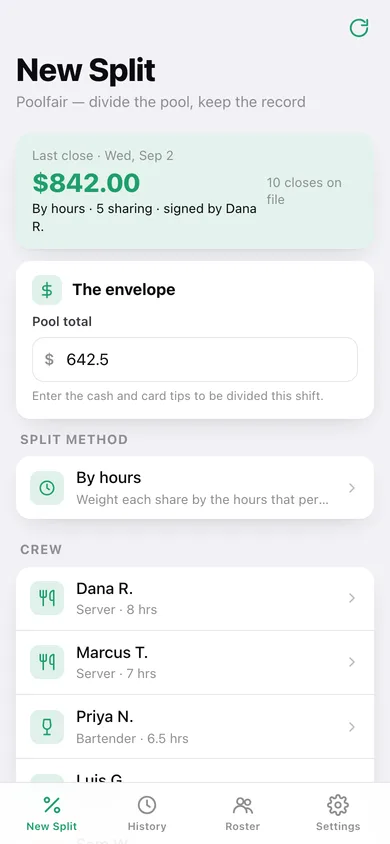
The envelope, method, crew with hours/points, and the Calculate button — plus your last close.
-
2
Choose method
The six ways to divide, with the role % buckets.
-
3
Split result
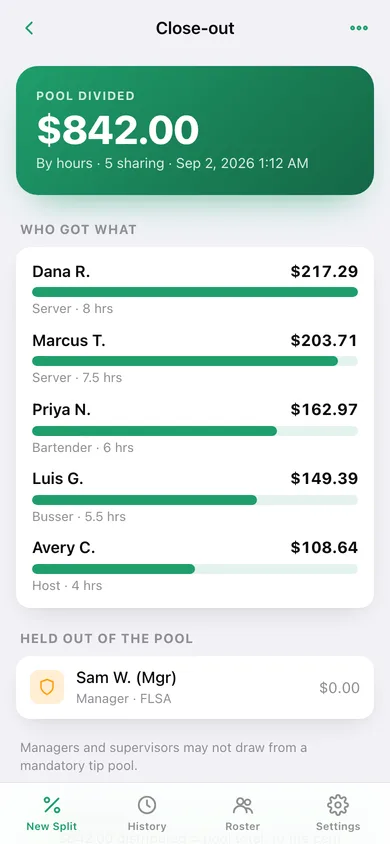
Who got what with a bar per person, held-out managers, the reconcile check and the full split sheet.
-
4
Sign off
Review the sheet and stamp it with your name and the time.
-
5
History
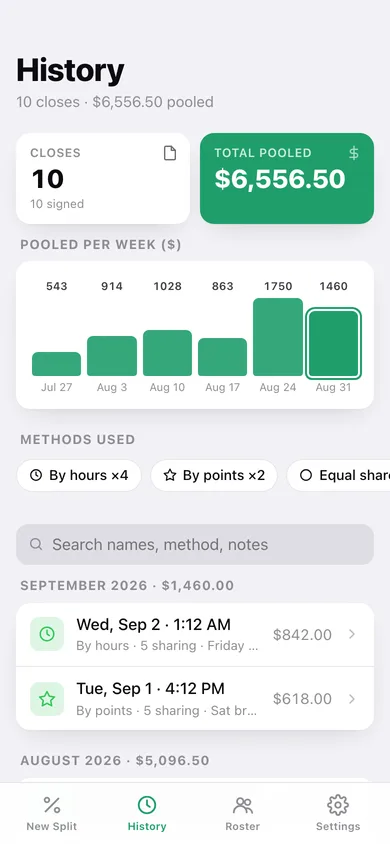
Closes and total pooled, pooled per week, methods used, search and month groups.
-
6
Crew Roster
Saved regulars with role, default points and manager flag.
-
7
Settings
Default method, signer name, the rules Poolfair follows, exports, sample data and erase.
Try it with sample data: Loads ten signed closes over the last five weeks (one per method, with a held-out manager on two of them), a saved eight-person roster and a tonight's-shift draft ready to calculate. You can start fresh at any time.
Ready? It's free.
No account, no install, no subscription. Everything you do stays in this browser.
Your say
What should Poolfair do? Tell us before we build it.
Tell us what to build next.
Comments need a free Google sign-in, so every one is from a real person.
Sign in with Google to commentNo comments yet — be the first to say what this app should do next.
Questions
Is the web version of Poolfair free?+
Yes. Every screen is free to use: no subscription, no in-app purchases, no account.
Do I need an account?+
No. Open Poolfair and start using it right away. Sign in with Google only if you want to upvote an app, save it to your list, or leave a comment.
Where is my data stored?+
Only in this browser's local storage. Nothing you enter is sent to our servers, so we can't see it, back it up, or restore it. Clearing site data, a private window, or another device starts empty. Export a backup from the in-app menu to keep it.
Is there a Poolfair app for iPhone or Android?+
Not yet. Poolfair is a community proposal: the browser version is complete, and we build the iPhone and Android app once 100 people upvote it. Upvoters get one email when it ships.