
Web app · Business
Pondlog
Your pond-farm logbook — feed, water checks, mortality and harvest profit, in any browser
Add each pond once, then keep daily records in seconds: feed kilograms and type, pH and dissolved oxygen, any mortality. At harvest, enter weight and price per kg and Pondlog shows gross income against feed spend and your feed-conversion ratio. Free, offline, no sensors.
Stored in your browser only. Nothing you do in the web version is sent to our servers. Clear your browser data and it's gone — so export a backup from the in-app menu if you want to keep it.
This app is a community proposal.
Try the full browser version now. We build the iPhone and Android app once 100 people upvote it.
We'll email you once, when it ships. Unsubscribe anytime.
In your browser
What you can do in Pondlog on the web
Ponds and grow cycles
Name, area in m², species (tilapia, catfish, carp, shrimp, pangasius, snakehead, milkfish) and a stocking count and date to open each cycle.
One-tap daily feed log
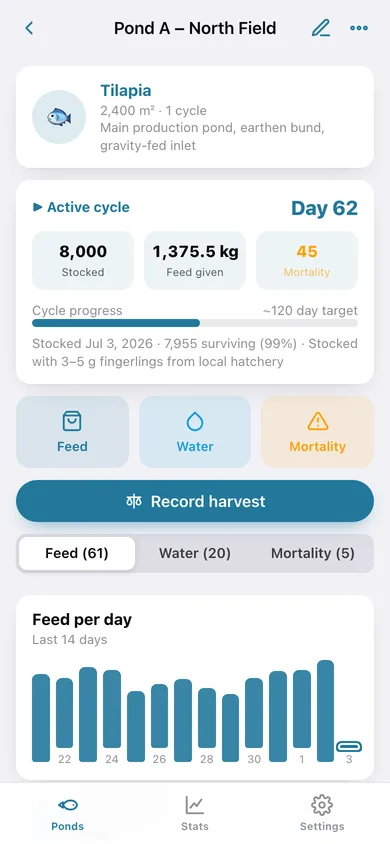
Kilograms plus feed type — pellet, trash fish, rice bran, soybean meal, commercial mix — with a 14-day feed-per-day chart on every pond.
Water checks with status bands
pH and dissolved oxygen graded good / fair / poor against the 6.5–8.5 pH and ≥ 5 mg/L DO ranges, a pH trend line, and a home-screen alert when a pond slips.
Mortality and survival
Count each loss with a cause note; the cycle card keeps a running survivor count and survival percentage.
Harvest profit in one screen
Weight sold × price per kg minus the feed-cost estimate gives instant profit or loss, plus feed conversion ratio and days grown.
Farm stats across ponds
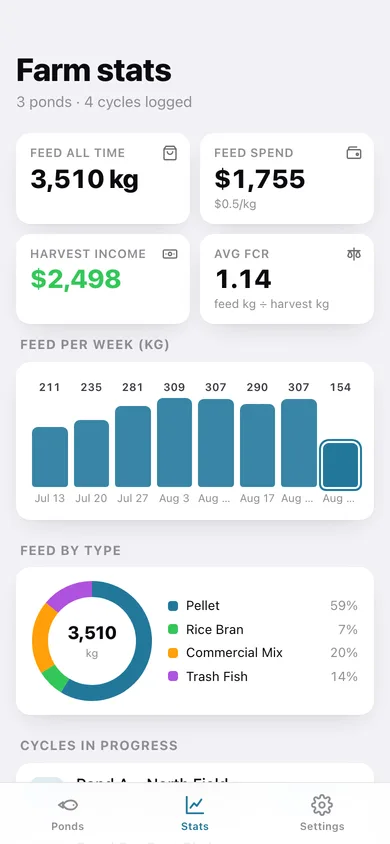
Feed per week, feed by type, cycles in progress and every harvested cycle's net result, with CSV and JSON export.
Screens
Every screen, rebuilt for the browser
-
1
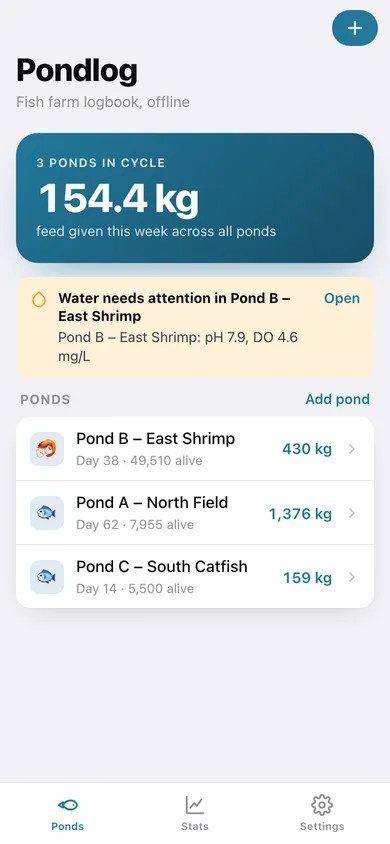
Ponds
Feed given this week, water alerts and every pond with its cycle day, survivors and feed total.
-
2
Pond timeline
Cycle card with progress to target, Feed / Water / Mortality quick actions, charts and the full log.
-
3
New pond
Name, area, species, notes and an optional first stocking.
-
4
New cycle
Stocked count, stocking date and species for a restock.
-
5
Record harvest
Weight sold and price per kg with a live profit estimate; closes the cycle.
-
6
Farm stats
Feed per week, feed by type, active cycles and harvested-cycle profit.
-
7
Settings
Feed cost per kg, cycle target days, currency symbol, exports, sample data and erase.
Try it with sample data: Loads three ponds — an active tilapia cycle (day 62), an intensive shrimp cycle (day 38) and a catfish pond with one harvested cycle and a fresh restock — with two months of daily feed, water checks and mortality. You can start fresh at any time.
Ready? It's free.
No account, no install, no subscription. Everything you do stays in this browser.
Your say
What should Pondlog do? Tell us before we build it.
Tell us what to build next.
Comments need a free Google sign-in, so every one is from a real person.
Sign in with Google to commentNo comments yet — be the first to say what this app should do next.
Questions
Is the web version of Pondlog free?+
Yes. Every screen is free to use: no subscription, no in-app purchases, no account.
Do I need an account?+
No. Open Pondlog and start using it right away. Sign in with Google only if you want to upvote an app, save it to your list, or leave a comment.
Where is my data stored?+
Only in this browser's local storage. Nothing you enter is sent to our servers, so we can't see it, back it up, or restore it. Clearing site data, a private window, or another device starts empty. Export a backup from the in-app menu to keep it.
Is there a Pondlog app for iPhone or Android?+
Not yet. Pondlog is a community proposal: the browser version is complete, and we build the iPhone and Android app once 100 people upvote it. Upvoters get one email when it ships.