
Web app · Business
PierceBook
The piercer's client book — every jewelry spec and every downsize date, in your browser
Per-client, per-anatomy piercing records with needle gauge and the exact jewelry installed (gauge, length, material, brand, style), a downsize due-list across all clients, a dated service ledger of every return visit, a photo log, and a printable client record. Free, offline, no account.
Stored in your browser only. Nothing you do in the web version is sent to our servers. Clear your browser data and it's gone — so export a backup from the in-app menu if you want to keep it.
This app is a community proposal.
Try the full browser version now. We build the iPhone and Android app once 100 people upvote it.
We'll email you once, when it ships. Unsubscribe anytime.
In your browser
What you can do in PierceBook on the web
Per-anatomy piercing records
22 placements across ear, face and body with side, pierce date, needle gauge and the installed jewelry — 18g to 00g, length in mm, implant titanium to 18k gold, labret to ring, brand with recent-brand shortcuts.
Downsize due-list
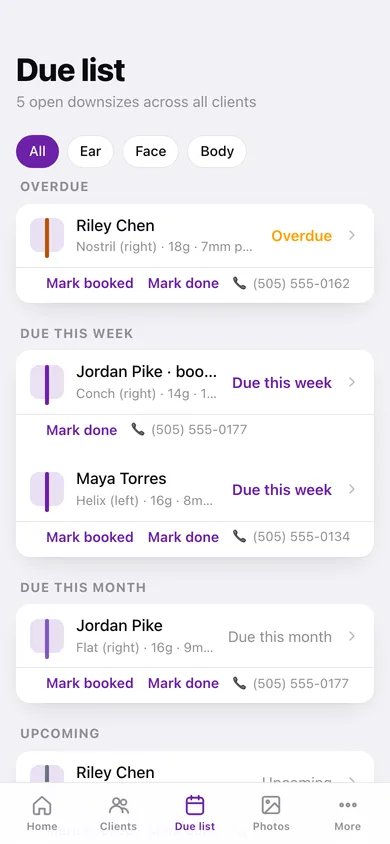
Every open schedule bucketed into overdue, due this week, due this month and upcoming with the client, placement, current post length and day count; mark booked or done, filter by ear / face / body.
Service ledger
Log a downsize, jewelry change, checkup or removal on any piercing; a downsize completes the schedule, a removal retires the piercing, and the record reads like a timeline from install to healed.
Currently installed, always known
The record shows both what was installed at the pierce and what is in it now after the latest swap — the answer to 'what did I put in her conch last year?'
Photo log
Attach fresh and healed photos to any piercing (resized and kept in this browser), browse them all by month, and see each one on its record.
Printable client record
A dated, studio-headed record of a client's piercings, service ledger and photos — print or save as PDF for your files, a studio move, or an inspector.
Screens
Every screen, rebuilt for the browser
-
1
Home
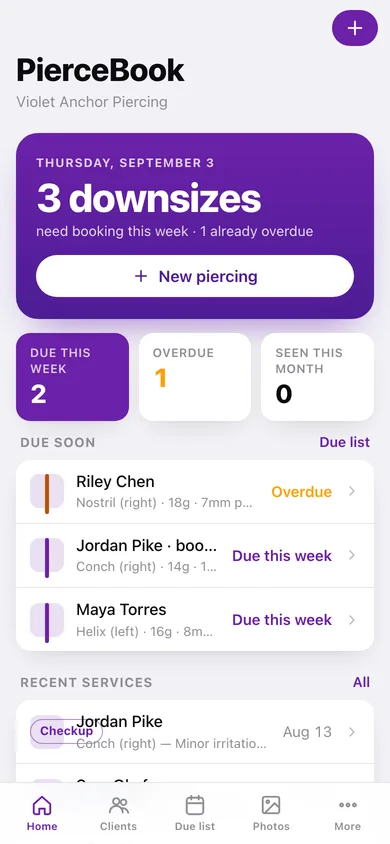
Studio hero with downsizes needing booking this week, due-this-week / overdue / seen-this-month counts, due-soon rows and recent services.
-
2
Clients
Searchable client book showing each client's piercings and any overdue downsize.
-
3
Client detail
Contact card, active and retired piercings, and the client record export.
-
4
New / edit client
Name, pronouns, phone, email and notes.
-
5
Piercing record
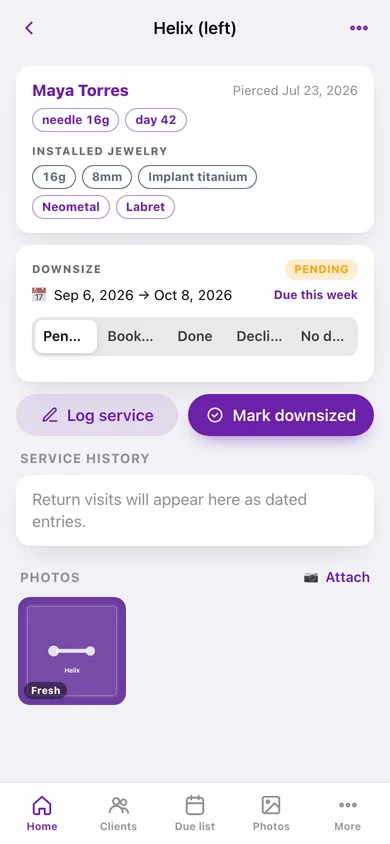
Installed and current jewelry chips, downsize window and status, service timeline and photos.
-
6
New / edit piercing
Client, placement, side, pierce date, needle, jewelry spec, brand shortcuts and the downsize window.
-
7
Log service
Downsize, jewelry change, checkup or removal with the new spec and notes.
-
8
Due list
Open downsizes by urgency with mark booked / mark done, plus recently completed.
-
9
Photo log
Every fresh and healed photo across all clients, by month.
-
10
Service history
Reverse-chronological ledger of every service entry across all clients.
-
11
Records export
Pick a client and what to include; a dated printable record with piercings, ledger and photos.
-
12
More
Studio name, downsize window defaults, gauge display, records, backup and erase.
Try it with sample data: Loads Violet Anchor Piercing's book: five clients and nine piercings — an overdue nostril downsize, a booked conch, a helix due this week, a completed navel downsize with its ledger, gold rings with no downsize — plus checkups, jewelry changes and four sample photos. You can start fresh at any time.
Ready? It's free.
No account, no install, no subscription. Everything you do stays in this browser.
Your say
What should PierceBook do? Tell us before we build it.
Tell us what to build next.
Comments need a free Google sign-in, so every one is from a real person.
Sign in with Google to commentNo comments yet — be the first to say what this app should do next.
Questions
Is the web version of PierceBook free?+
Yes. Every screen is free to use: no subscription, no in-app purchases, no account.
Do I need an account?+
No. Open PierceBook and start using it right away. Sign in with Google only if you want to upvote an app, save it to your list, or leave a comment.
Where is my data stored?+
Only in this browser's local storage. Nothing you enter is sent to our servers, so we can't see it, back it up, or restore it. Clearing site data, a private window, or another device starts empty. Export a backup from the in-app menu to keep it.
Is there a PierceBook app for iPhone or Android?+
Not yet. PierceBook is a community proposal: the browser version is complete, and we build the iPhone and Android app once 100 people upvote it. Upvoters get one email when it ships.