
Education
Permitlog: teen driving permit hours log
Teen drive hours, always ready
No account, no install. What you do stays in your browser.
This app is a community proposal.
Try the full browser version now. We build the iPhone and Android app once 100 people upvote it.
We'll email you once, when it ships. Unsubscribe anytime.
| Price | Free, no subscription |
|---|---|
| Account | None needed to try |
| Works offline | Yes |
| Data | On your device, never on our servers |
| Platforms | Browser |
| Status | Community proposal (built for phones at 100 upvotes) |
| Last updated | 2026-06-10 |
Accessibility: Larger Text · Light & Dark · iPad layout · Browser version How we checked →
 Try it live
The full Permitlog, right here in your browser.
No account and no install. What you enter is saved in this browser only, never on our servers.
Open Permitlog →


About this app
What Permitlog does
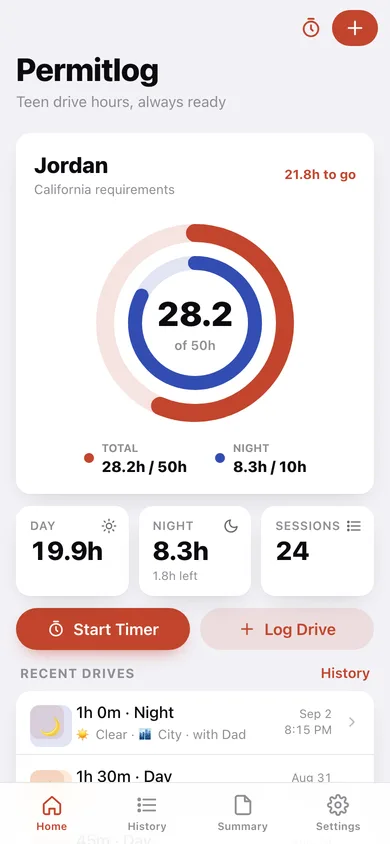
Permitlog makes the supervised-hours grind manageable for teens and their parents. Most US states require 40–60 hours of practice driving before a teen can test for a full license — including a separate quota of night hours — and the DMV expects a signed log as proof. Instead of scribbling on the paper form in the glove box or building a spreadsheet, use Permitlog: tap to start a drive, tap to stop, pick night or day, note the weather and road type, and move on. Two progress rings on the home screen show exactly how many hours remain for total and night driving against your state’s requirement. When the teen is ready to test, generate a clean printable-style summary — all sessions listed with dates, durations, supervisor names, and totals — ready to sign and submit.
Features
Built to be useful, not noisy.
Drive timer
One-tap start/stop session timer that records precise start time, end time, and computed minutes; also accepts manual entry for drives logged after the fact.
Session tagging
Per-drive tags for night/day, weather condition (clear, rain, snow, fog), road type (highway, city, rural, parking lot), and supervisor name with free-text notes.
Progress rings
Home screen dual-ring display showing hours accumulated vs. state-required total and night quotas, updating immediately after each logged drive.
History & summary export
Chronological list of all sessions grouped by month; a summary view formats all data as a clean, signable report ready to screenshot or share as PDF.
Why it exists
The problem
Every US state requires a signed supervised-driving log at the DMV, yet most families track hours on a paper form or a spreadsheet in the glove box. The paper form gets crumpled, lost, or filled in from memory days later; spreadsheets require manual math and don’t surface night-hour shortfalls until it’s too late to s…
What's different
How Permitlog stands out
A fully offline, no-subscription log built around the two-ring view (total vs. night hours) that mirrors the exact DMV proof document — unlike RoadReady (account-required, cloud sync) and GoTime (GPS-dependent), Permitlog works with zero network access, pre-loads state requirements, and produces a printable export tha…
You might also like
All apps →
Readfox
Education
Any book. Listens as they read.

Sayline
Education
Learn any speech or script by heart.

SpellHive
Education
Spelling Bee Prep — Spell It Out Loud

Podium: Speech Coach
Education
Live filler-word coach

IEP Vault
Education
Your IEP paper trail, offline

Minutes Owed
Education
Scheduled vs delivered minutes
FAQ
Questions about Permitlog
How much does Permitlog cost?▾
Permitlog is free. All features are included from day one — no subscription, no in-app purchases, no paid tiers. Everything you see in this listing works the moment you install it.
Where does Permitlog store my data?▾
Permitlog stores what you enter on your device. No account is required, and we never sell your data. Any anonymous usage data or optional notifications are explained in the Permitlog privacy policy.
What platforms does Permitlog support?▾
iOS, on iPhone and iPad. You can find the latest availability on this page.
How do I get support for Permitlog?▾
Use the Support link on this page, or email support@allthingsn.com. We answer every message and keep responses on the same thread.
Related guide
Best iPhone apps with no subscription (one-time purchase & free), 2026
More notes & productivity apps with no subscription →
More in Education

