
Web app · Finance
Paywall
Cap your AI spend before it caps you
Track ChatGPT, Claude, Cursor, Copilot, Midjourney and the rest of the stack: a cap per service, an overall monthly ceiling drawn as a wall that fills brick by brick, renewal countdowns and a log of what you were actually charged. Free, no install.
Stored in your browser only. Nothing you do in the web version is sent to our servers. Clear your browser data and it's gone — so export a backup from the in-app menu if you want to keep it.
This app is a community proposal.
Try the full browser version now. We build the iPhone and Android app once 100 people upvote it.
We'll email you once, when it ships. Unsubscribe anytime.
In your browser
What you can do in Paywall on the web
The whole AI stack in one number
Every subscription normalised to what it costs per month — annual plans divided by twelve — so the real monthly and yearly figure stops hiding behind different billing cycles.
A wall you cannot ignore
Your overall monthly cap drawn as a brick wall that fills as the stack grows, turning amber near the limit and red once you are past it.
A cap per service
Give each subscription its own ceiling and Paywall flags the moment the plan costs more per month than you said you would spend on it.
Thirty services, two taps
A built-in catalogue of AI subscriptions with list prices — chat, code, image, video, audio, research and API credits — so adding one is picking it, not typing it.
Renewal countdowns and a charge log
See what is due in the next few days and the next 45, then log what you were actually charged — the plan price and the real bill drift apart as soon as usage overages start.
Where the money goes
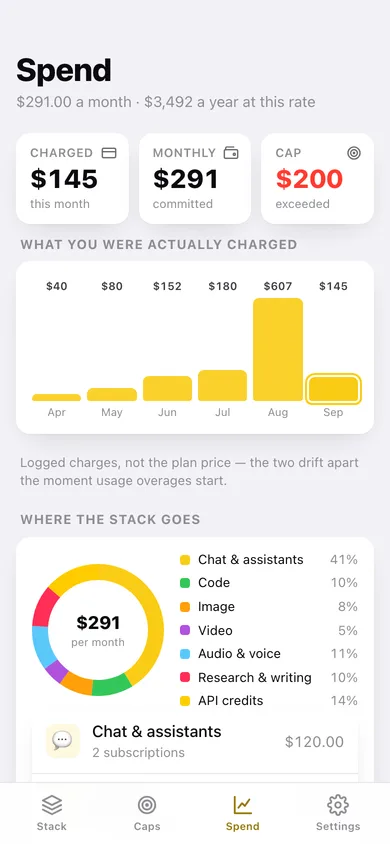
Charged-per-month bars, a category donut, the biggest line in your stack, and a CSV of the whole thing.
Screens
Every screen, rebuilt for the browser
-
1
The stack
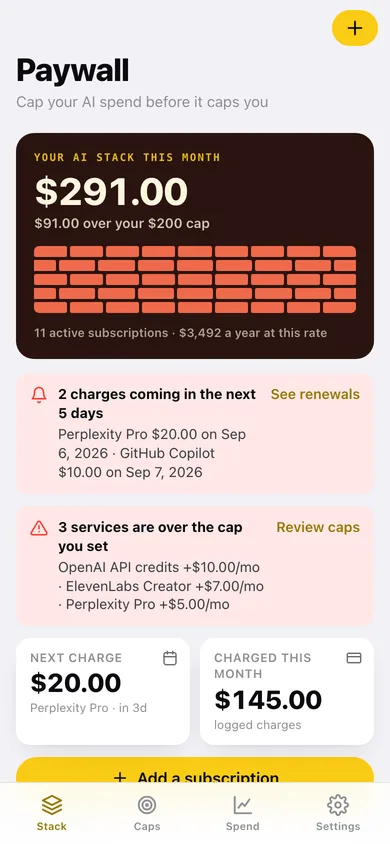
This month's AI total against your cap on the brick wall, what renews next, over-cap warnings, and every active subscription.
-
2
Subscription detail
One service: monthly cost against its own cap, renewal countdown, billing cycle, and every charge you logged for it.
-
3
Add a subscription
Pick from the AI catalogue by category or type your own — cost, cycle, renewal date and cap, with a live per-month preview.
-
4
Caps
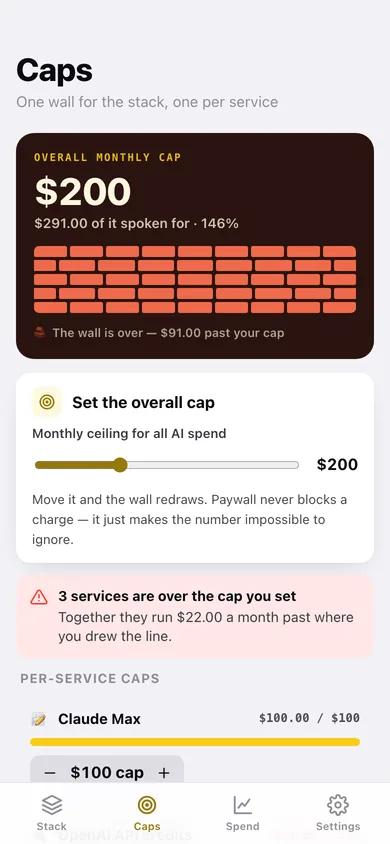
The overall monthly ceiling on a slider with the wall redrawing beneath it, plus a cap and a usage bar for every service.
-
5
Spend
What you were actually charged month by month, where the stack goes by category, and the next 45 days of renewals as a timeline.
-
6
Settings
Overall cap, how early a renewal counts as due soon, your subscriptions, CSV and JSON export, sample data and erase.
Try it with sample data: Adds an eleven-service AI stack — ChatGPT Plus, Claude Max, Cursor, Copilot, Perplexity, ElevenLabs, an annual Midjourney plan, Suno, Notion AI, Runway and OpenAI API credits — with per-service caps, a paused and a cancelled service, and three months of logged charges including two API usage overages. You can start fresh at any time.
Ready? It's free.
No account, no install, no subscription. Everything you do stays in this browser.
Your say
What should Paywall do? Tell us before we build it.
Tell us what to build next.
Comments need a free Google sign-in, so every one is from a real person.
Sign in with Google to commentNo comments yet — be the first to say what this app should do next.
Questions
Is the web version of Paywall free?+
Yes. Every screen is free to use: no subscription, no in-app purchases, no account.
Do I need an account?+
No. Open Paywall and start using it right away. Sign in with Google only if you want to upvote an app, save it to your list, or leave a comment.
Where is my data stored?+
Only in this browser's local storage. Nothing you enter is sent to our servers, so we can't see it, back it up, or restore it. Clearing site data, a private window, or another device starts empty. Export a backup from the in-app menu to keep it.
Is there a Paywall app for iPhone or Android?+
Not yet. Paywall is a community proposal: the browser version is complete, and we build the iPhone and Android app once 100 people upvote it. Upvoters get one email when it ships.