
Web app · Finance
PayoutProof
Dashboard said X. Bank got Y. Keep the record they won't.
For each platform, each month, log what the dashboard said at period close and what actually landed. PayoutProof computes the variance, tags the part that is honest reconciliation, scores who pays what they show, and tells you the week a deposit goes missing. Free, no install.
Stored in your browser only. Nothing you do in the web version is sent to our servers. Clear your browser data and it's gone — so export a backup from the in-app menu if you want to keep it.
This app is a community proposal.
Try the full browser version now. We build the iPhone and Android app once 100 people upvote it.
We'll email you once, when it ships. Unsubscribe anytime.
In your browser
What you can do in PayoutProof on the web
Two numbers, one variance
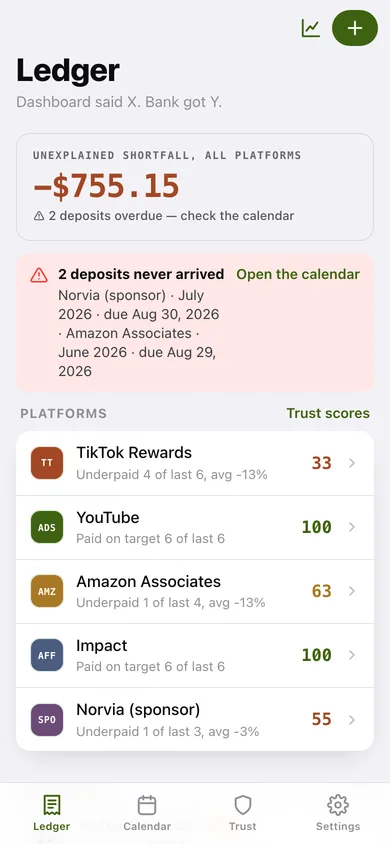
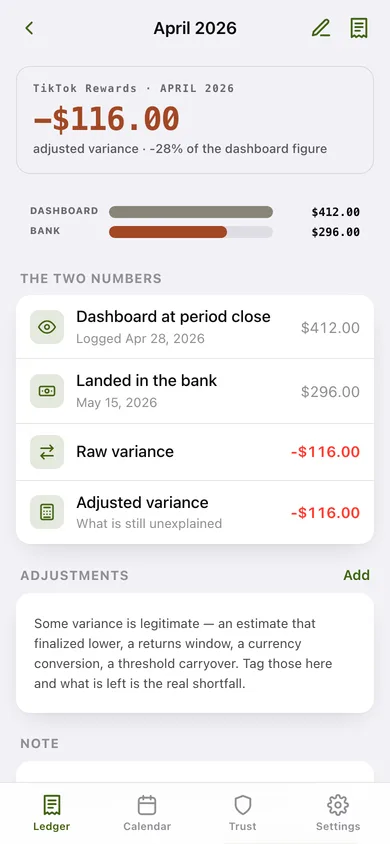
Dashboard figure versus bank deposit for every platform-month, with the raw variance, the part your adjustments explain, and the adjusted variance that is left.
Payout schedules already loaded
AdSense around the 21st, TikTok the 15th, Amazon Associates roughly sixty days behind the earning month, networks on the 15th, sponsors on the 30th, shops on the 5th — pick a kind and the schedule fills itself in.
A calendar that catches a missing deposit
Expected payout dates plotted month by month, colour-coded paid, expected or overdue, so a date that passes with nothing logged surfaces that week rather than at tax time.
Trust scores per platform
The share of the last twelve months a platform paid within 3% of its own estimate after adjustments, minus twelve points for every deposit that never arrived — plus a sentence like "underpaid 4 of last 6, avg -11%".
An adjustment log for the grey areas
Tag estimate finalized, returns window, currency conversion, platform fees or threshold carryover, and separate expected reconciliation from an actual shortfall.
Shareable variance receipts
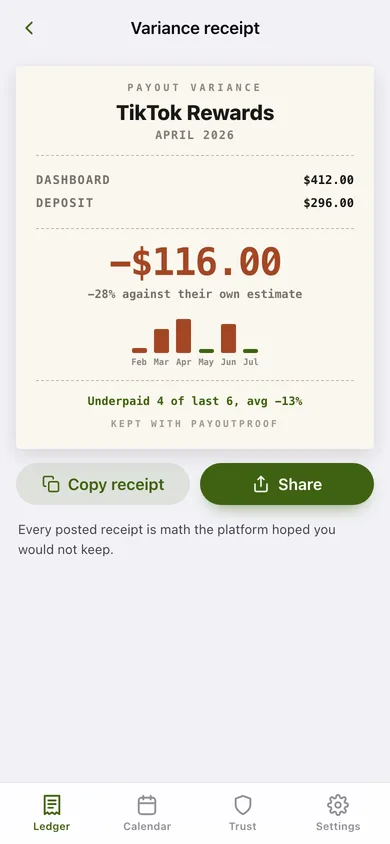
A thermal-receipt card with the dashboard figure, the deposit, the gap, the percentage and a six-month sparkline — copy it or share it as text.
Screens
Every screen, rebuilt for the browser
-
1
Ledger
Unexplained shortfall across every platform, overdue deposits, trust scores at a glance, and each month's entries.
-
2
Platform detail
One platform's trust ring, schedule, streak sentence, adjusted-variance bar chart and every month logged.
-
3
Payout detail
Dashboard versus bank as facing bars, the raw and adjusted variance, and the adjustments that explain the gap.
-
4
Log a payout
Platform, earning month, the dashboard figure and the deposit — with a live variance preview and the expected payout date.
-
5
Platform setup
Name, payer kind and the payout schedule — day of month or lag after the earning month closes.
-
6
Variance receipt
The shareable thermal-receipt card: dashboard, deposit, explained, the gap and a six-month sparkline.
-
7
Payout calendar
Expected deposit dates on a month grid with paid, expected and overdue markers, plus everything currently overdue.
-
8
Trust scores
Every platform ranked by how reliably it pays what it shows, with the score spread as a chart.
-
9
Adjustment log
Every tagged adjustment, totalled by reason, so reconciliation is separated from real shortfalls.
-
10
Year summary
Banked versus dashboard for the year, explained versus unexplained, variance by month and by platform, with CSV export.
-
11
Settings
Platforms and schedules, reconciling options, backup, sample data and erase.
Try it with sample data: Adds five platforms and six months of payouts: a near-parity AdSense account, a TikTok Rewards account that underpays month after month, Amazon Associates through its commission cliff with one deposit that never arrived, a clean affiliate network, and a sponsor on net-60 terms — plus four tagged adjustments across four different reasons. You can start fresh at any time.
Ready? It's free.
No account, no install, no subscription. Everything you do stays in this browser.
Your say
What should PayoutProof do? Tell us before we build it.
Tell us what to build next.
Comments need a free Google sign-in, so every one is from a real person.
Sign in with Google to commentNo comments yet — be the first to say what this app should do next.
Questions
Is the web version of PayoutProof free?+
Yes. Every screen is free to use: no subscription, no in-app purchases, no account.
Do I need an account?+
No. Open PayoutProof and start using it right away. Sign in with Google only if you want to upvote an app, save it to your list, or leave a comment.
Where is my data stored?+
Only in this browser's local storage. Nothing you enter is sent to our servers, so we can't see it, back it up, or restore it. Clearing site data, a private window, or another device starts empty. Export a backup from the in-app menu to keep it.
Is there a PayoutProof app for iPhone or Android?+
Not yet. PayoutProof is a community proposal: the browser version is complete, and we build the iPhone and Android app once 100 people upvote it. Upvoters get one email when it ships.